Landscape Architecture Board
Prompt
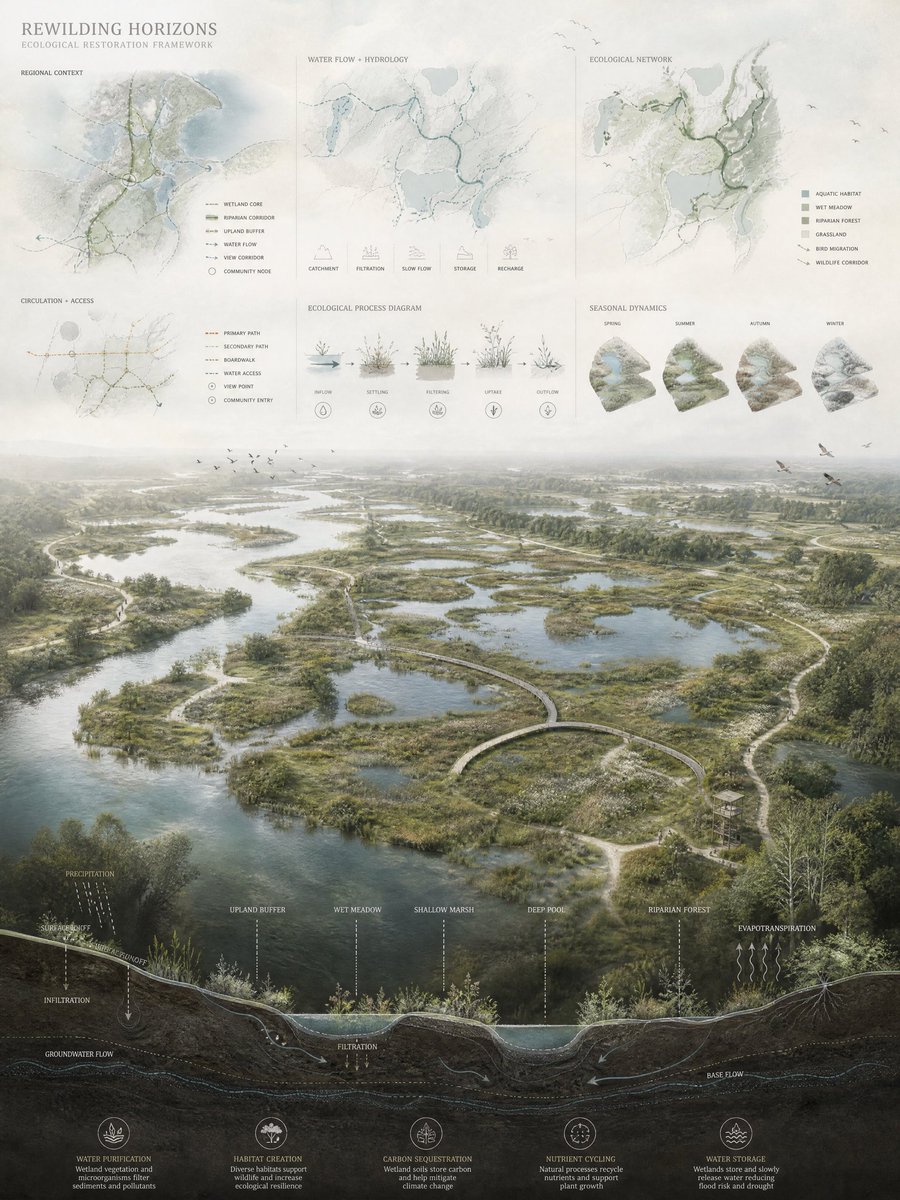
Generate a 3:4 vertical, competition-grade landscape architecture presentation board. The board blends photorealistic aerial rendering with refined architectural diagram language, in the style of a high-end international landscape competition submission. Mood: calm, atmospheric, regenerative, ecological, scientific yet poetic. Layout (three stacked zones): 1. Top zone: analytical ecological diagrams and mapping overlays. 2. Middle zone: a large aerial landscape rendering as the primary focal image. 3. Bottom zone: a continuous sectional cut through the ecological landscape system. Top analytical zone: • Simplified ecological maps with soft, transparent color overlays. • Ultra-thin linework in white and pale gray. • Diagrams of water flow, circulation systems, ecological networks, habitat zones, and landscape connectivity. • Dashed lines for movement and flow. • Minimal annotations and soft ecological icons. • Floating overlay effect sitting above the rendering. • Very light pastel tones, high transparency, clean spacing, no dense clutter. Middle aerial rendering: • Bird's-eye view of an ecological restoration landscape. • Wetlands, ponds, flowing water systems, vegetation patches, bioswales, regenerative terrain. • Soft, slightly desaturated palette of greens, browns, and muted water blues. • Atmospheric depth with subtle haze in the distance. • Gentle human and ecological activity: walking paths, birds, small environmental interactions. • Wide landscape depth, smooth terrain transitions, calm cinematic environmental lighting. • Soft paper-texture finish integrated into the rendering. Bottom sectional cut: • Continuous section through terrain and ecological systems. • Soil layers, hydrology, groundwater movement, vegetation roots, ecological restoration processes, water filtration systems. • Thin white or pale linework, muted tones, minimal color. • Arrows indicating water movement and ecological flow. • Elegant architectural drafting quality, seamlessly merged into the board. Diagram language: extremely thin and precise linework, slightly softened edges (no harsh vector look), minimal labels, clean scientific notation, soft ecological symbols, balanced between scientific clarity and poetic visualization. Color system: • Base: desaturated greens, earthy browns, muted blue water tones. • Overlay: pale green, soft cyan, light beige, translucent pastel layers. • Avoid saturated accents, harsh contrast, bright reds, or overly graphic colors. Texture and atmosphere: soft atmospheric rendering, slight environmental haze, diffused lighting, subtle paper-grain or printed board texture, refined competition-board aesthetic. Format: 3:4 vertical architectural competition board composition. #AIart #GPTImage2
- Category
- UI & Interfaces
- Model
- GPT Image 2
- Creator
- iamaiistudio
- Source language
- en
- Source ID
- evolink-iamaiistudio-2054654236705845670
- Published
- May 14, 2026
Views2