20

Miniature Set Style Portrait
Enlarge

Miniature Set Style Portrait

Prompt
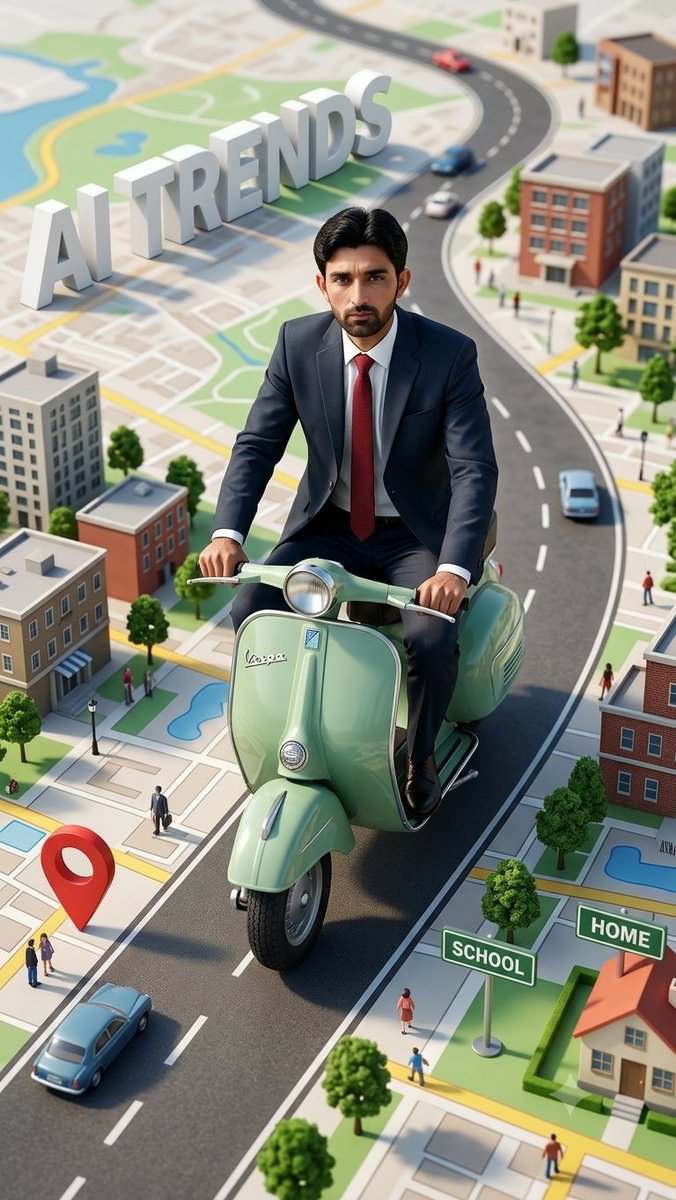
A cinematic wide-angle shot features uploaded face as reference, riding a vintage light-green scooter, wearing a dark suit and red tie, looking directly at the camera with a serious expression; the scooter is positioned on a stylized map-like surface with roads and a winding blue path, surrounded by miniature buildings, trees, vehicles, and people, creating a forced perspective effect; in the upper-left corner, large 3D white letters spell out "AI TRENDS"; a red location pin is placed near the lower-left corner, and a "SCHOOL" and "HOME" sign is on the lower-right; the scene is brightly lit with natural daylight, casting soft shadows and creating a vibrant, playful atmosphere; the style is reminiscent of a meticulously crafted miniature set, rendered with hyper-realistic detail; the camera angle is a high-angle shot, giving a sense of scale and perspective, with a shallow depth of field that blurs the background slightly, focusing attention on the scooter and rider; the color palette is dominated by bright, saturated colors, with a mix of warm and cool tones, creating a visually appealing and dynamic composition.
Category
Posters & Typography
Model
GPT Image 2
Creator
DilshadAI1
Views3
Source ID
youmind-23277

Guide

About "Miniature Set Style Portrait"

What is this prompt for?

"Miniature Set Style Portrait" AI image prompt for GPT Image 2 (Posters & Typography). A cinematic wide-angle shot features uploaded face as reference, riding…

The full copyable prompt and example visuals above are ready for AI image generation or one-click recreate in Picva.

How to use this prompt

  1. Step 1

    Open the prompt detail

    Review the example visuals, category, and full prompt text for "Miniature Set Style Portrait".

  2. Step 2

    Copy the prompt

    Copy the prompt body from this page, or load it directly in Studio.

  3. Step 3

    Pick a model (GPT Image 2)

    Prefer GPT Image 2. If you switch models, keep subject and composition and tweak style terms.

  4. Step 4

    Generate and export

    Recreate the look in Picva, or export into your workflow for editing and publishing.

FAQ

What is the "Miniature Set Style Portrait" prompt?
It is an AI image-generation prompt for GPT Image 2 in the Posters & Typography category. This page includes the full prompt text, example visuals, and a one-click recreate path in Picva.
How do I use this prompt to generate an image?
Copy the prompt from this page, or use Generate / Studio. Paste it into a compatible image model, or recreate the look in Picva with optional reference images.
Which model is this prompt for?
This page lists GPT Image 2. Most descriptive prompts also transfer to nearby image models such as GPT Image, Flux, or Midjourney with light style tweaks.
Can I use the result commercially?
You can usually copy the prompt for creation, but commercial use of the final image depends on the model terms, reference-image rights, and the generated content. Follow the source author and platform rules.