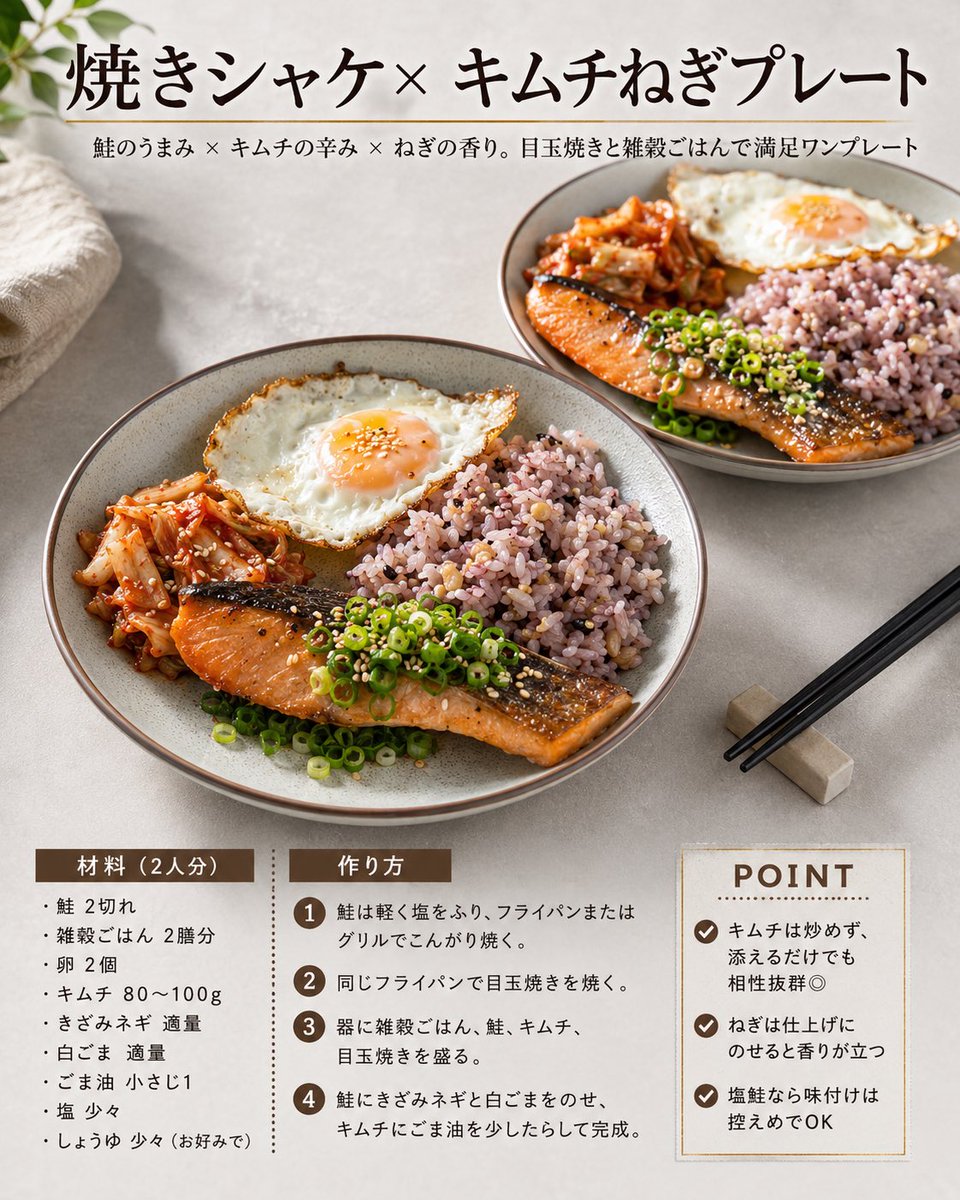
Japanese Salmon Kimchi Recipe Card
Prompt
Goal: Create a square Japanese recipe card for a plated meal, styled like a clean modern cookbook magazine page.

Canvas: 1:1 square image, warm natural daylight food photography, soft beige stone tabletop background, subtle shadows, high-resolution editorial layout.

Layout: The top third has a large Japanese headline centered-left, with a thin horizontal divider line beneath it and a smaller Japanese subtitle below. The middle half is dominated by two ceramic plates of food: one large main plate in the lower-left foreground and one smaller plate in the upper-right background. The bottom quarter contains three recipe information blocks: ingredients on the left, cooking steps in the center, and a boxed POINT tips panel on the right.

Text content: Use the headline 焼きシャケ×キムチねぎプレート. Use the subtitle 鮭のうまみ × キムチの辛み × ねぎの香り。目玉焼きと雑穀ごはんで満足ワンプレート. Bottom-left section title: 「材料(2人分)」. Bottom-center section title: 「作り方」. Bottom-right title: “POINT”. Keep all text crisp, black or dark brown, with brown label bars and a refined Japanese serif typeface for the headline.

Food subject details: Show exactly two matching round gray-beige ceramic plates. Each plate contains exactly four main food components: grilled salmon fillet with browned skin, a sunny-side-up fried egg with runny orange yolk, red kimchi, and a mound of purple multigrain rice. Garnish the salmon with sliced green scallions and white sesame seeds. The foreground plate should be largest and most detailed, angled slightly from above; the background plate should be smaller and softly receding.

Visible recipe text: Ingredients list must contain exactly 8 bullet items: salmon 2 fillets, multigrain rice 2 bowls, eggs 2, kimchi 80–100 g, chopped green onion as needed, white sesame as needed, sesame oil 1 teaspoon, salt a little, soy sauce a little if preferred. Cooking steps must contain exactly 4 numbered steps in brown circles: lightly salt and brown the salmon in a frying pan or grill; cook the fried eggs in the same pan; arrange multigrain rice, salmon, kimchi, and fried egg on plates; top the salmon with chopped green onion and white sesame, drizzle sesame oil over kimchi, and finish. POINT panel must contain exactly 3 checkmark tips: do not fry the kimchi, just add it for enough flavor; add green onion at the end so the aroma stands out; keep seasoning modest because salted salmon is flavorful.

Props and styling: Add a folded cream linen cloth in the upper-left corner, a few soft green leaves entering from the top-left edge, and black chopsticks resting diagonally on a small rectangular chopstick rest at the lower-right. Use an appetizing warm color palette: salmon orange, kimchi red, scallion green, egg white and orange, purple rice, beige ceramic.

Constraints: No people, no hands, no extra dishes beyond exactly two plates, no watermark, no logo, no excessive decorative graphics, maintain a premium homemade recipe-card aesthetic.
- Category
- Charts & Infographics
- Model
- GPT Image 2
- Creator
- hAru_mAki_ch
- Source ID
- youmind-24025
Views1





