Anime Typhoon Live News Reporter
Prompt
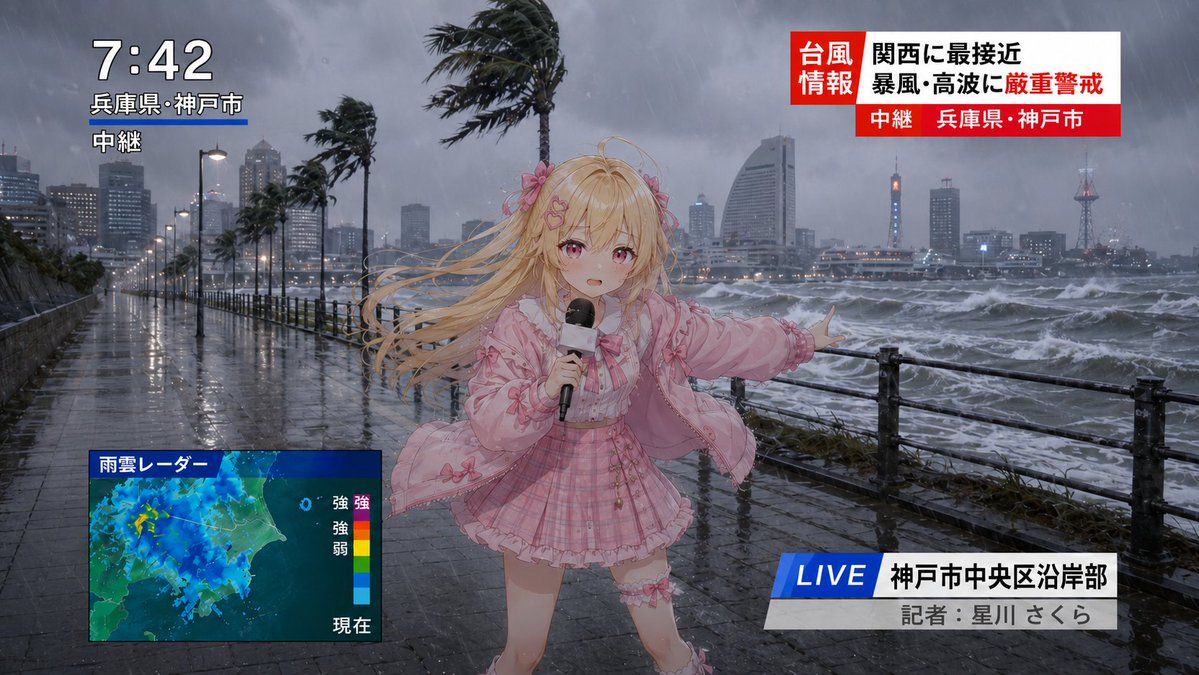
Goal: Create a dramatic live television news still of an anime typhoon report in Kobe, Japan, combining a realistic stormy waterfront background with a cute anime reporter composited in the foreground.

Canvas: 16:9 horizontal broadcast frame, photorealistic rainy seaside city scene at dusk or early evening, grey-blue storm lighting, wet reflective pavement, rough ocean waves, heavy rain streaks, strong wind, dark clouds, distant skyline and harbor towers.

Main subject: A cute blonde anime girl news reporter stands slightly right of center on a waterfront promenade beside a black metal railing. She has very long blonde hair blown violently to the left by the wind, pink flower hair accessories, a determined reporting pose, and one arm extended toward the stormy sea. She holds a black handheld microphone in her other hand. Her outfit is a pink idol-style ensemble: frilly pink jacket, bow details, pale blouse, pink plaid pleated skirt, ruffled trim, ribbons, and thigh accessory. Her face is intentionally covered by a centered square blur/censor block in a muted beige color.

Environment details: The promenade is soaked and reflective, lined with street lamps and wind-bent palm trees. Show exactly 5 prominent palm trees leaning in the wind along the waterfront. The ocean on the right is churning with whitecaps and spray. The city skyline appears through rain and mist, with high-rise buildings and a lit tower in the distance.

Broadcast graphics: Include exactly 4 on-screen TV overlay groups. 1) Top-left time/location stack: large white time 7:42, smaller Japanese location text 兵庫県・神戸市, and a white live-relay label 中継; add a short blue underline beneath the location. 2) Top-right typhoon alert banner: red-and-white Japanese breaking-news panel with the labels 台風 情報 関西に最接近 暴風・高波に厳重警戒 plus a red lower strip reading 中継 兵庫県・神戸市. 3) Bottom-left weather radar box: a rectangular blue-framed rain-cloud radar map labeled 「雨雲レーダー」, with a vertical color scale on the right and small Japanese intensity labels 「強」「弱」 and 「現在」. 4) Bottom-right lower third: a blue slanted LIVE tag, white location bar reading 「神戸市中央区沿岸部」, and grey reporter credit bar reading 「記者:星川 さくら」.

Visual style: Realistic disaster-news photography for the background, high-quality anime character rendering for the reporter, cohesive broadcast composition, rain and motion effects, dramatic wind-blown hair and clothing, sharp TV news graphics, no watermark, no extra logos, no extra overlay groups.
- Category
- Posters & Typography
- Model
- GPT Image 2
- Creator
- Mayz1169
- Source ID
- youmind-24216
Views3