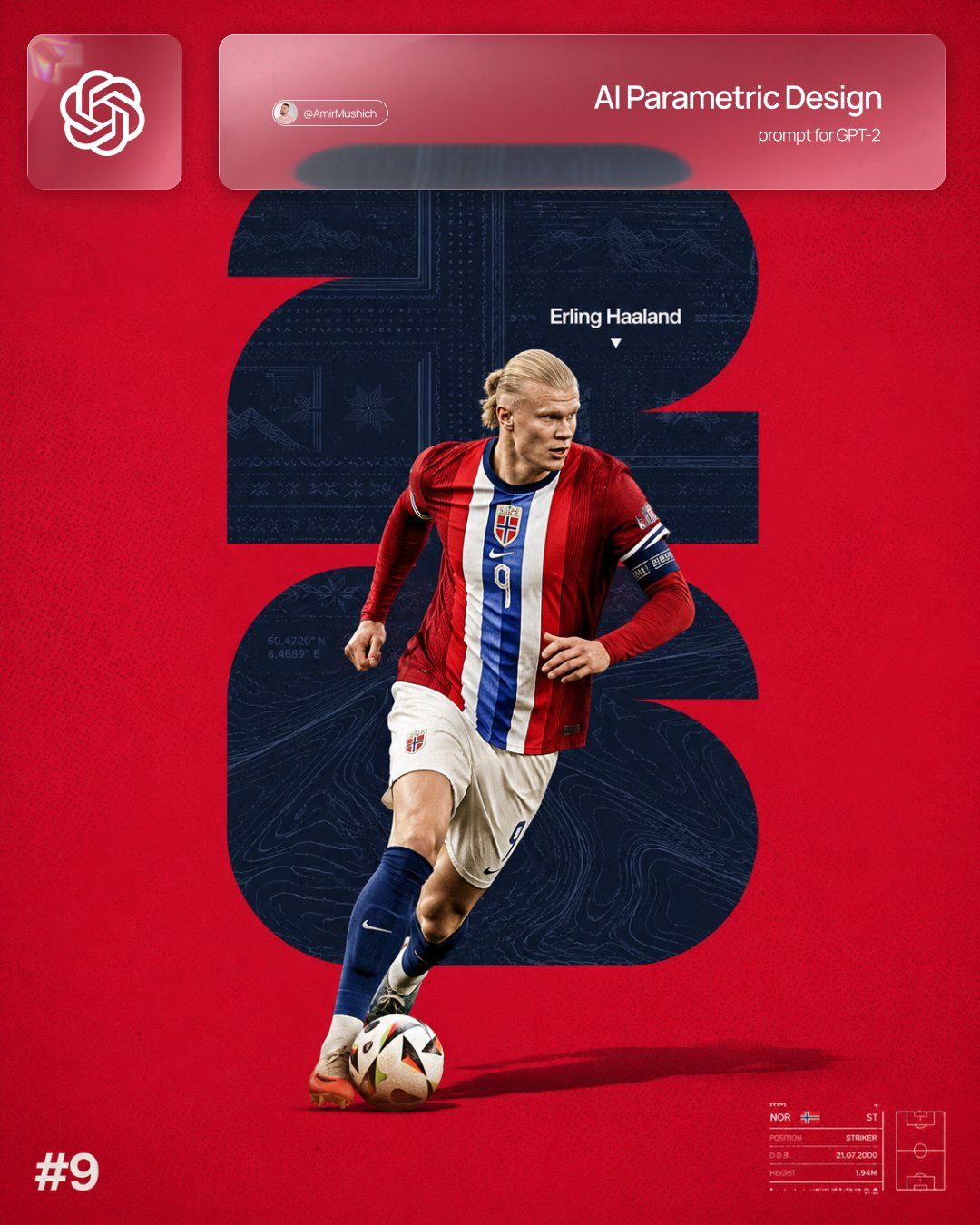
2026世界杯极简主义足球海报设计
Prompt
TEAM_COUNTRY = [CHANGE COUNTRY]
PLAYER_NAME = [CHANGE NAME]

Prompt:
Create a vertical minimalist football poster for TEAM_COUNTRY featuring PLAYER_NAME.

Use TEAM_COUNTRY national team colors as the main palette. The poster should have a clean vivid background, subtle halftone dot texture, light poster grain, and premium editorial sports design.

Composition:
One realistic full-body football player, PLAYER_NAME, in dynamic action, running or dribbling with the ball. The player should wear a realistic TEAM_COUNTRY national team kit in the correct team colors. Premium sports photography cutout, sharp details, realistic lighting, strong contrast, clean ground shadow. The player is placed slightly below center and overlaps the main background symbol.

Background symbol:
Place a huge oversized FIFA World Cup 2026 logo-inspired silhouette behind the player. Keep the outer contour bold, dark, flat, graphic, centered, and partially hidden by the athlete. The shape should remain the main tournament identity anchor of the poster.

Fill the inside of this dark World Cup 2026-inspired silhouette with a subtle national identity pattern for TEAM_COUNTRY. The pattern can be inspired by TEAM_COUNTRY flag geometry, federation crest details, traditional ornament, national symbols, or culturally relevant graphic motifs. Keep it tone-on-tone, low contrast, premium, and visible only as a refined texture inside the dark shape.

Add tiny secondary-color accent lines or embossed details inside the symbol, matching TEAM_COUNTRY palette. The result should feel like a World Cup 2026 silhouette infused with hidden national DNA, not a plain black logo and not a literal flag.

Typography and details:
Add the player name “PLAYER_NAME” in small clean sans-serif typography near the upper-right area of the big background symbol, with a tiny downward triangle marker pointing toward the player.

Add a bold minimal “#XX” shirt number in the bottom-left corner. If the real shirt number is known, use it. If not, use a plausible shirt number.

Add a small technical data strip in the bottom-right corner instead of a simple barcode: tiny lines, grid marks, microtext, and scouting-card-inspired details. Keep it minimal and graphic.

Add a tiny abstract federation-inspired mark in the top-left corner, based on TEAM_COUNTRY flag geometry, not a direct official crest.

Visual style:
Premium World Cup editorial poster, minimalist, bold, high contrast, modern football campaign design, clean negative space, halftone texture, subtle grain, realistic athlete, sharp cutout, flat graphic background, national color system, expensive sports branding look.

Important rules:
The structure must remain consistent:
- vertical poster
- one dominant national color background
- one realistic full-body player
- huge dark World Cup 2026-inspired silhouette behind the player
- subtle national ornament inside the silhouette
- small name label near the upper-right area of the symbol
- bold shirt number bottom-left
- technical data strip bottom-right
- halftone texture across the poster
- clean premium football campaign look

Avoid:
busy background, stadium, crowd, multiple players, cartoon style, glossy gaming look, fake 3D text, messy lighting, random sponsor logos, oversized official crests, literal flag background, overly bright ornament, tourist clichés, distorted limbs, low-quality face, unreadable typography.
- Category
- Charts & Infographics
- Model
- ChatGPT
- Creator
- @AmirMushich
- Source ID
- 16617
- Published
- Jun 23, 2026
Views57







