20

超写实东亚霓虹夜景人像提示词
Enlarge

超写实东亚霓虹夜景人像提示词

Prompt
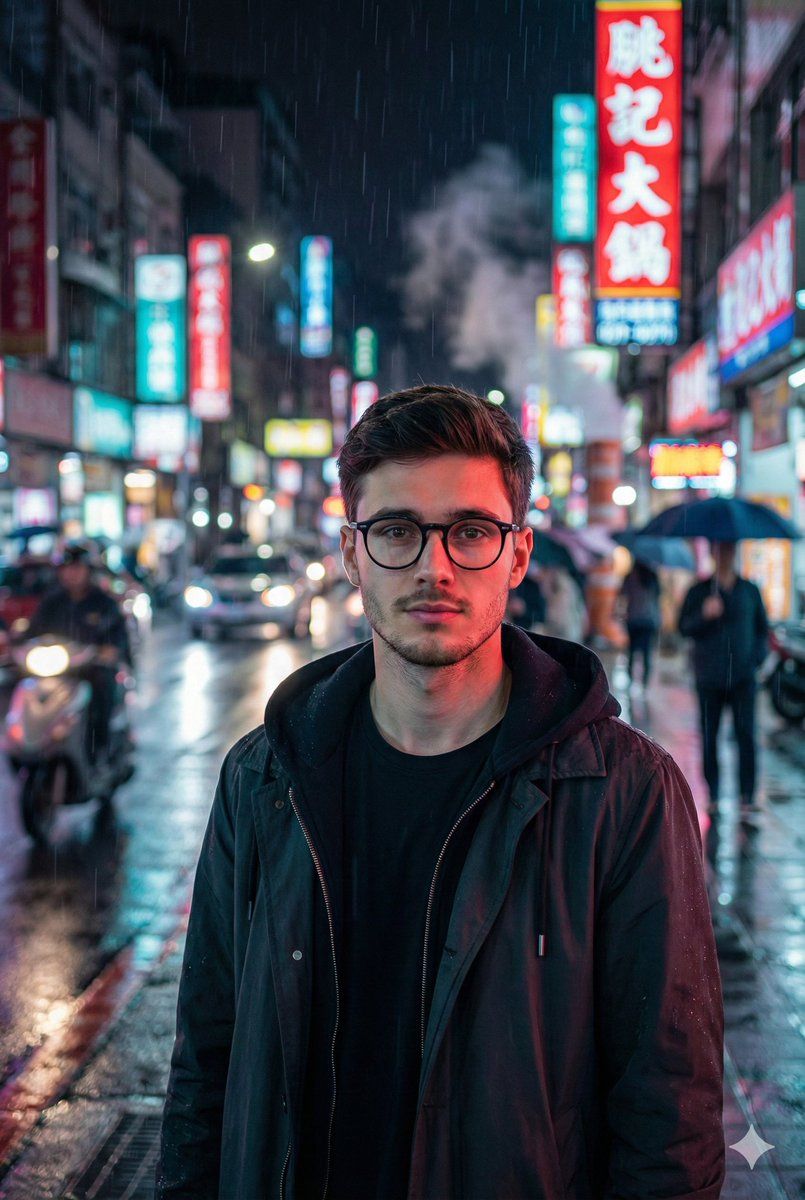
Use the provided reference image for the man’s face, hairstyle, and overall appearance → .
Create a high-resolution vertical 4K photorealistic portrait of him standing on a busy East-Asian street at night. His expression is calm but alert, with subtle reflections of neon lights across his skin. He wears a dark hooded jacket layered under a lightweight streetwear coat.

The environment is filled with vibrant neon signage—reds, cyans, and magentas glowing off wet pavement. Light rain falls, visible as streaked droplets caught in headlights and neon reflections. Motion blur from passing cars, pedestrians, and city lights creates a dynamic sense of movement while the subject remains sharply in focus.

Camera: 85mm portrait lens, shallow depth of field, crisp detail on the face (matching the reference image), creamy bokeh in the background. Soft rim-lighting from neon signs edges his silhouette. Wet surfaces reflect saturated colors, enhancing the cinematic mood.

Atmosphere: soft rain mist, drifting steam from a street vent, blurred scooters and cars, neon reflections wrapping around the subject’s shoulders.

Avoid: distorted anatomy, incorrect facial structure (must match reference), double features, overexposure, cartoon/painterly look, text or watermarks, excessive motion blur on the subject.
Category
创意图片
Model
Nano Banana Pro
Creator
Oogie
Views0
Source ID
84838249-bea2-4cbc-aea4-23952cf3300f
Published
Mar 8, 2026

Guide

About "超写实东亚霓虹夜景人像提示词"

What is this prompt for?

"超写实东亚霓虹夜景人像提示词" AI image prompt for Nano Banana Pro (创意图片). 为 Gemini Nano Banana Pro 提供一个详细的提示,以创建一张高分辨率、逼真的垂直肖像,描绘一名男子在繁忙的东亚夜间街道上。要求该男子的面部与提供的参考图片相符。提示强调湿润路面…

The full copyable prompt and example visuals above are ready for AI image generation or one-click recreate in Picva.

How to use this prompt

  1. Step 1

    Open the prompt detail

    Review the example visuals, category, and full prompt text for "超写实东亚霓虹夜景人像提示词".

  2. Step 2

    Copy the prompt

    Copy the prompt body from this page, or load it directly in Studio.

  3. Step 3

    Pick a model (Nano Banana Pro)

    Prefer Nano Banana Pro. If you switch models, keep subject and composition and tweak style terms.

  4. Step 4

    Generate and export

    Recreate the look in Picva, or export into your workflow for editing and publishing.

FAQ

What is the "超写实东亚霓虹夜景人像提示词" prompt?
It is an AI image-generation prompt for Nano Banana Pro in the 创意图片 category. This page includes the full prompt text, example visuals, and a one-click recreate path in Picva.
How do I use this prompt to generate an image?
Copy the prompt from this page, or use Generate / Studio. Paste it into a compatible image model, or recreate the look in Picva with optional reference images.
Which model is this prompt for?
This page lists Nano Banana Pro. Most descriptive prompts also transfer to nearby image models such as GPT Image, Flux, or Midjourney with light style tweaks.
Can I use the result commercially?
You can usually copy the prompt for creation, but commercial use of the final image depends on the model terms, reference-image rights, and the generated content. Follow the source author and platform rules.