16

霓虹雨地铁出口肖像提示
Enlarge

霓虹雨地铁出口肖像提示

Prompt
{
  "positive": {
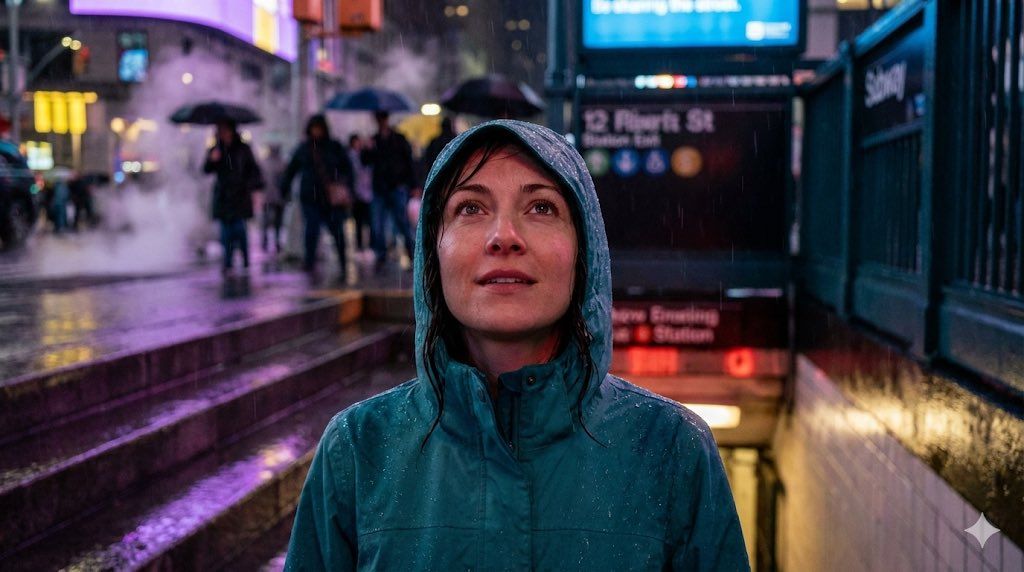
    "description": "High-detail 4K portrait of a woman emerging from a subway exit into neon rain.",
    "subject": {
      "gender": "female",
      "hair": {
        "style": "slightly soaked and pushed back",
        "condition": "wet from rain"
      },
      "expression": "subtle curiosity while looking upward toward neon signs",
      "clothing": {
        "type": "hooded jacket",
        "color": "teal",
        "details": "water droplets beading on the fabric"
      }
    },
    "lighting": {
      "ambient_mix": ["red station lighting", "cold street-blue tones"],
      "mood": "cinematic realism"
    },
    "environment": {
      "location": "subway exit at night",
      "weather": "neon rain",
      "details": {
        "wet_steps": "reflecting purple and yellow city lights",
        "background": [
          "blurred crowd with umbrellas",
          "motion bokeh",
          "steam rising from grates"
        ]
      }
    },
    "camera": {
      "resolution": "4K",
      "focus": "clean sharp facial focus"
    }
  },
  "negative": [
    "blurred face",
    "stretched limbs",
    "cartoon textures",
    "overexposed highlights",
    "dark crushed shadows",
    "watermark"
  ]
}
Category
创意图片
Model
Nano Banana Pro
Creator
Dr.duet
Views0
Source ID
98d9a41a-ed95-4692-9439-7cd57db3cec8
Published
Mar 8, 2026

Guide

About "霓虹雨地铁出口肖像提示"

What is this prompt for?

"霓虹雨地铁出口肖像提示" AI image prompt for Nano Banana Pro (创意图片). 这是一个为 Gemini 应用上的 Nano Banana Pro 设计的结构化 JSON 提示,详细描述了一幅高细节的 4K 女性肖像画:她从地铁出口走出,进入“霓虹雨”中。提示中明确了人物的外观(湿…

The full copyable prompt and example visuals above are ready for AI image generation or one-click recreate in Picva.

How to use this prompt

  1. Step 1

    Open the prompt detail

    Review the example visuals, category, and full prompt text for "霓虹雨地铁出口肖像提示".

  2. Step 2

    Copy the prompt

    Copy the prompt body from this page, or load it directly in Studio.

  3. Step 3

    Pick a model (Nano Banana Pro)

    Prefer Nano Banana Pro. If you switch models, keep subject and composition and tweak style terms.

  4. Step 4

    Generate and export

    Recreate the look in Picva, or export into your workflow for editing and publishing.

FAQ

What is the "霓虹雨地铁出口肖像提示" prompt?
It is an AI image-generation prompt for Nano Banana Pro in the 创意图片 category. This page includes the full prompt text, example visuals, and a one-click recreate path in Picva.
How do I use this prompt to generate an image?
Copy the prompt from this page, or use Generate / Studio. Paste it into a compatible image model, or recreate the look in Picva with optional reference images.
Which model is this prompt for?
This page lists Nano Banana Pro. Most descriptive prompts also transfer to nearby image models such as GPT Image, Flux, or Midjourney with light style tweaks.
Can I use the result commercially?
You can usually copy the prompt for creation, but commercial use of the final image depends on the model terms, reference-image rights, and the generated content. Follow the source author and platform rules.