20

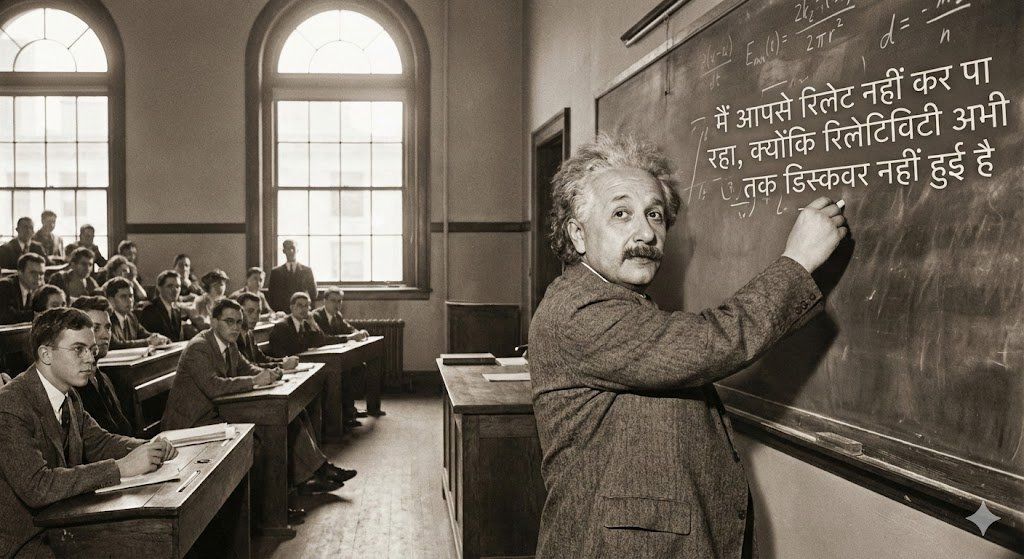
爱因斯坦在麻省理工学院讲课,并讲了一个印地语笑话
Enlarge

爱因斯坦在麻省理工学院讲课,并讲了一个印地语笑话

Prompt
a realistic, slightly cinematic scene of albert einstein teaching a class at mit in the early 20th century. show him at a large chalkboard covered with equations, chalk in hand, mid-explanation. the classroom has wooden desks, warm natural light from tall windows, and attentive students. on the chalkboard, clearly written in devanagari, include the sentence: "मैं आपसे रिलेट नहीं कर पा रहा, क्योंकि रिलेटिविटी अभी तक डिस्कवर नहीं हुई है". capture einstein’s characteristic hair, suit, and expressive posture. blend historical accuracy with playful anachronism, maintaining a high-detail, academic visual style.
Category
创意图片
Model
Nano Banana Pro
Views0
Source ID
4f9623aa-9783-4da5-bbbb-501d9c6c69e0
Published
Mar 8, 2026

Guide

About "爱因斯坦在麻省理工学院讲课,并讲了一个印地语笑话"

What is this prompt for?

"爱因斯坦在麻省理工学院讲课,并讲了一个印地语笑话" AI image prompt for Nano Banana Pro (创意图片). 爱因斯坦在麻省理工学院 (MIT) 教室黑板前的写实场景的详细提示,黑板上清晰地写着一句俏皮的梵文 (Devanagari) 句子。 --- 一幅逼真、略带电影感的场景,描绘了…

The full copyable prompt and example visuals above are ready for AI image generation or one-click recreate in Picva.

How to use this prompt

  1. Step 1

    Open the prompt detail

    Review the example visuals, category, and full prompt text for "爱因斯坦在麻省理工学院讲课,并讲了一个印地语笑话".

  2. Step 2

    Copy the prompt

    Copy the prompt body from this page, or load it directly in Studio.

  3. Step 3

    Pick a model (Nano Banana Pro)

    Prefer Nano Banana Pro. If you switch models, keep subject and composition and tweak style terms.

  4. Step 4

    Generate and export

    Recreate the look in Picva, or export into your workflow for editing and publishing.

FAQ

What is the "爱因斯坦在麻省理工学院讲课,并讲了一个印地语笑话" prompt?
It is an AI image-generation prompt for Nano Banana Pro in the 创意图片 category. This page includes the full prompt text, example visuals, and a one-click recreate path in Picva.
How do I use this prompt to generate an image?
Copy the prompt from this page, or use Generate / Studio. Paste it into a compatible image model, or recreate the look in Picva with optional reference images.
Which model is this prompt for?
This page lists Nano Banana Pro. Most descriptive prompts also transfer to nearby image models such as GPT Image, Flux, or Midjourney with light style tweaks.
Can I use the result commercially?
You can usually copy the prompt for creation, but commercial use of the final image depends on the model terms, reference-image rights, and the generated content. Follow the source author and platform rules.











