19

Nano Banana Pro 提示词结构和视觉元素
Enlarge

Nano Banana Pro 提示词结构和视觉元素

Prompt
Subject(主題)
+ Composition(構図)
+ Action(動作)
+ Setting(場所)
+ Style(スタイル)
+ Lighting/Material(光/質感)

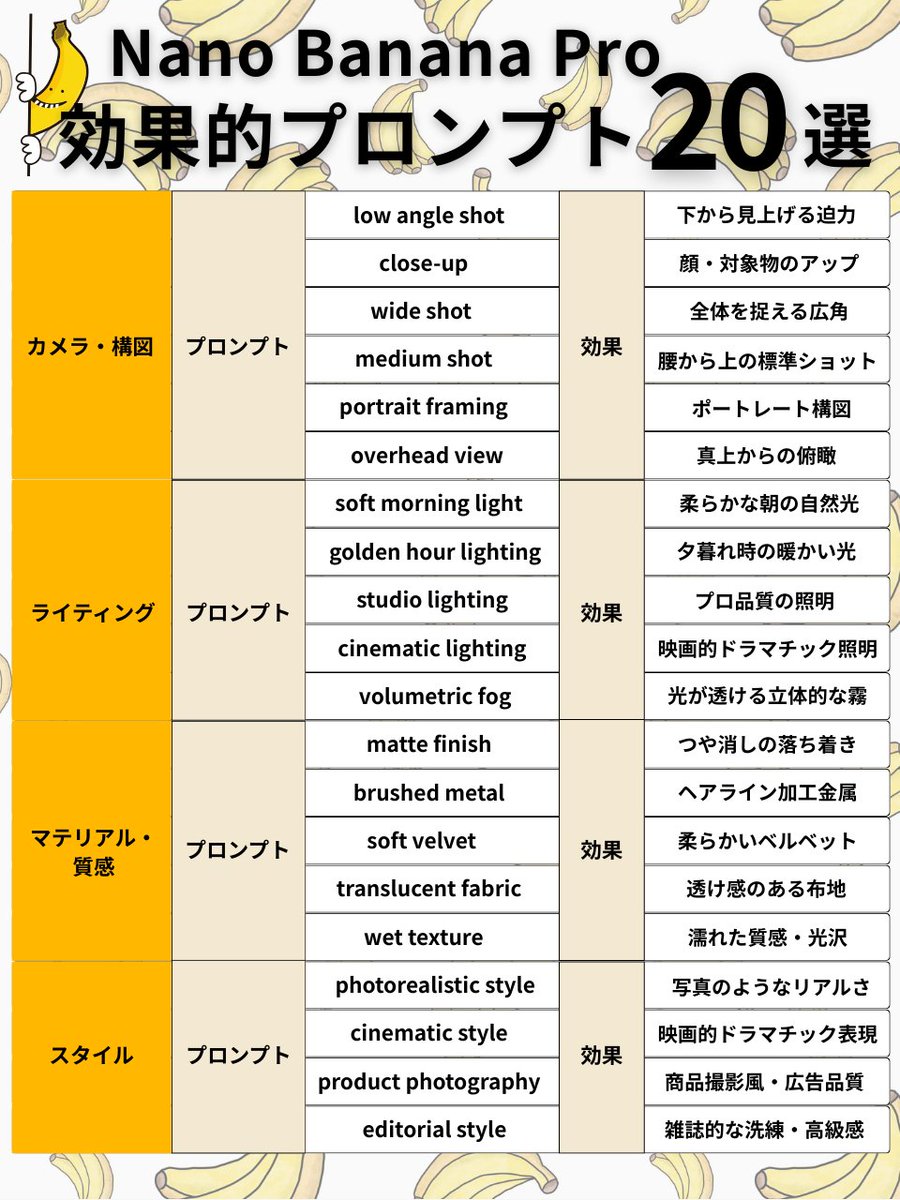
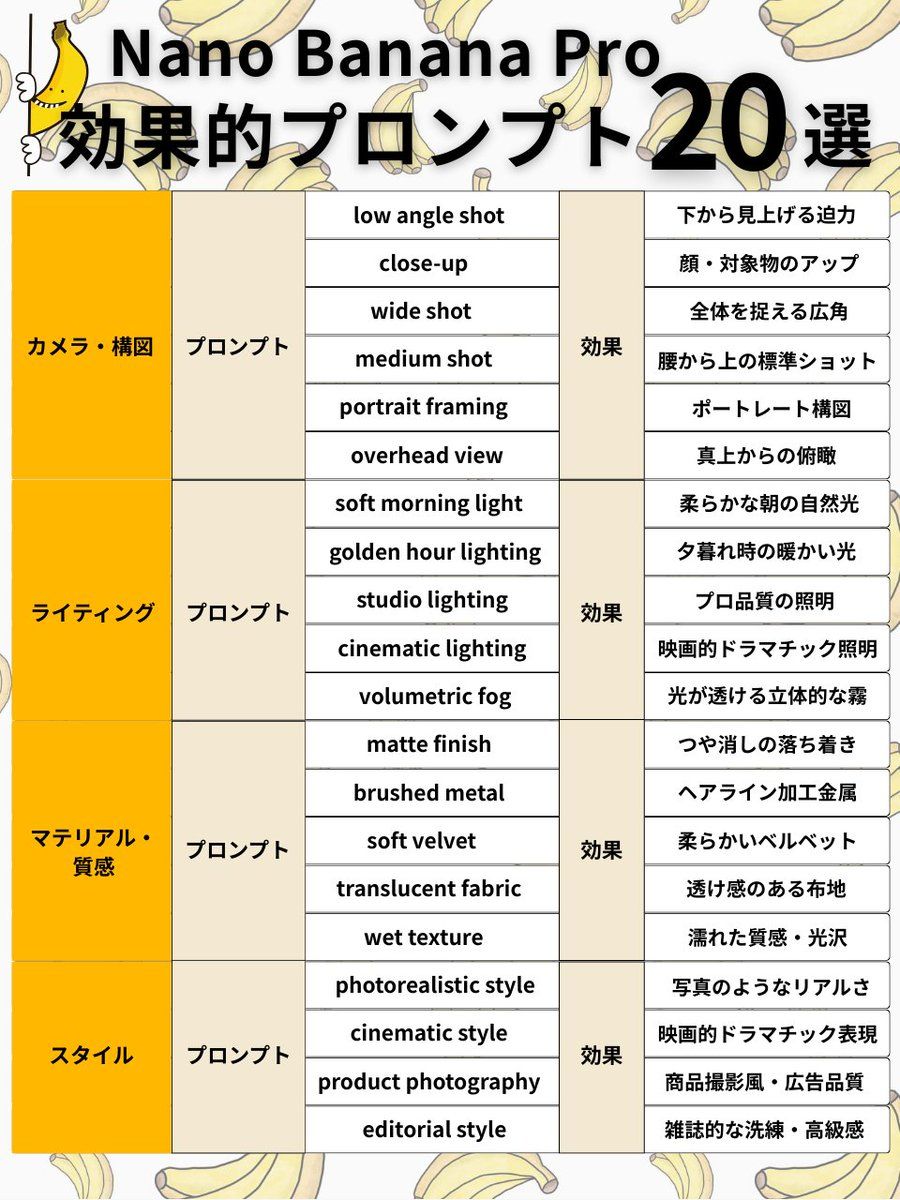
<カメラ・構図 6選>
✅ low angle shot
→ 下から見上げる迫力
✅ close-up
→ 顔・対象物のアップ
✅ wide shot
→ 全体を捉える広角
✅ medium shot
→ 腰から上の標準ショット
✅ portrait framing
→ ポートレート構図
✅ overhead view
→ 真上からの俯瞰

<ライティング 5選>
✅ soft morning light
→ 柔らかな朝の自然光
✅ golden hour lighting
→ 夕暮れ時の暖かい光
✅ studio lighting
→ プロ品質の照明
✅ cinematic lighting
→ 映画的ドラマチック照明
✅ volumetric fog
→ 光が透ける立体的な霧

<マテリアル・質感 5選>
✅ matte finish
→ つや消しの落ち着き
✅ brushed metal
→ ヘアライン加工金属
✅ soft velvet
→ 柔らかいベルベット
✅ translucent fabric
→ 透け感のある布地
✅ wet texture
→ 濡れた質感・光沢

<スタイル 4選>
✅ photorealistic style
→ 写真のようなリアルさ
✅ cinematic style
→ 映画的ドラマチック表現
✅ product photography
→ 商品撮影風・広告品質
✅ editorial style
→ 雑誌的な洗練・高級感
Category
创意图片
Model
Nano Banana Pro
Views0
Source ID
9d74358c-c941-4f67-bf7b-d731bb8d779b
Published
Mar 8, 2026

Guide

About "Nano Banana Pro 提示词结构和视觉元素"

What is this prompt for?

"Nano Banana Pro 提示词结构和视觉元素" AI image prompt for Nano Banana Pro (创意图片). 这是一份基于 Google 官方推荐的 Nano Banana Pro 有效提示综合指南,其中概述了基本的结构框架,并提供了相机镜头、光照、材质纹理和艺术风格的具体示例。这…

The full copyable prompt and example visuals above are ready for AI image generation or one-click recreate in Picva.

How to use this prompt

  1. Step 1

    Open the prompt detail

    Review the example visuals, category, and full prompt text for "Nano Banana Pro 提示词结构和视觉元素".

  2. Step 2

    Copy the prompt

    Copy the prompt body from this page, or load it directly in Studio.

  3. Step 3

    Pick a model (Nano Banana Pro)

    Prefer Nano Banana Pro. If you switch models, keep subject and composition and tweak style terms.

  4. Step 4

    Generate and export

    Recreate the look in Picva, or export into your workflow for editing and publishing.

FAQ

What is the "Nano Banana Pro 提示词结构和视觉元素" prompt?
It is an AI image-generation prompt for Nano Banana Pro in the 创意图片 category. This page includes the full prompt text, example visuals, and a one-click recreate path in Picva.
How do I use this prompt to generate an image?
Copy the prompt from this page, or use Generate / Studio. Paste it into a compatible image model, or recreate the look in Picva with optional reference images.
Which model is this prompt for?
This page lists Nano Banana Pro. Most descriptive prompts also transfer to nearby image models such as GPT Image, Flux, or Midjourney with light style tweaks.
Can I use the result commercially?
You can usually copy the prompt for creation, but commercial use of the final image depends on the model terms, reference-image rights, and the generated content. Follow the source author and platform rules.