20

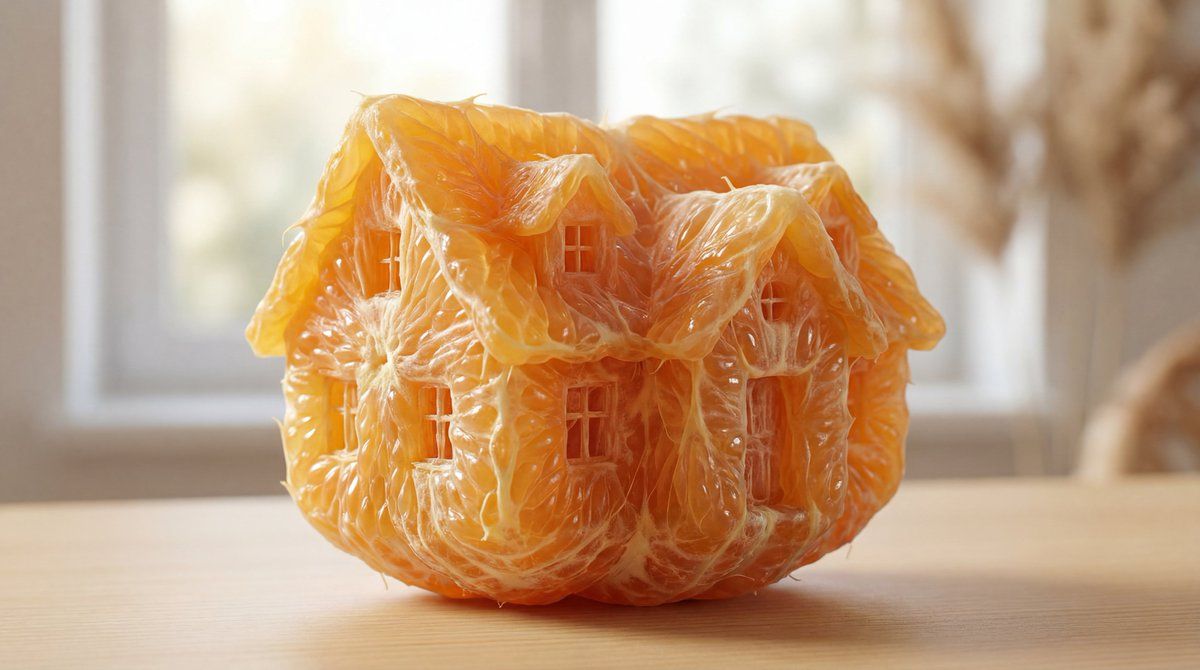
橙色果肉雕塑提示
Enlarge

橙色果肉雕塑提示

Prompt
hyper-realistic image showcasing an extraordinary piece of orange pulp, meticulously sculpted into an elaborate {argument name="subject" default="[SUBJECT]"} form. This single, standout pulp segment should be the central focus, with its {argument name="subject" default="[SUBJECT]"}-like contours and features exquisitely defined. The texture should be remarkably detailed, showcasing the natural, fibrous quality of orange pulp, and its color should be a vivid, true-to-life orange, emblematic of fresh citrus. The {argument name="subject" default="[SUBJECT]"}-shaped pulp must be vivid and pronounced, set against a soft, unobtrusive background that enhances its striking form. The image should encapsulate the imaginative fusion of natural fruit textures with the majestic form of a {argument name="subject" default="[SUBJECT]"}, all while maintaining a lifelike appearance
Category
创意图片
Model
Nano Banana Pro
Creator
Umesh
Views0
Source ID
4a831a3c-f3e0-4209-a637-2f95ff262b19
Published
Mar 8, 2026

Guide

About "橙色果肉雕塑提示"

What is this prompt for?

"橙色果肉雕塑提示" AI image prompt for Nano Banana Pro (创意图片). Nano Banana Pro 的一个提示,要求生成一张超写实的图像,内容是一个单独的橙子果肉瓣,被精心雕塑成一个精致的形状。该提示强调极致的细节、自然的纤维质感、鲜艳的色彩以及柔和的背景,以突出水果质感与雕…

The full copyable prompt and example visuals above are ready for AI image generation or one-click recreate in Picva.

How to use this prompt

  1. Step 1

    Open the prompt detail

    Review the example visuals, category, and full prompt text for "橙色果肉雕塑提示".

  2. Step 2

    Copy the prompt

    Copy the prompt body from this page, or load it directly in Studio.

  3. Step 3

    Pick a model (Nano Banana Pro)

    Prefer Nano Banana Pro. If you switch models, keep subject and composition and tweak style terms.

  4. Step 4

    Generate and export

    Recreate the look in Picva, or export into your workflow for editing and publishing.

FAQ

What is the "橙色果肉雕塑提示" prompt?
It is an AI image-generation prompt for Nano Banana Pro in the 创意图片 category. This page includes the full prompt text, example visuals, and a one-click recreate path in Picva.
How do I use this prompt to generate an image?
Copy the prompt from this page, or use Generate / Studio. Paste it into a compatible image model, or recreate the look in Picva with optional reference images.
Which model is this prompt for?
This page lists Nano Banana Pro. Most descriptive prompts also transfer to nearby image models such as GPT Image, Flux, or Midjourney with light style tweaks.
Can I use the result commercially?
You can usually copy the prompt for creation, but commercial use of the final image depends on the model terms, reference-image rights, and the generated content. Follow the source author and platform rules.











