15

20 格卡通机器人绘画指南提示
Enlarge

20 格卡通机器人绘画指南提示

Prompt
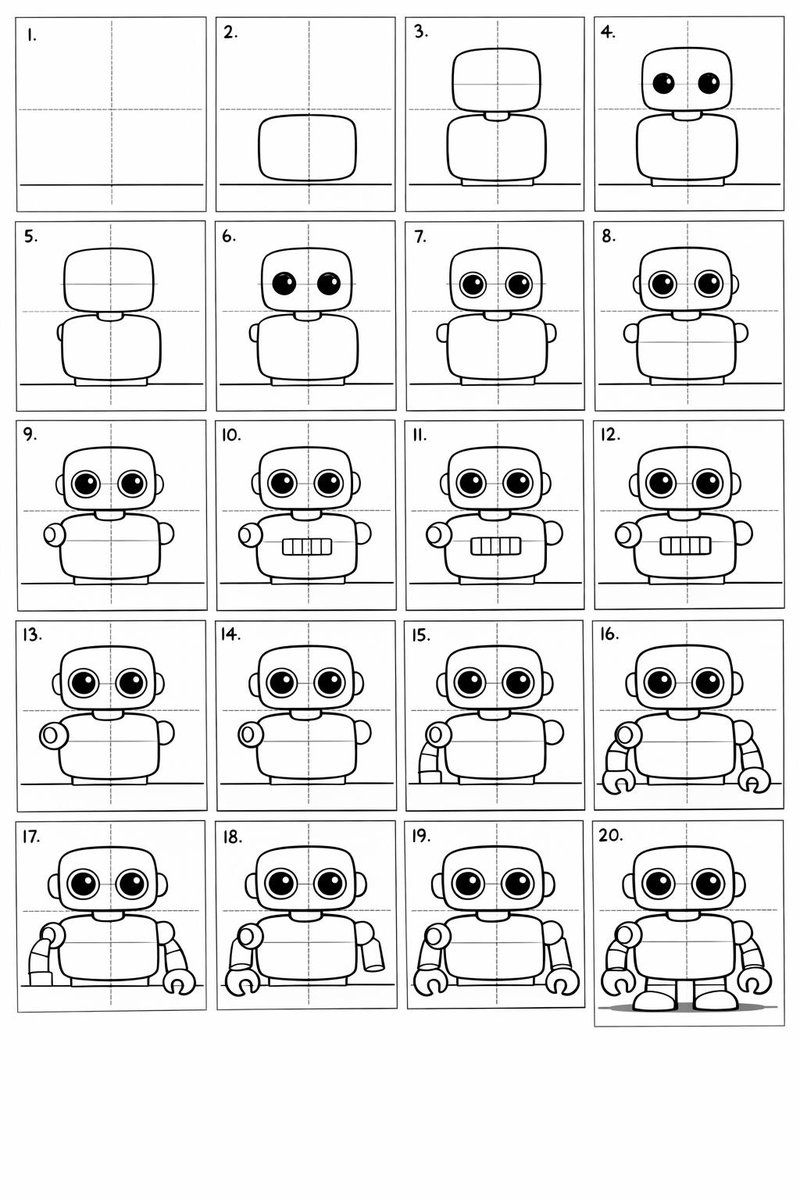
Create a 20-panel layout guide for drawing a cute cartoon robot. Each panel keeps everything from before and adds one clear change.

1. Light guide lines: vertical center, horizontal center, and a ground line.
2. Add torso: rounded rectangle above the ground.
3. Add torso centerline.
4. Add head: smaller rounded square above torso.
5. Add neck connector: short rounded block.
6. Add left eye circle.
7. Add right eye circle.
8. Add pupils inside both eyes.
9. Add thin rim rings around both eyes.
10. Add mouth rectangle below eyes.
11. Add evenly spaced vertical slats in the mouth.
12. Add left shoulder joint circle on torso side.
13. Add right shoulder joint circle.
14. Add left upper arm cylinder from left shoulder.
15. Add left elbow circle and left forearm cylinder.
16. Add left claw hand (base curve + two prongs).
17. Add right upper arm cylinder from right shoulder.
18. Add right elbow circle and right forearm cylinder.
19. Add right claw hand to match left.
20. Add legs and feet as simple blocks: two short legs from torso bottom and two rounded trapezoid feet, plus a small ground shadow.
Category
创意图片
Model
Nano Banana Pro
Creator
Umesh
Views0
Source ID
763b1600-1119-43d8-a4b7-a860ec0b3562
Published
Mar 8, 2026

Guide

About "20 格卡通机器人绘画指南提示"

What is this prompt for?

"20 格卡通机器人绘画指南提示" AI image prompt for Nano Banana Pro (创意图片). 这是一个为 Nano Banana Pro(在 LeonardoAi 上使用)设计的详细分步提示,指导模型创建一个 20 格的可爱卡通机器人绘制布局指南,每个面板都增加一个特定的、累积的变化,从…

The full copyable prompt and example visuals above are ready for AI image generation or one-click recreate in Picva.

How to use this prompt

  1. Step 1

    Open the prompt detail

    Review the example visuals, category, and full prompt text for "20 格卡通机器人绘画指南提示".

  2. Step 2

    Copy the prompt

    Copy the prompt body from this page, or load it directly in Studio.

  3. Step 3

    Pick a model (Nano Banana Pro)

    Prefer Nano Banana Pro. If you switch models, keep subject and composition and tweak style terms.

  4. Step 4

    Generate and export

    Recreate the look in Picva, or export into your workflow for editing and publishing.

FAQ

What is the "20 格卡通机器人绘画指南提示" prompt?
It is an AI image-generation prompt for Nano Banana Pro in the 创意图片 category. This page includes the full prompt text, example visuals, and a one-click recreate path in Picva.
How do I use this prompt to generate an image?
Copy the prompt from this page, or use Generate / Studio. Paste it into a compatible image model, or recreate the look in Picva with optional reference images.
Which model is this prompt for?
This page lists Nano Banana Pro. Most descriptive prompts also transfer to nearby image models such as GPT Image, Flux, or Midjourney with light style tweaks.
Can I use the result commercially?
You can usually copy the prompt for creation, but commercial use of the final image depends on the model terms, reference-image rights, and the generated content. Follow the source author and platform rules.