20

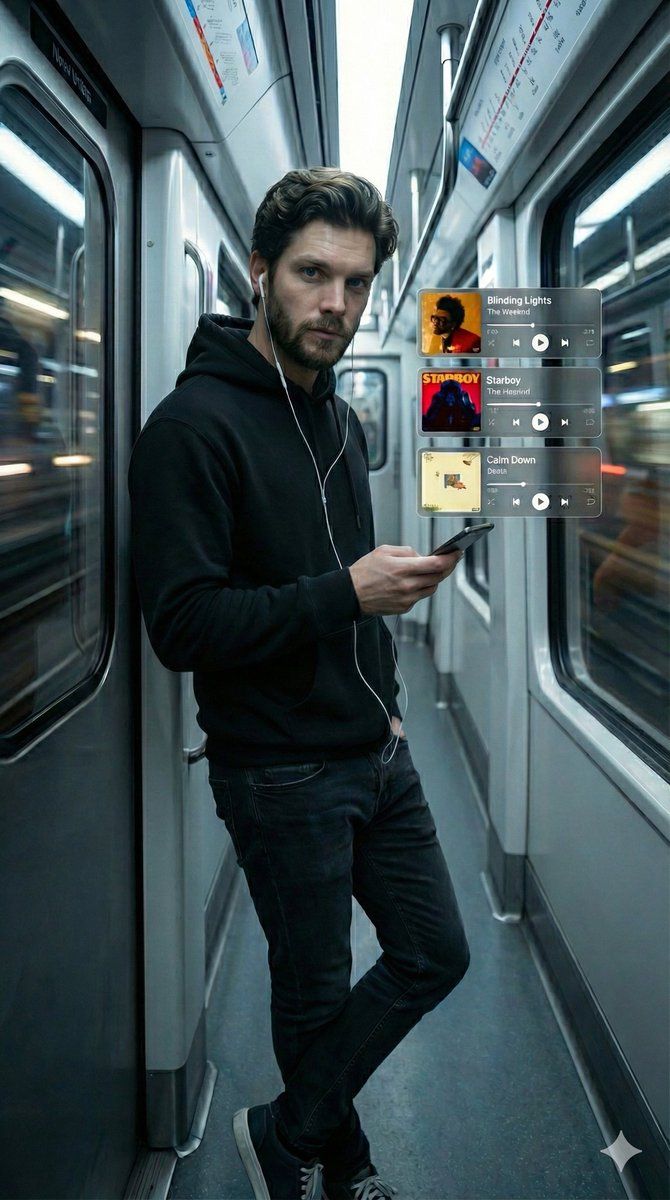
电影感地铁肖像与全息音乐 UI
Enlarge

电影感地铁肖像与全息音乐 UI

Prompt
{
  "parameters": {
    "aspect_ratio": "9:16",
    "style": "Cinematic, Photorealistic",
    "lighting": "Cool white subway lighting, volumetric atmosphere"
  },
  "prompt": "Full body shot, 9:16 vertical ratio. Ultra-realistic cinematic portrait of a handsome young man with a short beard and wavy hair, wearing a black hoodie and wired white earphones. He is leaning casually against the metal pole inside a modern moving subway train, holding a smartphone in one hand and looking slightly off-camera with a contemplative expression. Floating beside him are high-tech transparent holographic music-player cards (Glassmorphism UI). Clearly readable text on cards: '{argument name="song 1" default="Blinding Lights - The Weeknd"}', '{argument name="song 2" default="Starboy"}', and '{argument name="song 3" default="Calm Down - Rema"}' with album art and playback controls. Background features motion blur of city lights through the subway windows. Sharp focus on the subject, 8k resolution, highly detailed texture.",
  "negative_prompt": "wireless headphones, bluetooth buds, bad hands, missing fingers, extra fingers, distorted text, unreadable text, cartoon, 3d render, drawing, anime, warm yellow lighting, static background, blurry face, low resolution, messy interface."
}
Category
创意图片
Model
Nano Banana Pro
Creator
𝐌
Views0
Source ID
ac484224-de2a-494d-bcad-e334dff2926f
Published
Mar 8, 2026

Guide

About "电影感地铁肖像与全息音乐 UI"

What is this prompt for?

"电影感地铁肖像与全息音乐 UI" AI image prompt for Nano Banana Pro (创意图片). 一个垂直(9:16)的电影级超写实提示词,用于生成一张地铁车厢内男士全身肖像。肖像中,男士身旁漂浮着全息玻璃拟物风格的音乐播放器卡片,上面显示着具体的歌曲名称和专辑封面。 --- ```json…

The full copyable prompt and example visuals above are ready for AI image generation or one-click recreate in Picva.

How to use this prompt

  1. Step 1

    Open the prompt detail

    Review the example visuals, category, and full prompt text for "电影感地铁肖像与全息音乐 UI".

  2. Step 2

    Copy the prompt

    Copy the prompt body from this page, or load it directly in Studio.

  3. Step 3

    Pick a model (Nano Banana Pro)

    Prefer Nano Banana Pro. If you switch models, keep subject and composition and tweak style terms.

  4. Step 4

    Generate and export

    Recreate the look in Picva, or export into your workflow for editing and publishing.

FAQ

What is the "电影感地铁肖像与全息音乐 UI" prompt?
It is an AI image-generation prompt for Nano Banana Pro in the 创意图片 category. This page includes the full prompt text, example visuals, and a one-click recreate path in Picva.
How do I use this prompt to generate an image?
Copy the prompt from this page, or use Generate / Studio. Paste it into a compatible image model, or recreate the look in Picva with optional reference images.
Which model is this prompt for?
This page lists Nano Banana Pro. Most descriptive prompts also transfer to nearby image models such as GPT Image, Flux, or Midjourney with light style tweaks.
Can I use the result commercially?
You can usually copy the prompt for creation, but commercial use of the final image depends on the model terms, reference-image rights, and the generated content. Follow the source author and platform rules.








