20

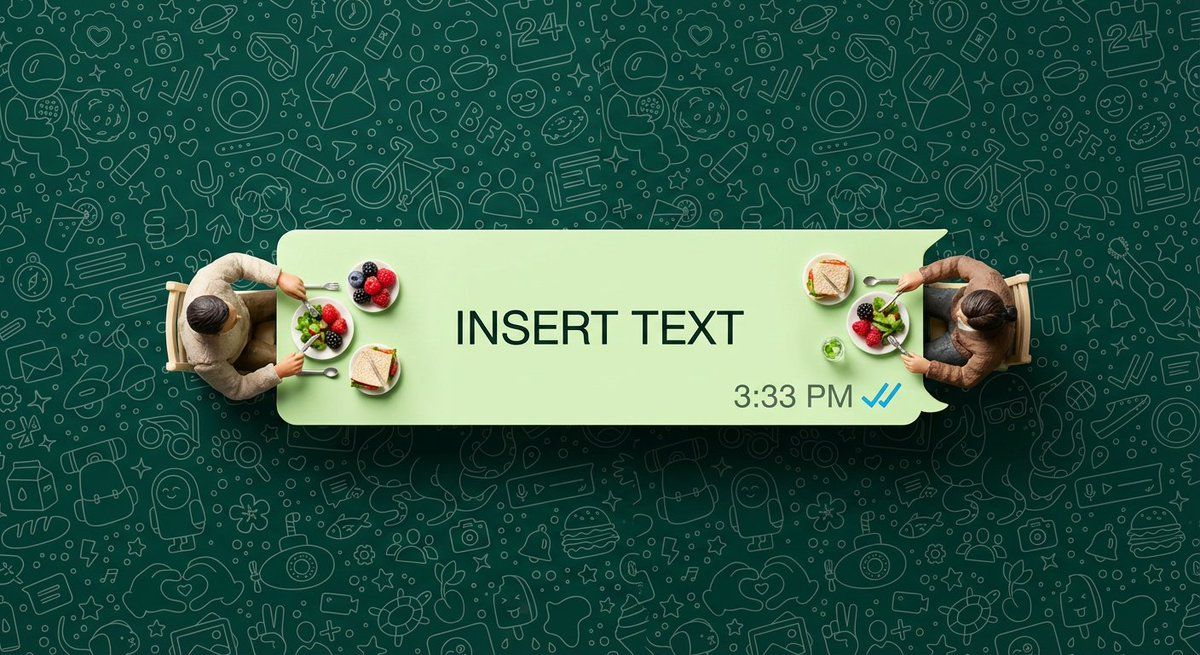
WhatsApp 语音气泡餐桌微距拍摄
Enlarge

WhatsApp 语音气泡餐桌微距拍摄

Prompt
Ultra-photorealistic top-down macro shot of a long, light-green WhatsApp speech bubble used as a dining table. Two real miniature girls sit at opposite ends (no chairs visible), looking upward with natural expressions. They are clearly human—not figurines—with realistic skin texture, natural hair, and detailed clothing folds. Inside the bubble text reads “{argument name="bubble text" default="INSERT TEXT"}”, with 3:33 PM and blue double-check ticks at the bottom right. The background is fully covered edge-to-edge with a dense, seamless WhatsApp doodle wallpaper. Professional studio lighting, sharp focus, 8K realism.
Category
创意图片
Model
Nano Banana Pro
Views0
Source ID
c58e3020-140f-4096-8165-8dd9c936a541
Published
Mar 8, 2026

Guide

About "WhatsApp 语音气泡餐桌微距拍摄"

What is this prompt for?

"WhatsApp 语音气泡餐桌微距拍摄" AI image prompt for Nano Banana Pro (创意图片). 一张超写实的微距照片,浅绿色的 WhatsApp 聊天气泡充当餐桌。两名真实的迷你女孩坐在两端,气泡文本显示“INSERT TEXT”,背景是密集的 WhatsApp 涂鸦壁纸。 ---…

The full copyable prompt and example visuals above are ready for AI image generation or one-click recreate in Picva.

How to use this prompt

  1. Step 1

    Open the prompt detail

    Review the example visuals, category, and full prompt text for "WhatsApp 语音气泡餐桌微距拍摄".

  2. Step 2

    Copy the prompt

    Copy the prompt body from this page, or load it directly in Studio.

  3. Step 3

    Pick a model (Nano Banana Pro)

    Prefer Nano Banana Pro. If you switch models, keep subject and composition and tweak style terms.

  4. Step 4

    Generate and export

    Recreate the look in Picva, or export into your workflow for editing and publishing.

FAQ

What is the "WhatsApp 语音气泡餐桌微距拍摄" prompt?
It is an AI image-generation prompt for Nano Banana Pro in the 创意图片 category. This page includes the full prompt text, example visuals, and a one-click recreate path in Picva.
How do I use this prompt to generate an image?
Copy the prompt from this page, or use Generate / Studio. Paste it into a compatible image model, or recreate the look in Picva with optional reference images.
Which model is this prompt for?
This page lists Nano Banana Pro. Most descriptive prompts also transfer to nearby image models such as GPT Image, Flux, or Midjourney with light style tweaks.
Can I use the result commercially?
You can usually copy the prompt for creation, but commercial use of the final image depends on the model terms, reference-image rights, and the generated content. Follow the source author and platform rules.












