20

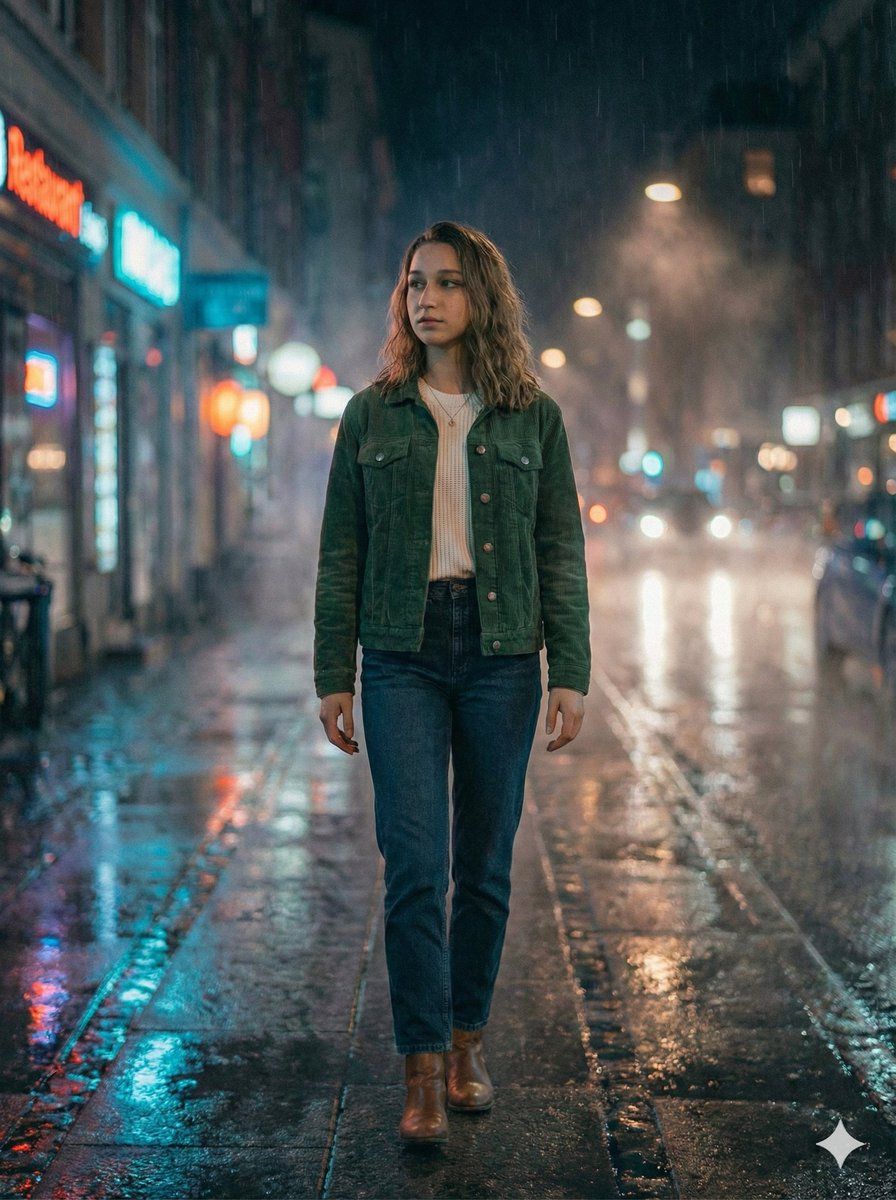
电影感夜雨人像 (JSON)
Enlarge

电影感夜雨人像 (JSON)

Prompt
{
  "Ultra-realistic cinematic portrait of a woman (same face, hairstyle, and overall appearance as reference image), walking through a rainy city street at night. Neon sign lights reflect across wet asphalt and puddles, creating shimmering colors. Raindrops bead on her jacket and subtle droplets cling to loose hair strands. She has a calm but moody expression, eyes slightly thoughtful as she looks ahead. Background is softly blurred with beautiful bokeh lights from traffic and storefronts. Film-like atmosphere with blue and red neon contrast, soft rim lighting on her shoulders, and light mist in the air. Dynamic street reflections, shallow depth of field, detailed skin texture, realistic wet fabric, natural posture, cinematic composition, 85mm lens look, volumetric light, high resolution, photoreal, studio-grade quality.",

  "style": "cinematic, moody, atmospheric, urban night photography",

  "camera": {
    "lens": "85mm prime",
    "aperture": "f/1.8",
    "lighting": "soft rim lighting + reflected neon fill"
  },

  "negative_prompt": "deformed face, extra fingers, unrealistic raindrops, cartoonish textures, distorted hands, bad anatomy, harsh overexposure, washed out colors, low-resolution, duplicate subjects, messy background, over-sharpening",

  "format": "portrait, 4k, high detail, realistic color grading"
}
Category
创意图片
Model
Nano Banana Pro
Creator
Johnn
Views0
Source ID
b04be251-06f3-41e4-b08b-5656c8717d65
Published
Mar 8, 2026

Guide

About "电影感夜雨人像 (JSON)"

What is this prompt for?

"电影感夜雨人像 (JSON)" AI image prompt for Nano Banana Pro (创意图片). 一个结构化的 JSON 提示词,用于生成一张超现实的电影级肖像,描绘一位女性在夜晚穿过下雨的城市街道。它强调忧郁的蓝色和红色霓虹灯对比、湿沥青上的倒影、细致的皮肤纹理,以及特定的相机设置(85mm…

The full copyable prompt and example visuals above are ready for AI image generation or one-click recreate in Picva.

How to use this prompt

  1. Step 1

    Open the prompt detail

    Review the example visuals, category, and full prompt text for "电影感夜雨人像 (JSON)".

  2. Step 2

    Copy the prompt

    Copy the prompt body from this page, or load it directly in Studio.

  3. Step 3

    Pick a model (Nano Banana Pro)

    Prefer Nano Banana Pro. If you switch models, keep subject and composition and tweak style terms.

  4. Step 4

    Generate and export

    Recreate the look in Picva, or export into your workflow for editing and publishing.

FAQ

What is the "电影感夜雨人像 (JSON)" prompt?
It is an AI image-generation prompt for Nano Banana Pro in the 创意图片 category. This page includes the full prompt text, example visuals, and a one-click recreate path in Picva.
How do I use this prompt to generate an image?
Copy the prompt from this page, or use Generate / Studio. Paste it into a compatible image model, or recreate the look in Picva with optional reference images.
Which model is this prompt for?
This page lists Nano Banana Pro. Most descriptive prompts also transfer to nearby image models such as GPT Image, Flux, or Midjourney with light style tweaks.
Can I use the result commercially?
You can usually copy the prompt for creation, but commercial use of the final image depends on the model terms, reference-image rights, and the generated content. Follow the source author and platform rules.











