20

电影感街头摄影专题人像
Enlarge

电影感街头摄影专题人像

Prompt
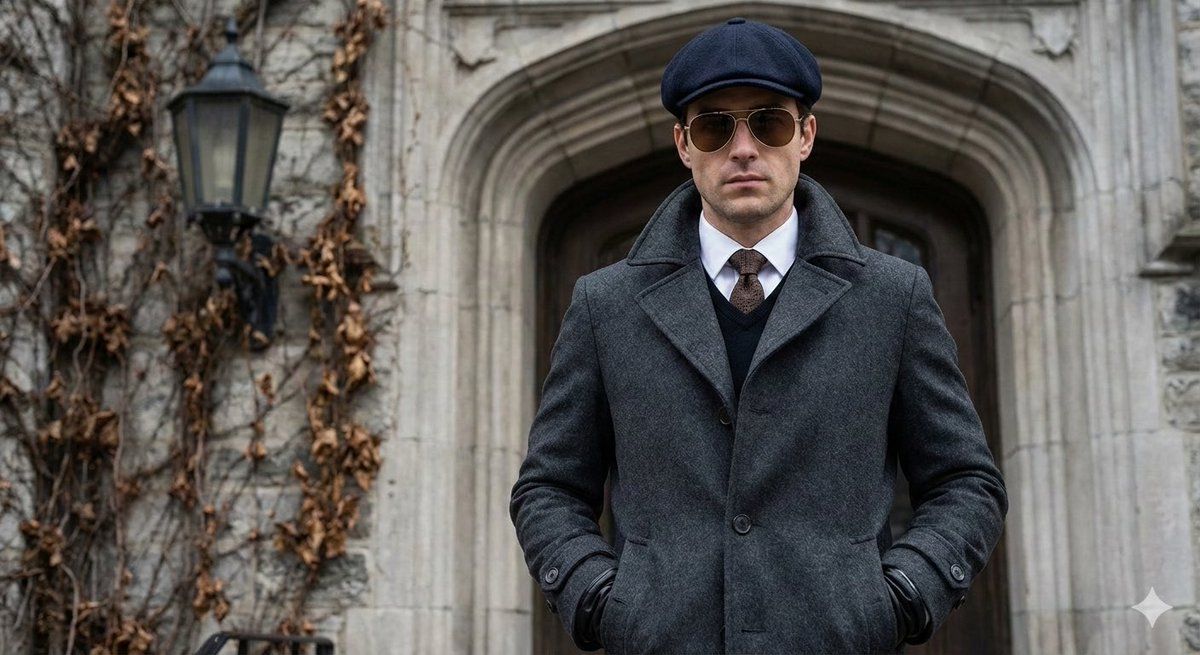
Medium-up editorial portrait shot at eye-level, focusing on a man looking directly into the camera. He is standing in front of a grey textured stone building with an arched doorway in the background. The man is wearing a {argument name="coat type" default="[COAT]"}. Underneath, he wears a white dress shirt, a brown patterned tie, and a dark V-neck sweater.

Accessories include a dark navy wool flat cap, gold- rimmed aviator sunglasses with brown lenses, and black leather gloves. His hands are tucked into the large side pockets of the coat. To the left, a vintage black outdoor lantern is mounted on the stone wall with dry vines climbing around it.

Soft overcast natural lighting, cinematic street photography, high-end fashion editorial style, sharp focus on facial features and fabric textures, 8k resolution.
Category
创意图片
Model
Nano Banana Pro
Creator
Weinberg
Views0
Source ID
418bab83-0ca7-4b11-a8a1-02a2ee14a2c2
Published
Mar 8, 2026

Guide

About "电影感街头摄影专题人像"

What is this prompt for?

"电影感街头摄影专题人像" AI image prompt for Nano Banana Pro (创意图片). 一个生成半身特写编辑肖像的提示,描绘一名男子站在纹理石砌建筑前。提示中详细说明了他的叠穿服装(外套、毛衣、领带)、配饰(鸭舌帽、飞行员太阳镜)以及电影般的街头摄影光线(柔和的阴天自然光)。 --- 中景…

The full copyable prompt and example visuals above are ready for AI image generation or one-click recreate in Picva.

How to use this prompt

  1. Step 1

    Open the prompt detail

    Review the example visuals, category, and full prompt text for "电影感街头摄影专题人像".

  2. Step 2

    Copy the prompt

    Copy the prompt body from this page, or load it directly in Studio.

  3. Step 3

    Pick a model (Nano Banana Pro)

    Prefer Nano Banana Pro. If you switch models, keep subject and composition and tweak style terms.

  4. Step 4

    Generate and export

    Recreate the look in Picva, or export into your workflow for editing and publishing.

FAQ

What is the "电影感街头摄影专题人像" prompt?
It is an AI image-generation prompt for Nano Banana Pro in the 创意图片 category. This page includes the full prompt text, example visuals, and a one-click recreate path in Picva.
How do I use this prompt to generate an image?
Copy the prompt from this page, or use Generate / Studio. Paste it into a compatible image model, or recreate the look in Picva with optional reference images.
Which model is this prompt for?
This page lists Nano Banana Pro. Most descriptive prompts also transfer to nearby image models such as GPT Image, Flux, or Midjourney with light style tweaks.
Can I use the result commercially?
You can usually copy the prompt for creation, but commercial use of the final image depends on the model terms, reference-image rights, and the generated content. Follow the source author and platform rules.