20

360 度等距柱状全景图提示
Enlarge

360 度等距柱状全景图提示

Prompt
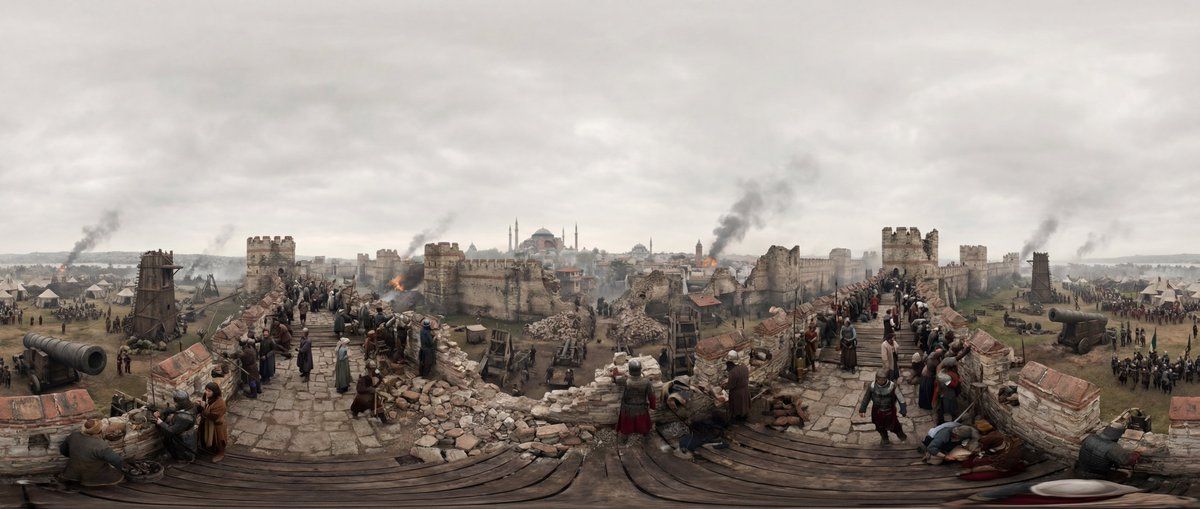
[SCENE] = {argument name="scene description" default="Troy, Anatolia, approx. 12th century BC. The moments after the Trojan Horse is pulled inside the city walls."}

Make a 360-degree equirectangular panorama in 21:9 aspect ratio.
Render the scene as a full spherical panorama with correct equirectangular projection.
Set the entire environment strictly based on [SCENE].
Place the camera at the exact center of the scene with a fixed viewpoint.
Design the environment as a continuous, circular world with no left or right edge.
Ensure the first and last horizontal edges align perfectly.
Distribute architecture, people, and objects evenly around the full 360° view.
Use realistic real-world lighting, materials, and physical behavior.
Keep sharp focus across the entire panorama.
Use uniform natural daylight with no dominant light direction.
Ensure lighting intensity and color remain consistent across the full 360° panorama.
Treat the environment as lit by an evenly diffused sky dome rather than a single sun source.
Apply soft global shadows that do not favor any horizontal direction.
Avoid directional sunlight gradients that could cause seam lighting mismatches.
Avoid modern elements, UI overlays, borders, frames, cropped views, fantasy styling, or broken panorama seams.
Category
创意图片
Model
Nano Banana Pro
Creator
Aimi Kōda
Views1
Source ID
0fcc17a3-a55b-40a2-aba9-eec065f62adf
Published
Mar 8, 2026

Guide

About "360 度等距柱状全景图提示"

What is this prompt for?

"360 度等距柱状全景图提示" AI image prompt for Nano Banana Pro (创意图片). 一个高度技术性的提示,旨在生成无缝的 360 度等距柱状全景图像,并针对整个球形视图中的一致光照和构图进行了优化。它指定了一个历史场景,并包含防止接缝或定向阴影等视觉伪影的规则,使其成为虚拟现实环…

The full copyable prompt and example visuals above are ready for AI image generation or one-click recreate in Picva.

How to use this prompt

  1. Step 1

    Open the prompt detail

    Review the example visuals, category, and full prompt text for "360 度等距柱状全景图提示".

  2. Step 2

    Copy the prompt

    Copy the prompt body from this page, or load it directly in Studio.

  3. Step 3

    Pick a model (Nano Banana Pro)

    Prefer Nano Banana Pro. If you switch models, keep subject and composition and tweak style terms.

  4. Step 4

    Generate and export

    Recreate the look in Picva, or export into your workflow for editing and publishing.

FAQ

What is the "360 度等距柱状全景图提示" prompt?
It is an AI image-generation prompt for Nano Banana Pro in the 创意图片 category. This page includes the full prompt text, example visuals, and a one-click recreate path in Picva.
How do I use this prompt to generate an image?
Copy the prompt from this page, or use Generate / Studio. Paste it into a compatible image model, or recreate the look in Picva with optional reference images.
Which model is this prompt for?
This page lists Nano Banana Pro. Most descriptive prompts also transfer to nearby image models such as GPT Image, Flux, or Midjourney with light style tweaks.
Can I use the result commercially?
You can usually copy the prompt for creation, but commercial use of the final image depends on the model terms, reference-image rights, and the generated content. Follow the source author and platform rules.













