20

电影级仓鼠硬拉视频提示
Enlarge

电影级仓鼠硬拉视频提示

Prompt
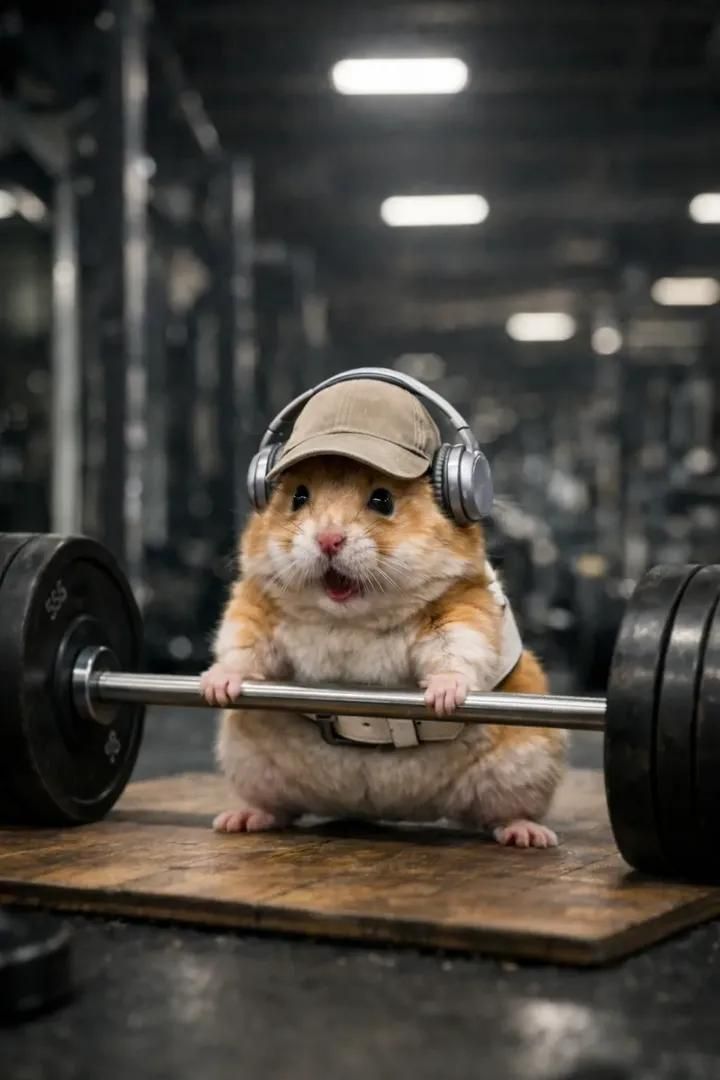
Ultra-realistic cinematic gym scene featuring a small tan-and-white hamster wearing a beige baseball cap, silver over-ear headphones, and a white lifting belt.
Scene opens with the barbell resting fully on the ground on a worn wooden lifting platform. The hamster is in a proper deadlift stance — feet planted wide, paws gripping the bar, back straight, head slightly lifted forward.
0–4 seconds:
Slow, dramatic buildup. The hamster struggles to initiate the lift — muscles tense, fur slightly trembling, paws tightening on the bar. Subtle body shake, controlled strain, deep focus. No camera shake. No text. No flashy effects.
4–8 seconds:
The hamster successfully deadlifts the barbell in one smooth, powerful motion, lifting it from the floor to full standing lockout. Chest up, shoulders back, bar held firmly at hip level. The effort turns into quiet triumph.
Cinematic low front angle throughout to exaggerate scale and power.
Shallow depth of field with a modern gym environment softly blurred in the background.
Cool neutral gym lighting with realistic reflections on metal plates and soft shadows on the floor.
Style:
Hyper-realistic, premium movie realism, high contrast, clean motion, no distortion, no surreal physics, no bar intersecting the body, no camera jumps, no visual noise.
Emotional tone: determination → victory.
Category
创意图片
Model
Nano Banana Pro
Creator
𝐌
Views0
Source ID
13e13d81-9654-4c29-a647-2a6b0ad785b7
Published
Mar 8, 2026

Guide

About "电影级仓鼠硬拉视频提示"

What is this prompt for?

"电影级仓鼠硬拉视频提示" AI image prompt for Nano Banana Pro (创意图片). 一个详细的视频生成提示,用于创建一个超现实、电影级的场景:一只小仓鼠在健身房里进行硬拉,重点是缓慢、富有戏剧性的铺垫,超现实的风格,以及低角度视角,以夸大其体型和力量。 --- 超逼真的电影级健身房场景…

The full copyable prompt and example visuals above are ready for AI image generation or one-click recreate in Picva.

How to use this prompt

  1. Step 1

    Open the prompt detail

    Review the example visuals, category, and full prompt text for "电影级仓鼠硬拉视频提示".

  2. Step 2

    Copy the prompt

    Copy the prompt body from this page, or load it directly in Studio.

  3. Step 3

    Pick a model (Nano Banana Pro)

    Prefer Nano Banana Pro. If you switch models, keep subject and composition and tweak style terms.

  4. Step 4

    Generate and export

    Recreate the look in Picva, or export into your workflow for editing and publishing.

FAQ

What is the "电影级仓鼠硬拉视频提示" prompt?
It is an AI image-generation prompt for Nano Banana Pro in the 创意图片 category. This page includes the full prompt text, example visuals, and a one-click recreate path in Picva.
How do I use this prompt to generate an image?
Copy the prompt from this page, or use Generate / Studio. Paste it into a compatible image model, or recreate the look in Picva with optional reference images.
Which model is this prompt for?
This page lists Nano Banana Pro. Most descriptive prompts also transfer to nearby image models such as GPT Image, Flux, or Midjourney with light style tweaks.
Can I use the result commercially?
You can usually copy the prompt for creation, but commercial use of the final image depends on the model terms, reference-image rights, and the generated content. Follow the source author and platform rules.