20

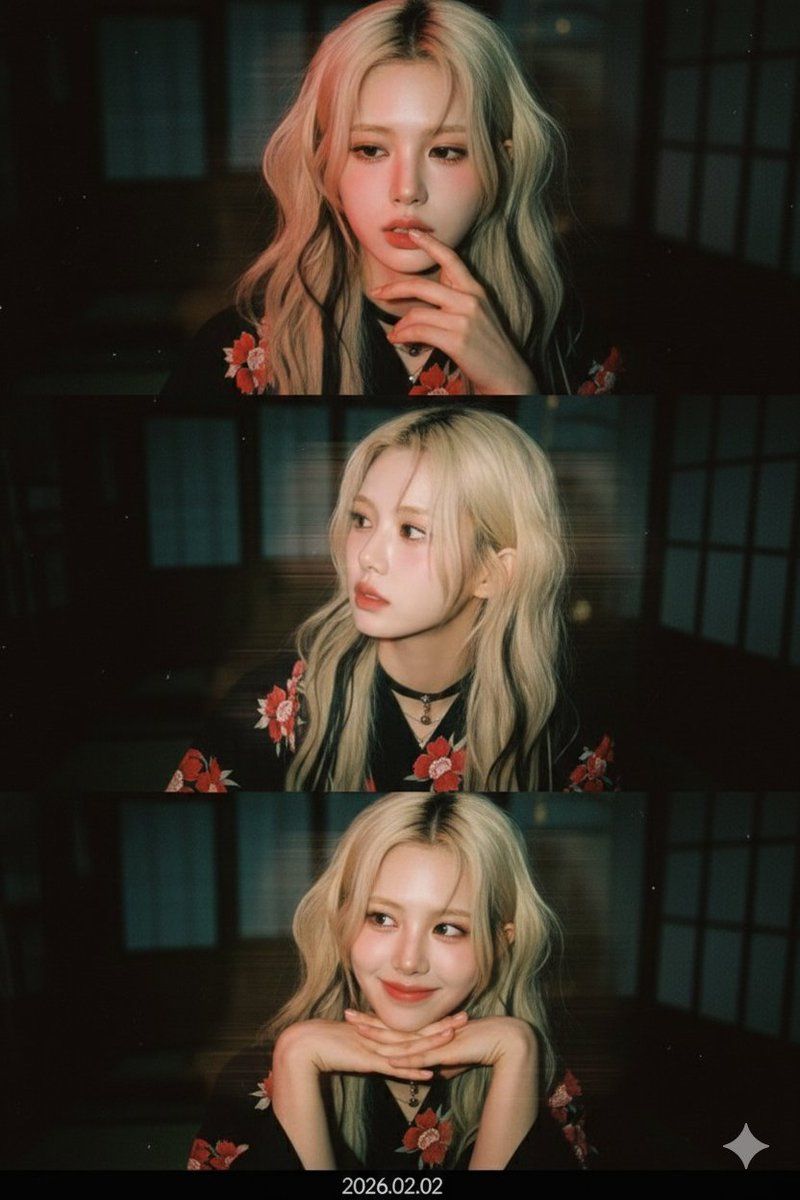
三格胶片拼贴提示(摄影师版本)
Enlarge

三格胶片拼贴提示(摄影师版本)

Prompt
첨부한 얼굴 사진을 그대로 사용해 세로형 3프레임 low-res 웹캠 콜라주를 만든다

얼굴 관련 절대 규칙:

얼굴은 절대 변형하지 않는다

이목구비 비율, 얼굴형, 눈 크기, 코, 입, 턱선을 그대로 유지한다

나이를 더 어려 보이게 하거나 귀엽게 미화하지 않는다

입력된 사진 속 인물의 성별을 절대 변경하지 않는다

새로운 인물(이성/동성)을 생성하지 않는다

헤어스타일:

원본 헤어스타일을 유지한다

길이, 가르마, 컬은 바꾸지 않는다

다만 자연스럽게 살짝 흐트러진 러프한 상태로만 연출한다

촬영 톤 & 색감 (레퍼런스 반영):

첨부한 레퍼런스 사진과 동일한 색감으로 표현한다

배경:

일본식 나무로 만들어진 료칸.

배경 디테일은 최소화

어둡고 흐린 상태 유지

의상 규칙 (입력 사진 기준):

입력된 사진이 여자일 경우 → 모든 프레임에서 검은색에 빨간색 꽃무늬가 그려진 {argument name="female attire" default="유카타"}

입력된 사진이 남자일 경우 → 모든 프레임에서 검은색 실크 와이셔츠에 {argument name="male attire" default="빨간 넥타이"}

1번째 프레임:

슬픈 영화속 주인공처럼 슬픈 표정

입가 근처에 손가락

2번째 프레임:

고개는 살짝 옆으로 돌리고

아름다운 옆라인을 보여주고

일상적인 셀피 느낌, 과한 포즈 금지

3번째 프레임:

따뜻하고 아름다운 미소

양손은 깍지를 껴서 턱을 괸다

감정은 차분하고 몽환적인 분위기

중요 추가 지침:

입력된 사진 속 인물 한 명만 사용한다

성별, 얼굴, 분위기를 바꾸지 않는다

스타일 변화는 조명, 색감, 노이즈, 효과에만 적용한다

모든 프레임에서 동일한 얼굴을 일관되게 사용한다

효과 관련 절대 규칙:

모든 프레임에서 동일한 cinesteel 800T film style, 시네마틱 광원효과로 조명을 넣는다.

효과 관련 절대 규칙:

모든 프레임에서 동일한 한쪽엔 레드조명 효과와 좌에서 우로 센스있는 모션블러 효과를 넣는다.
Category
创意图片
Model
Nano Banana Pro
Views0
Source ID
4ffffc50-7b8c-4235-8583-7c0ce8a9ae1c
Published
Mar 8, 2026

Guide

About "三格胶片拼贴提示(摄影师版本)"

What is this prompt for?

"三格胶片拼贴提示(摄影师版本)" AI image prompt for Nano Banana Pro (创意图片). 一个为 Nano Banana Pro/Gemini 设计的多帧提示词,用于创建三帧低分辨率网络摄像头拼贴画,并带有电影胶片美学(Cinesteel 800T)。它严格要求使用上传的人脸照片,且…

The full copyable prompt and example visuals above are ready for AI image generation or one-click recreate in Picva.

How to use this prompt

  1. Step 1

    Open the prompt detail

    Review the example visuals, category, and full prompt text for "三格胶片拼贴提示(摄影师版本)".

  2. Step 2

    Copy the prompt

    Copy the prompt body from this page, or load it directly in Studio.

  3. Step 3

    Pick a model (Nano Banana Pro)

    Prefer Nano Banana Pro. If you switch models, keep subject and composition and tweak style terms.

  4. Step 4

    Generate and export

    Recreate the look in Picva, or export into your workflow for editing and publishing.

FAQ

What is the "三格胶片拼贴提示(摄影师版本)" prompt?
It is an AI image-generation prompt for Nano Banana Pro in the 创意图片 category. This page includes the full prompt text, example visuals, and a one-click recreate path in Picva.
How do I use this prompt to generate an image?
Copy the prompt from this page, or use Generate / Studio. Paste it into a compatible image model, or recreate the look in Picva with optional reference images.
Which model is this prompt for?
This page lists Nano Banana Pro. Most descriptive prompts also transfer to nearby image models such as GPT Image, Flux, or Midjourney with light style tweaks.
Can I use the result commercially?
You can usually copy the prompt for creation, but commercial use of the final image depends on the model terms, reference-image rights, and the generated content. Follow the source author and platform rules.










