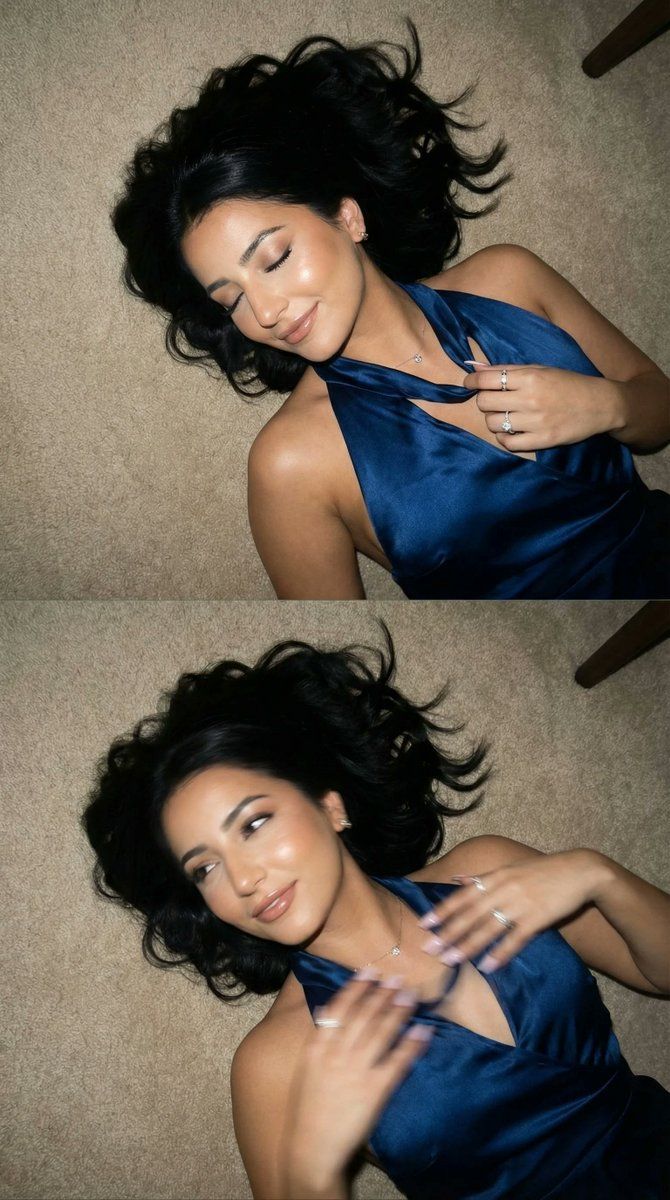
闪光灯下的电影感编辑双联画
Prompt
{
  "generation_request": {
    "meta_data": {
      "tool": "NanoBanana Pro",
      "task_type": "photoreal_cinematic_flash_floor_editorial_diptych",
      "priority": "highest",
      "language": "en",
      "version": "v1.0_BLUE_DRESS_FLOOR_FLASH_DIPTYCH_NO_TEXT"
    },

    "output": {
      "aspect_ratio": "3:4",
      "resolution": "ultra_high",
      "num_images": 4
    },

    "scene": {
      "concept": "A two-frame editorial diptych shot from above: a glamorous woman lying on a carpeted floor in a deep blue satin halter dress. Phone/compact-camera flash aesthetic, candid late-night energy. Frame one is sharp with a relaxed smile and eyes closed; frame two has intentional motion blur from a sudden head turn, creating a chaotic-chic vibe.",
      "environment": "neutral beige carpet floor, minimal background, a thin white edge of furniture or wall line at the top",
      "time_of_day": "night",
      "atmosphere": "flash-lit, intimate, spontaneous"
    },

    "subject": {
      "age_appearance": "adult",
      "expression_range": [
        "eyes closed, soft smile",
        "half-open eyes with playful, blurred motion"
      ],
      "pose": "lying on back with head tilted, one hand holding the neckline of the halter dress near collarbone, the other arm relaxed across torso",
      "hair": "long dark hair fanned out messily around the head, loose strands across face",
      "wardrobe": "{argument name="dress color" default="deep blue"} satin halter dress with plunging neckline, glossy fabric folds",
      "accessories": "small earrings, delicate necklace, multiple rings, manicured nails"
    },

    "shot_design": {
      "layout": "vertical diptych (two stacked frames in one image), thin border separation",
      "frame_1": "tack sharp face, eyes closed, warm smile, hair spread naturally, flash highlights controlled",
      "frame_2": "intentional motion blur from head turning, slight face smear, hand blur, still readable silhouette",
      "continuity_rules": "outfit, floor,  top-down camera position; only micro-movement between frames"
    },

    "camera": {
      "camera_body": "compact camera / smartphone",
      "lens": "wide (24-28mm equivalent)",
      "aperture": "f/1.8",
      "shutter_behavior": "frame 1 faster shutter for sharpness; frame 2 slightly slower shutter for motion blur",
      "framing": "top-down overhead, tight crop emphasizing face, neckline, and hair spread",
      "look": "flash realism, imperfect candid editorial"
    },

    "lighting": {
      "key_light": "direct on-camera flash from above",
      "fill_light": "minimal ambient room light",
      "contrast": "medium-high",
      "highlights": "specular satin highlights on dress, not blown out; natural skin sheen"
    },

    "color_grading": {
      "palette": "deep blue satin, warm skin tones, neutral beige floor",
      "film_emulation": "modern nightlife editorial realism",
      "grain": "fine digital grain",
      "halation": "minimal"
}- Category
- 创意图片
- Model
- Nano Banana Pro
- Creator
- Özge Döner
- Source ID
- f0997df7-856d-4955-97eb-31a00acd22c3
- Published
- Mar 8, 2026
Views0


















