空灵花田奇幻肖像的 JSON 提示词
Prompt
{
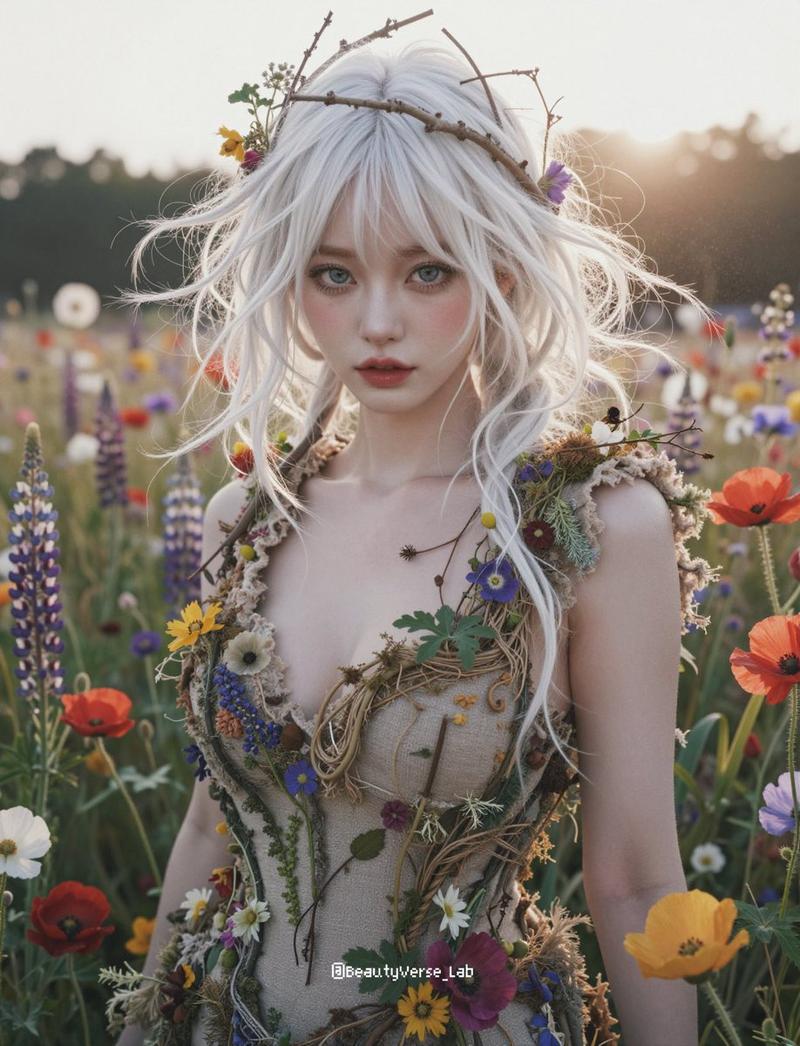
  "workflow_mode": "ethereal_flower_field_direct_reference",
  "description": "Uses a user-uploaded character image directly as a visual reference (without pre-refining it) to generate a fantasy portrait in a wildflower field. The character features are locked from the upload, while the environment and styling are generated from text.",

  "input_slots": {
    "source_image_character": "USER_UPLOADED_CHARACTER_ONLY"
  },

  "generation_params": {
    "aspect_ratio": "{argument name="aspect ratio" default="3:4"}",
    "quality_tags": "best quality, masterpiece, 8k, photorealistic, fantasy photography, ethereal, dreamlike, soft focus, backlight, sun flare, wildflowers, nature core, organic fashion, messy hair, cinematic lighting",
    "negative_prompt": "urban, indoor, studio, dark, modern clothing, jeans, t-shirt, plastic, harsh contrast, heavy makeup, straight hair, neat hair, old age, wrinkles"
  },

  "hard_coded_scene_prompt": {
    "environment": "field of blooming wildflowers ({argument name="flowers" default="purple lupines, red poppies, daisies"}), blurred nature background, outdoor meadow, vibrant but soft natural colors",
    "lighting": "strong backlighting (sun behind subject), lens flare, rim light on hair, soft hazy atmosphere, golden hour or late afternoon sunlight",
    "composition": "medium shot (waist up), eye-level, subject centered amidst the flowers, depth of field with foreground flowers blurred"
  },

  "pipeline_sequence": {
    "_hint": "Sequence: 1. Read & Lock Character (Direct) -> 2. Generate Scene & Pose from Text.",

    "step_1_character_reference_lock": {
      "action": "controlnet_reference_only",
      "target": "source_image_character",
      "purpose": "Directly use the uploaded image to lock facial structure and identity without modifying the source pixels first.",
      "weight": 0.85,
      "style_fidelity": 1.0
    },

    "step_2_final_synthesis": {
      "action": "generate_image",
      "prompt_construction": {
        "scene_text": "[hard_coded_scene_prompt]",
        "character_logic": "Standing in a flower field. Looking directly at the camera with a soft, dreamlike expression. Hair is white/platinum blonde, messy, voluminous, and windswept, decorated with small twigs and wild flowers. Arms relaxed by the sides.",
        "clothing_text": "Fantasy nature-inspired corset top or dress. Made of beige/tan rough textured fabric (linen or burlap). Adorned with real growing wildflowers (blue, red, yellow) and vines attached to the bodice. Raw hems, organic look.",
        "quality_text": "[quality_tags]"
      },
      "denoising_strength": 1.0,
"instruction": "Generate image using 'source_image_c"}- Category
- 创意图片
- Model
- Nano Banana Pro
- Creator
- 💙星野 銀華 (Hoshino Ginka)🤍
- Source ID
- 74fd623a-a979-46d9-a506-1a3c6e7e55b8
- Published
- Mar 8, 2026
Views0