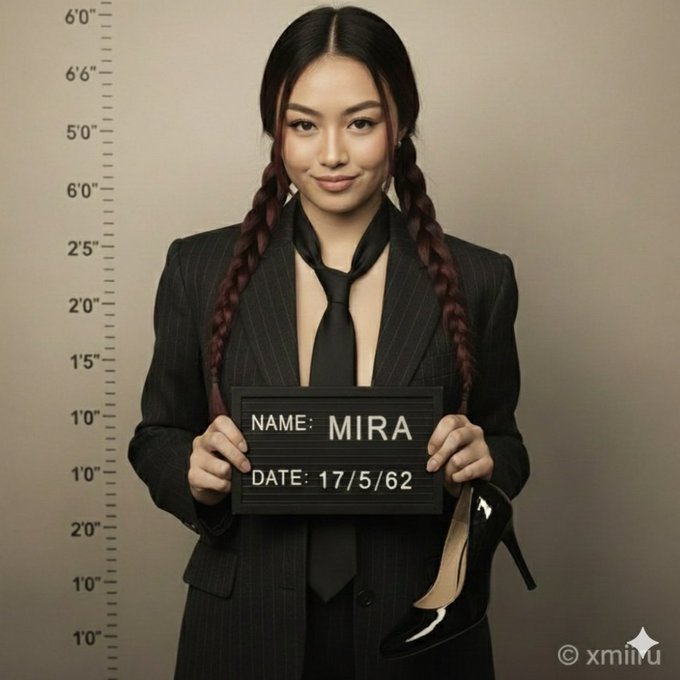
身着西装的女子摆出嫌犯照姿势
Prompt
{
  "title": "Hyper-Realistic Portrait: Suited Woman in Mugshot Pose",
  "description": "A high-resolution hyper-realistic 8K HD portrait photograph captured with a professional DSLR camera using a 50mm lens for natural depth of field and razor-sharp focus. Full-body composition mimicking an old-fashioned mugshot/police booking photo.",
  "subject": {
    "type": "woman",
    "features": {
      "likeness_reference": "attached image",
      "height": "tall",
      "build": "elegant",
      "facial_features": {
        "jawline": "sharp",
        "eyes": "intense",
        "expression": "confident, slightly smug smirk"
      },
      "pose": "leaning against wall, one knee bent"
    },
    "hair": {
      "style": "neat, straight, wavy or elegant updo",
      "appearance": "natural and well-groomed"
    },
    "clothing": {
      "jacket": "vintage-style tailored dark pinstripe suit jacket",
      "inner_garment": "none",
      "tie": "slightly loosened, dark shade matching jacket",
      "accessories": [
        {
          "type": "mugshot board",
          "text": {
            "name": "MIRA",
            "date": "17/5/62"
          }
        },
        {
          "type": "shoe",
          "description": "single shiny dark-colored high-heeled shoe in right hand",
          "material": "patent leather"
        }
      ]
    }
  },
  "background": {
    "style": "naturally blurred bokeh",
    "texture": "slightly gritty studio wall",
    "details": {
      "height_chart": "vertical lines with numerical markings 2'0\" to 6'6\"",
      "color_tone": "desaturated, slightly sepia-toned archival photograph aesthetic"
    }
  },
  "lighting": {
    "type": "clean, soft, balanced",
    "shadow": "accurate shadows and highlights",
    "direction": "strong overhead or frontal lighting emphasizing dramatic shadows and height chart lines"
  },
  "framing": {
    "resolution": "1080x1350px (4:5)",
    "focus": "sharp subject focus",
    "composition": "full figure and mugshot details",
    "color_accuracy": "professional, natural tones"
  },
  "style": "Hyper-realistic photography, 8K clarity, DSLR quality, accurate color grading, natural lens blur, vintage photo aesthetic, true-to-life detail",
  "watermark": "© xmiiru",
  "negative_prompt": [
    "No anime",
    "No cartoon",
    "No digital painting",
    "No illustration",
    "No 3D render",
    "No CGI",
    "No stylized features",
    "No plastic/doll-like skin",
    "No fantasy glow",
    "No cinematic effects",
    "No airbrushed smoothing",
    "No overexposure",
    "No unnatural blur",
    "No video-game/Unreal Engine style",
    "No sketch",
    "No artificial lighting effects",
    "No unrealistic proportions/textures",
    "No multiple shoes",
    "No modern background elements"
  ]
}- Category
- 创意图片
- Model
- Nano Banana Pro
- Creator
- @xmiiru_
- Source ID
- 8b865bba-c16a-4090-bf28-53896d036900
- Published
- Dec 27, 2025
Views4