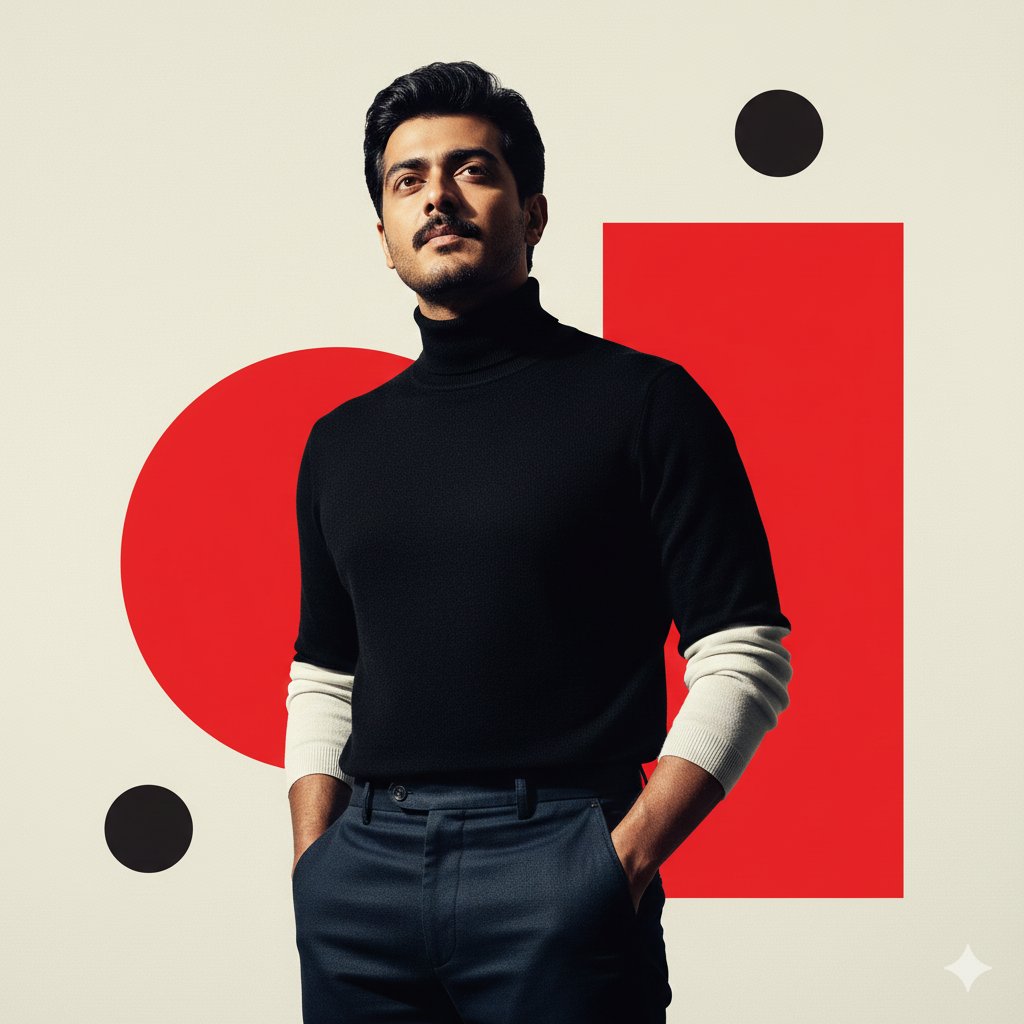
Black + White + Red 1. Open Gemini / ChatGPT / Grok 2. Upload your image 3. Cop
Prompt
Black + White + Red

1. Open Gemini / ChatGPT / Grok

2. Upload your image

3. Copy paste this prompt

{
  "prompt": "A man in his early thirties, 100% using the uploaded reference image for facial proportions, structure, identity, and overall appearance (do not alter face, jawline, or features), captured with full sharp detail and natural skin texture. High-contrast graphic poster-style portrait of a stylish male figure rendered in a striking minimalist color palette of black, cream-white, and vibrant primary red. The subject stands confidently in a three-quarter pose, looking sharply upward and slightly to the left. He wears a sophisticated high-neck black turtleneck sweater with contrasting long white sleeves visible underneath, paired with dark indigo or black high-waisted trousers. His hands are casually tucked into the front pockets, posture exuding confidence and authority.\n\nThe background features bold abstract geometric shapes: two large overlapping vibrant red circles, a smaller black circle near the bottom left, and a medium black circle near the top right, all set against a smooth, slightly textured off-white or cream backdrop. A large red rectangular block appears partially behind the subject on the right, creating a layered, graphic composition.\n\nExtreme chiaroscuro lighting with harsh directional light creates deep dramatic shadows that sculpt the face, neck, and clothing, emphasizing jawline and fabric folds. Sharp shadow edges reinforce the high-contrast aesthetic. Hyper-realistic skin, fabric, and surface textures enhanced with Nano Banana Pro, seamlessly blending photorealistic subject detail with abstract graphic elements.\n\nModern, sophisticated fusion of high-fashion photography and graphic design, evoking retro-futuristic minimalism inspired by Swiss Style and mid-century advertising. Matte, clean textures, crisp edges, bold color contrast, cinematic depth, and a high-end editorial poster aesthetic.",
  "resolution": "8K",
  "style": "graphic poster, cinematic fashion, retro-futuristic minimalism",
  "lighting": "extreme chiaroscuro, harsh directional light",
  "color_palette": "black, cream-white, primary red",
  "quality": "hyper-realistic",
"reference_image": "strictly use uploaded image only"- Category
- portrait_photography
- Model
- Nano Banana Pro
- Creator
- Pixshop
- Source ID
- 5baaa035-fe7d-4fd4-9c61-d835a9ca93a5
- Published
- Jan 7, 2026
Views8





![(full body shot, wide angle view:1.2), [A woman], in a dynamic pose with arm outstretched, wearin...](https://cdn.pixshop.app/prompt-library/nano-banana-1992650501402542303/primary-0-1768409138355-prb0zuw4.jpeg)