Create a stylized AAA video game key art poster
Prompt
Create a stylized AAA video game key art poster.

CONCEPT:
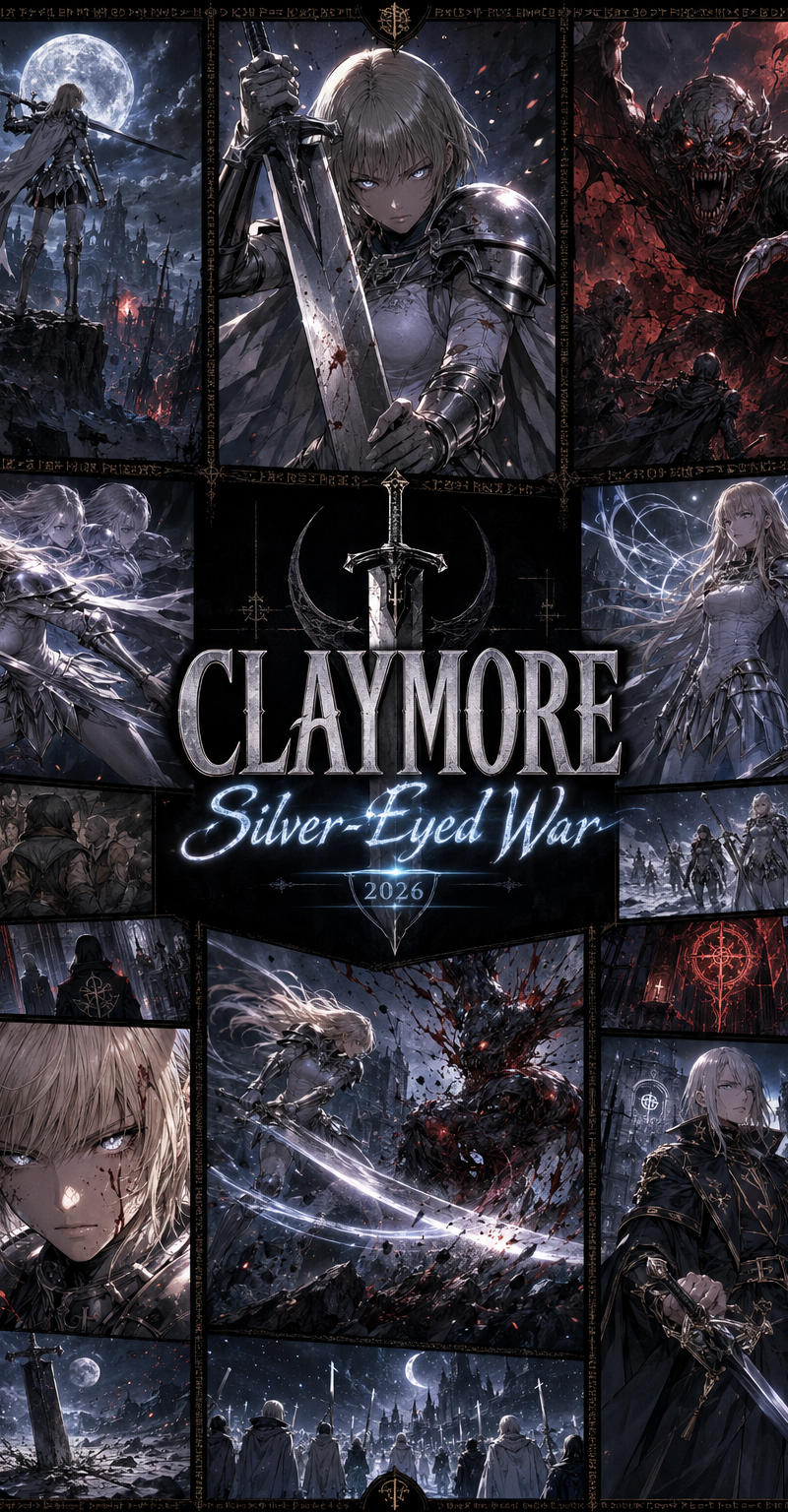
“Claymore: Silver-Eyed War” reimagined — a modern AAA dark fantasy evolution of the Claymore anime/manga world. Preserve the intense gothic fantasy identity, but upgrade with cinematic battlefield scale, demonic horror, elite warrior aesthetics, and premium game-cover impact.

STYLE:
AAA game key art, Unreal Engine 5 inspired rendering + illustrated dark fantasy anime hybrid
Bold black grid layout, sharp manga-panel framing, stylized Claymore-like warriors and awakened beings
High-contrast gothic palette: silver, ash grey, deep black, blood red, moonlit blue, pale gold

FORMAT:
Classic multi-panel dark fantasy cover grid composition with thick black dividers
Centered stacked title typography

────────────────────────────

🧩 PANEL COMPOSITION (MODERNIZED ICONIC GRID):

Top-left:
A moonlit battlefield with a Claymore warrior standing on a cliff edge, silver eyes glowing, enormous greatsword resting across her shoulder, dark clouds and ruined medieval towers behind

Top-center:
Stylized female warrior inspired by Clare, holding a massive Claymore sword with both hands, intense silver-eyed expression, white fitted armor, short cape flowing in the wind

Top-right:
Awakened Being monster lunging from the shadows, grotesque wings, elongated limbs, demonic aura, cinematic horror framing

Mid-left:
Stylized female Claymore warrior inspired by Miria, dynamic speed-blur pose, twin movement afterimages, elegant armor, confident battle expression

Center:
Large bold stacked title:
“CLAYMORE” in sharp engraved gothic serif typography
“Silver-Eyed War” in glowing silver-blue script
Add “2026” subtle tag integrated into sword-reflection glow

Mid-right:
Stylized female Claymore warrior inspired by Galatea, calm and elegant stance, long hair, psychic-sensing aura visualized as silver energy lines around her

Bottom-left:
Close-up protagonist portrait inspired by Clare, older and battle-hardened, silver eyes glowing, blood marks on face, dominant expression, cinematic rim lighting

Bottom-center:
High-speed combat panel — Claymore warrior slicing through a monstrous Awakened Being, sparks, black blood, shattered stone, silver sword arc cutting across the frame

Bottom-right:
Stylized male or female elite warrior from the Organization, mysterious dark uniform, holding a sealed scroll and blade, standing before a gothic fortress gate

Additional small panels (optional fill-ins):

* Yoma hiding inside a medieval village crowd
* Organization black-robed handlers watching from the shadows
* Silver-eyed warriors marching through snow
* Ruined cathedral with glowing demonic symbols
* Massive Claymore sword planted into cracked earth

────────────────────────────

🎨 ART DIRECTION:

Color:

* Strong contrast gothic fantasy palette
* Silver/blue moonlight split lighting across panels
* Blood red accents for combat and awakened being panels
* Pale gold highlights for armor edges and sword reflections

Lighting:

* Hard manga-style highlights + UE5 cinematic glow effects
* Moonlit rim lighting and supernatural silver-eye glow
* Dramatic shadows across faces, armor, and monster forms

Texture:

* Slight grain + manga screentone texture overlay
* Clean inked outlines with subtle 3D depth
* Brushed metal armor texture, cracked stone, ash, blood mist

────────────────────────────

🔤 TYPOGRAPHY:

“CLAYMORE” — bold engraved gothic serif font, metallic silver with black shadow
“Silver-Eyed War” — elegant glowing silver-blue script
“2026” — small futuristic gothic numeric tag integrated subtly into the sword-glow

────────────────────────────

🎥 CAMERA / FRAMING:

Each panel:

* Dynamic angles: low-angle warriors, close-up portraits, action tilt shots, monster over-the-shoulder framing
* Cinematic composition inside each frame
* Dramatic manga-panel energy with AAA key art depth

────────────────────────────

✨ PLAYFUL DETAILS:

* Glowing silver eyes across warrior panels
* Organization symbols subtly hidden in armor and banners
* Sword slash trails forming crescent-moon shapes
* Demonic aura particles around Awakened Beings
* Black blood splatter stylized like manga ink
* Subtle HUD/UI hints resembling a dark fantasy RPG interface
* Ancient runic markings embedded into the panel dividers

────────────────────────────

RENDER DETAILS:
Ultra-detailed stylized assets, crisp outlines, vibrant gothic lighting, clean separation between panels, premium dark fantasy game-cover quality

NEGATIVE:
real humans, photoreal poster, modern city, cyberpunk, guns, cars, casual clothing, flat illustration only, comedic style, soft pastel anime

OUTPUT:
--ar 2:3 --quality 2 --style raw
- Category
- Charts & Infographics
- Model
- GPT Image 2
- Creator
- Wayne Dragon
- Source language
- en
- Source ID
- 17249
- Published
- Jun 7, 2026
Views137
![[PROJECT CARD] Create a compact designed masthead, not a table](https://whqgdndlpxjbwosvipip.supabase.co/storage/v1/render/image/public/prompt-source-media/promptsref/work-19033/image-1-120e6393796318e7.png?width=800&quality=75)