18

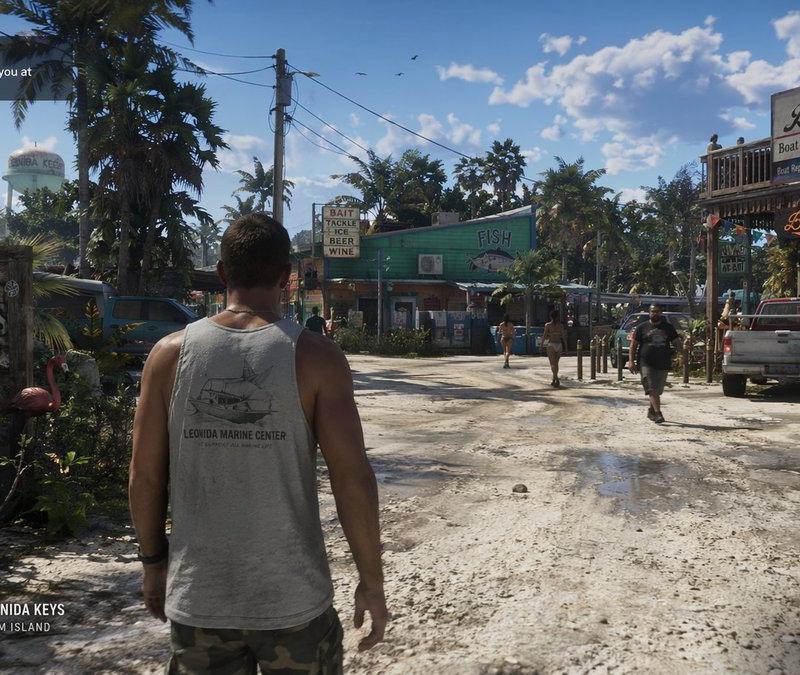
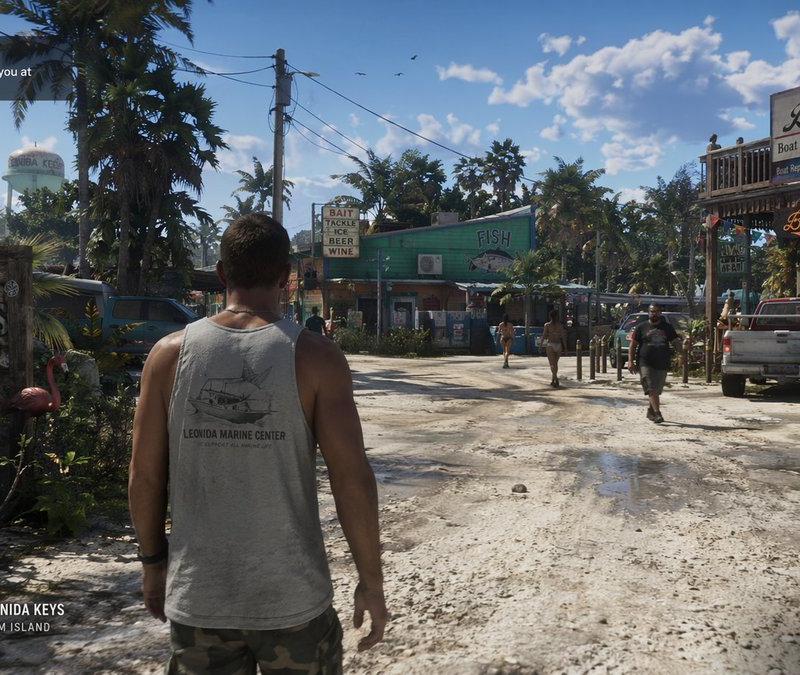
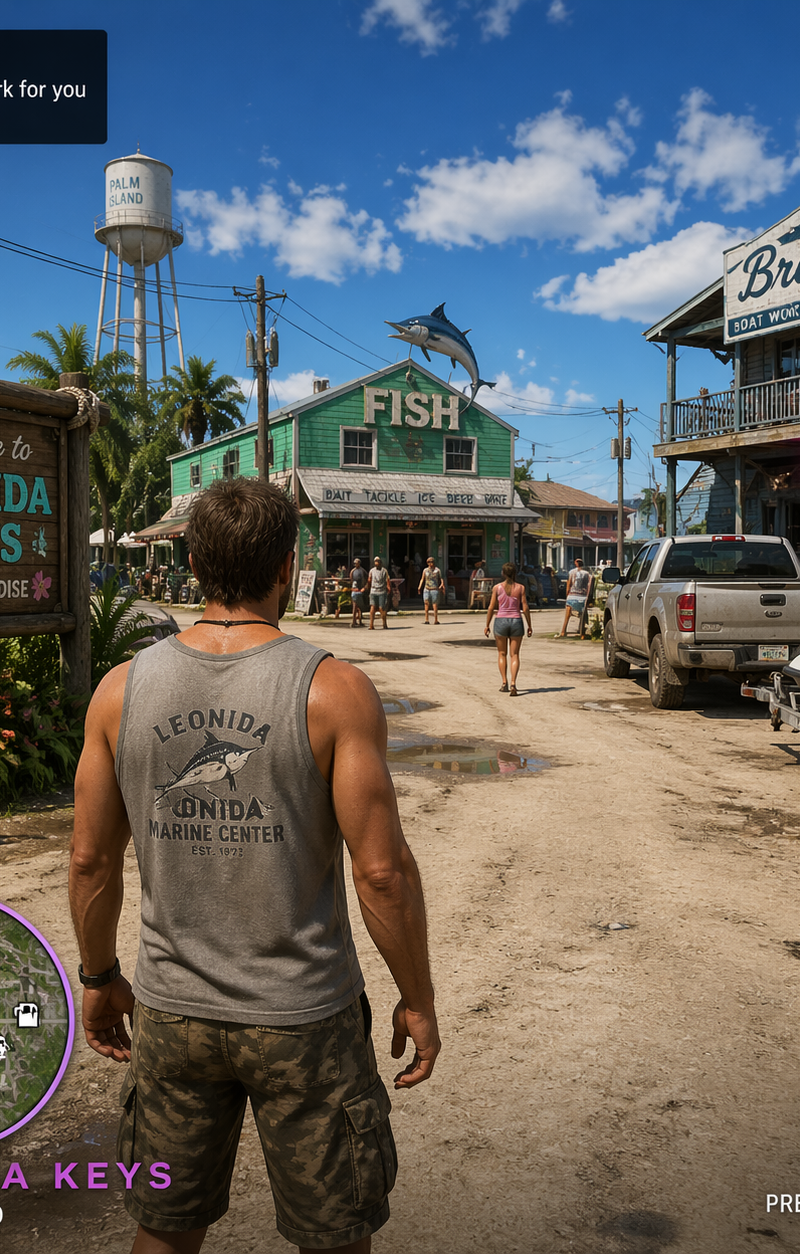
{ "type": "video game screenshot mockup", "perspective": "third-person over-the-
Enlarge

Example images

{ "type": "video game screenshot mockup", "perspective": "third-person over-the-

Prompt
{
 "type": "video game screenshot mockup",
 "perspective": "third-person over-the-shoulder",
 "character": {
 "description": "male protagonist seen from behind",
 "clothing": "grey tank top with graphic '{argument name=\"shirt graphic\" default=\"LEONIDA MARINE CENTER\"}', camouflage cargo shorts"
 },
 "environment": {
 "setting": "tropical coastal town, dirt road, sunny daytime with scattered clouds",
 "left_side": "wooden welcome sign reading 'Welcome to {argument name=\"location name\" default=\"LEONIDA KEYS\"} YOUR PARADISE', pink plastic flamingo, tropical foliage, distant water tower",
 "center": "green building with 'FISH' sign and marlin graphic, sign reading 'BAIT TACKLE ICE BEER WINE', pedestrians walking",
 "right_side": "two-story wooden building 'Brian's Boat Works & Marina', 'Brian's Bar' neon sign, parked pickup truck, jet skis on a trailer"
 },
 "ui_elements": {
 "count": 5,
 "components": [
 {
 "position": "top-left",
 "type": "mission objective",
 "text": "{argument name=\"mission title\" default=\"MEET RAUL\"}\n{argument name=\"mission description\" default=\"Raul has some work for you at his boatyard\"}"
 },
 {
 "position": "top-right",
 "type": "status HUD",
 "text": "13:47\n$1,142",
 "icon": "pink palm tree"
 },
 {
 "position": "bottom-left",
 "type": "minimap",
 "description": "circular map with purple border, white map icons including 'N' for north"
 },
 {
 "position": "bottom-left, right of minimap",
 "type": "location text",
 "text": "{argument name=\"location name\" default=\"LEONIDA KEYS\"}\nPALM ISLAND"
 },
 {
 "position": "bottom-right",
 "type": "watermark",
 "text": "{argument name=\"game title\" default=\"GTA VI\"}\nPRE-ALPHA FOOTAGE"
 }
 ]
 }
}
Category
Charts & Infographics
Model
GPT Image 2
Creator
xie underwood
Source language
en
Views349
Source ID
2006
Published
Apr 21, 2026
Studio

Guide

About "{ "type": "video game screenshot mockup", "perspective": "third-person over-the-"

What is this prompt for?

"{ "type": "video game screenshot mockup", "perspective": "third-person over-the-" AI image prompt for GPT Image 2 (Charts & Infographics). { "type": "video ga…

The full copyable prompt and example visuals above are ready for AI image generation or one-click recreate in Picva.

How to use this prompt

  1. Step 1

    Open the prompt detail

    Review the example visuals, category, and full prompt text for "{ "type": "video game screenshot mockup", "perspective": "third-person over-the-".

  2. Step 2

    Copy the prompt

    Copy the prompt body from this page, or load it directly in Studio.

  3. Step 3

    Pick a model (GPT Image 2)

    Prefer GPT Image 2. If you switch models, keep subject and composition and tweak style terms.

  4. Step 4

    Generate and export

    Recreate the look in Picva, or export into your workflow for editing and publishing.

FAQ

What is the "{ "type": "video game screenshot mockup", "perspective": "third-person over-the-" prompt?
It is an AI image-generation prompt for GPT Image 2 in the Charts & Infographics category. This page includes the full prompt text, example visuals, and a one-click recreate path in Picva.
How do I use this prompt to generate an image?
Copy the prompt from this page, or use Generate / Studio. Paste it into a compatible image model, or recreate the look in Picva with optional reference images.
Which model is this prompt for?
This page lists GPT Image 2. Most descriptive prompts also transfer to nearby image models such as GPT Image, Flux, or Midjourney with light style tweaks.
Can I use the result commercially?
You can usually copy the prompt for creation, but commercial use of the final image depends on the model terms, reference-image rights, and the generated content. Follow the source author and platform rules.