20

基于剧情生成 故事板和机位图 15-second cinematic fantasy battle storyboard, 16:9
Enlarge

基于剧情生成 故事板和机位图 15-second cinematic fantasy battle storyboard, 16:9

Prompt
基于剧情生成 故事板和机位图

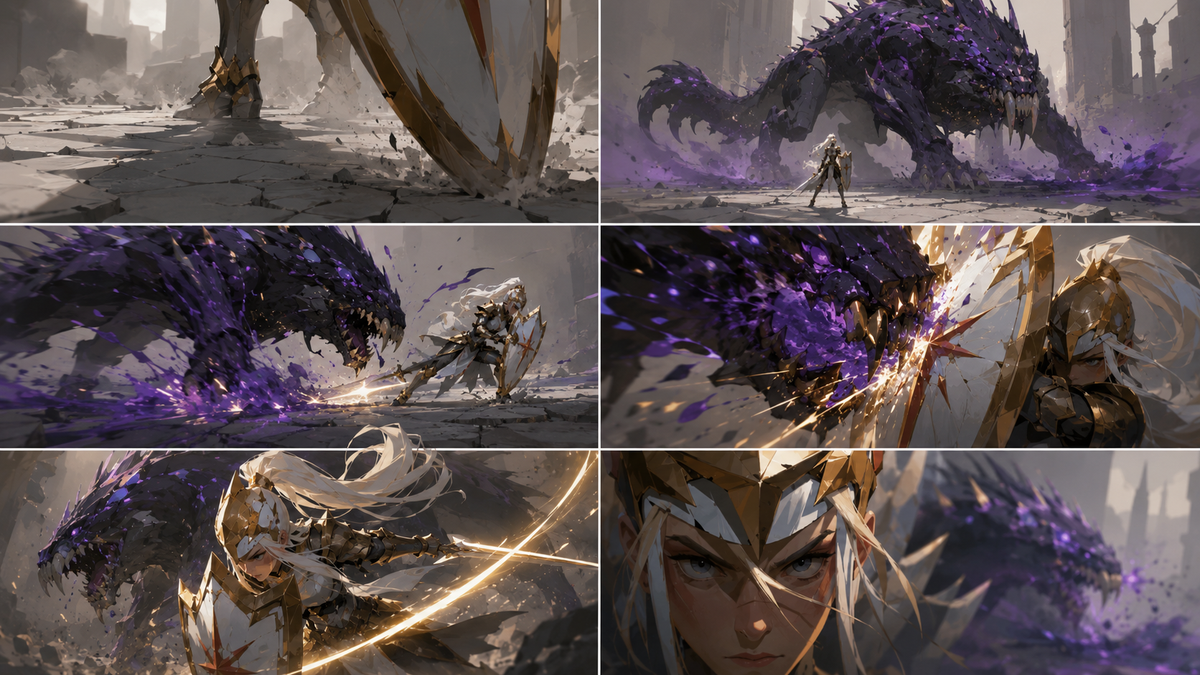
15-second cinematic fantasy battle storyboard, 16:9. 
Shot 1, 0-2s: ground-level tracking shot over cracked pale stone floor, the edge of a white-and-gold shield enters the foreground, dust trembling around the knight’s boots.
Shot 2, 2-4s: low-angle wide shot, a massive purple venom beast emerges from smoke in the distance, black shell plates and violet glowing poison marks, the knight appears small but steady in front of it.
Shot 3, 4-7s: side tracking shot, the beast charges forward, claws scraping sparks from the ground, violet poison splashes outward, the white-haired holy knight slides sideways and angles her shield.
Shot 4, 7-10s: extreme close shield POV, the beast slams into the shield, golden sparks and purple venom burst between them, heavy camera shake, intense impact.
Shot 5, 10-12.5s: slow-motion half-orbit camera, the knight pivots under the beast’s head, her sword begins to glow with a clean golden arc.
Shot 6, 12.5-15s: final close-up on the knight’s sharp focused eyes, the beast recoils behind her in soft focus, toxic purple mist split by golden light.

Keep the same visual style throughout: bold large color-block sculpting, reduced fine details, hard-edged shadows, geometric facial light and shadow, clean silhouettes, low texture noise, gold holy light versus toxic violet light, stylized tactical fantasy concept art, no text, no UI, no watermark.
Category
Charts & Infographics
Model
GPT Image 2
Views64
Source ID
32898
Published
Jun 23, 2026

Guide

About "基于剧情生成 故事板和机位图 15-second cinematic fantasy battle storyboard, 16:9"

What is this prompt for?

"基于剧情生成 故事板和机位图 15-second cinematic fantasy battle storyboard, 16:9" AI image prompt for GPT Image 2 (Charts & Infographics). 基于剧情生成 故事板和机位图 15-second cinemati…

The full copyable prompt and example visuals above are ready for AI image generation or one-click recreate in Picva.

How to use this prompt

  1. Step 1

    Open the prompt detail

    Review the example visuals, category, and full prompt text for "基于剧情生成 故事板和机位图 15-second cinematic fantasy battle storyboard, 16:9".

  2. Step 2

    Copy the prompt

    Copy the prompt body from this page, or load it directly in Studio.

  3. Step 3

    Pick a model (GPT Image 2)

    Prefer GPT Image 2. If you switch models, keep subject and composition and tweak style terms.

  4. Step 4

    Generate and export

    Recreate the look in Picva, or export into your workflow for editing and publishing.

FAQ

What is the "基于剧情生成 故事板和机位图 15-second cinematic fantasy battle storyboard, 16:9" prompt?
It is an AI image-generation prompt for GPT Image 2 in the Charts & Infographics category. This page includes the full prompt text, example visuals, and a one-click recreate path in Picva.
How do I use this prompt to generate an image?
Copy the prompt from this page, or use Generate / Studio. Paste it into a compatible image model, or recreate the look in Picva with optional reference images.
Which model is this prompt for?
This page lists GPT Image 2. Most descriptive prompts also transfer to nearby image models such as GPT Image, Flux, or Midjourney with light style tweaks.
Can I use the result commercially?
You can usually copy the prompt for creation, but commercial use of the final image depends on the model terms, reference-image rights, and the generated content. Follow the source author and platform rules.