Act as a Streetwear Editorial Designer and Art Director creating a vertical bran
Prompt
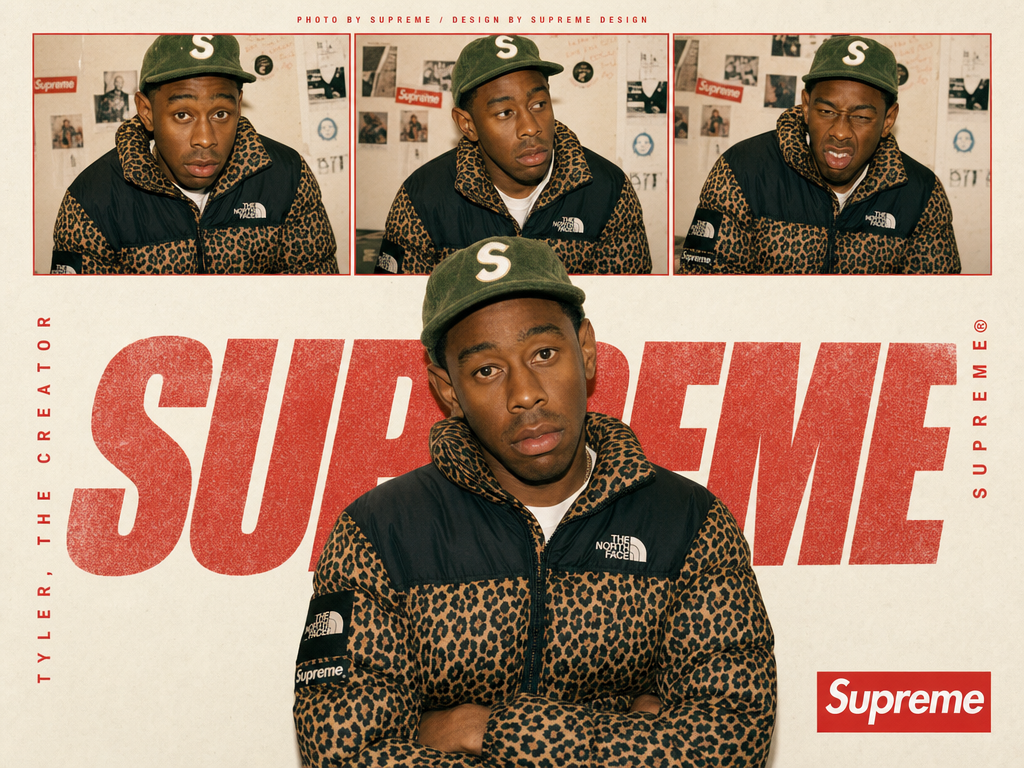
Act as a Streetwear Editorial Designer and Art Director creating a vertical brand poster in the style of a 1990s streetwear magazine spread — a single hero image combining contact sheet photography, oversized chalky brand typography, and vertical text elements. The entire poster is driven by [BRAND NAME]'s real brand identity, real colors, real typography, and real cultural figures. References: Supreme editorial posters, streetwear zine design, 90s hip-hop magazine layouts, Futura Bold typographic tradition.

---

PHASE 0: BRAND INTELLIGENCE — AUTONOMOUS EXTRACTION

Perform a complete brand decode of [BRAND NAME] from training data before generating anything.

COLOR SYSTEM — BRANDBOOK ACCURATE: identify [BRAND NAME]'s exact primary brand color and secondary/accent color from their official guidelines. The primary color drives: the contact sheet photo borders, the oversized chalky wordmark color, the box logo element, and the vertical text accents. The background is always warm off-white #F5F2ED to #F0EDE8 — a matte paper quality regardless of brand. This contrast between the neutral paper background and the brand color creates the poster's visual tension.

TYPOGRAPHY — EXACT BRAND CHARACTER: identify the exact typeface [BRAND NAME] uses for their wordmark and campaign typography. Describe its visual character precisely — weight, width, geometric vs humanist, any unique characteristics. This typeface is used for the oversized background wordmark, the vertical brand name text, and the box logo element.

CULTURAL FIGURE — PERSONE RULE: if [PERSONE] is provided by the user — use that exact person as the subject of all photography on the poster. Verify that this person has a real documented relationship with [BRAND NAME] — collaboration, ambassadorship, campaign appearance, or strong cultural association. If the relationship exists — proceed. If [PERSONE] is AUTO — autonomously identify the single most culturally resonant real public figure associated with [BRAND NAME] — the person most documented as wearing, collaborating with, or representing the brand. In both cases: the person is wearing [BRAND NAME] products visibly and authentically. The person's name appears on the left vertical text element. Their styling, attitude, and environment are consistent with [BRAND NAME]'s documented aesthetic.

BRAND MARK: identify [BRAND NAME]'s most iconic branded mark — the box logo, the wordmark lockup, the symbol — that appears as a repeating element and as the bottom-right corner badge on the poster.

BRAND LANGUAGE: identify real [BRAND NAME] attribution phrases — how the brand credits their photographic and design work in editorial contexts.

---

PHASE 1: POSTER STRUCTURE

Single vertical poster — aspect ratio 3:4 or 2:3 portrait. Background: warm off-white matte paper texture #F5F2ED — subtle paper grain visible at close inspection, not perfectly flat. The poster has four distinct zones stacked vertically: attribution strip (top), contact sheet strip (upper), hero photo zone (center and lower), footer zone (bottom).

---

PHASE 2: ATTRIBUTION STRIP — TOP

A single line of very small all-caps text at the very top of the poster — centered horizontally. Text format: "PHOTO BY [BRAND NAME]® / DESIGN BY [BRAND NAME] DESIGN" or equivalent attribution consistent with how [BRAND NAME] credits their editorial work. Type: very small, tracked out, [BRAND NAME]'s brand color or dark neutral.

---

PHASE 3: CONTACT SHEET STRIP — UPPER ZONE

Three equal-width rectangular photographs placed in a horizontal row — approximately 15 to 20% of total poster height. Three different poses or expressions of [PERSONE] — same session, same outfit. Each photo has a thin rectangular border in [BRAND NAME]'s primary brand color — 2 to 3px, clean and precise. Warm film analog quality — as if shot on 35mm. Portrait crop from chest to top of head.

---

PHASE 4: HERO PHOTO — CENTER ZONE

A large photograph of [PERSONE] — waist to top of head or full body. Centered horizontally, positioned in the lower 55 to 65% of the poster. Same warm film quality as contact sheet. [PERSONE] wearing [BRAND NAME] products prominently. No border — sits directly on the paper background. The figure's upper body overlaps with the oversized wordmark behind them — the figure exists in front of the typography, the typography exists behind the figure.

---

PHASE 5: OVERSIZED CHALKY WORDMARK — DEPTH LAYER

[BRAND NAME]'s wordmark set in a very large size — spanning approximately 80 to 90% of the poster width. Positioned at [PERSONE]'s chest/shoulder level — creating a depth sandwich: background paper → oversized type → figure photograph. Type treatment: chalky, textured, slightly rough — grainy, slightly irregular version of [BRAND NAME]'s typeface. Color: [BRAND NAME]'s primary brand color at 70 to 85% opacity. First and last characters partially cropped by poster edges.

---

PHASE 6: VERTICAL TEXT ELEMENTS

Left vertical text: [PERSONE]'s name — small caps, [BRAND NAME]'s brand color, regular weight, tracked out. Rotated 90°, running bottom to top, along the left edge of the hero photo zone.

Right vertical text: [BRAND NAME]'s brand name followed by ® symbol — same style as left text. Rotated 90°, running bottom to top, along the right edge of the hero photo zone.

---

PHASE 7: BOTTOM RIGHT BADGE

[BRAND NAME]'s primary brand mark badge in the lower right corner — box logo, wordmark badge, or primary branded lockup. Rendered exactly as it appears officially — correct proportions, correct colors, correct typography. Size: approximately 10 to 12% of poster width.

---

PHASE 8: PHOTO TREATMENT CONSISTENCY

All photographs — contact sheet and hero — share the same treatment: warm film analog quality, slight grain, natural color with a very subtle warm grade. Not heavily edited. The cultural figure's styling and products are specific to [BRAND NAME]'s aesthetic.

---

PHASE 9: TECH SPECS

Single vertical image, 3:4 or 2:3 portrait. Background: warm off-white paper, subtle grain, matte. Contact sheet photos: warm film quality, thin brand-color border. Hero photo: same treatment, no border, centered. Oversized wordmark: chalky grainy texture, brand color at 70 to 85% opacity, partially obscured by figure. Vertical text: crisp small caps, rotated 90°. Bottom badge: clean precise brand mark. Color palette: [BRAND NAME]'s brand color, off-white background, photo natural colors. Output feel: published in a streetwear magazine, pinned in a skate shop, or used as [BRAND NAME]'s official drop announcement poster.
- Category
- Charts & Infographics
- Model
- GPT Image 2
- Creator
- Dgv Fhc
- Source ID
- 8039
- Published
- May 21, 2026
Views109




