20

一张高端、照片级真实的摄影棚肖像,描绘了附件中的模特,被转化为一份详细、生动的“机密档案”。模特居中而立,手持一块带有纹理的黑色黑板,黑板上用白...
Enlarge

一张高端、照片级真实的摄影棚肖像,描绘了附件中的模特,被转化为一份详细、生动的“机密档案”。模特居中而立,手持一块带有纹理的黑色黑板,黑板上用白...

Prompt
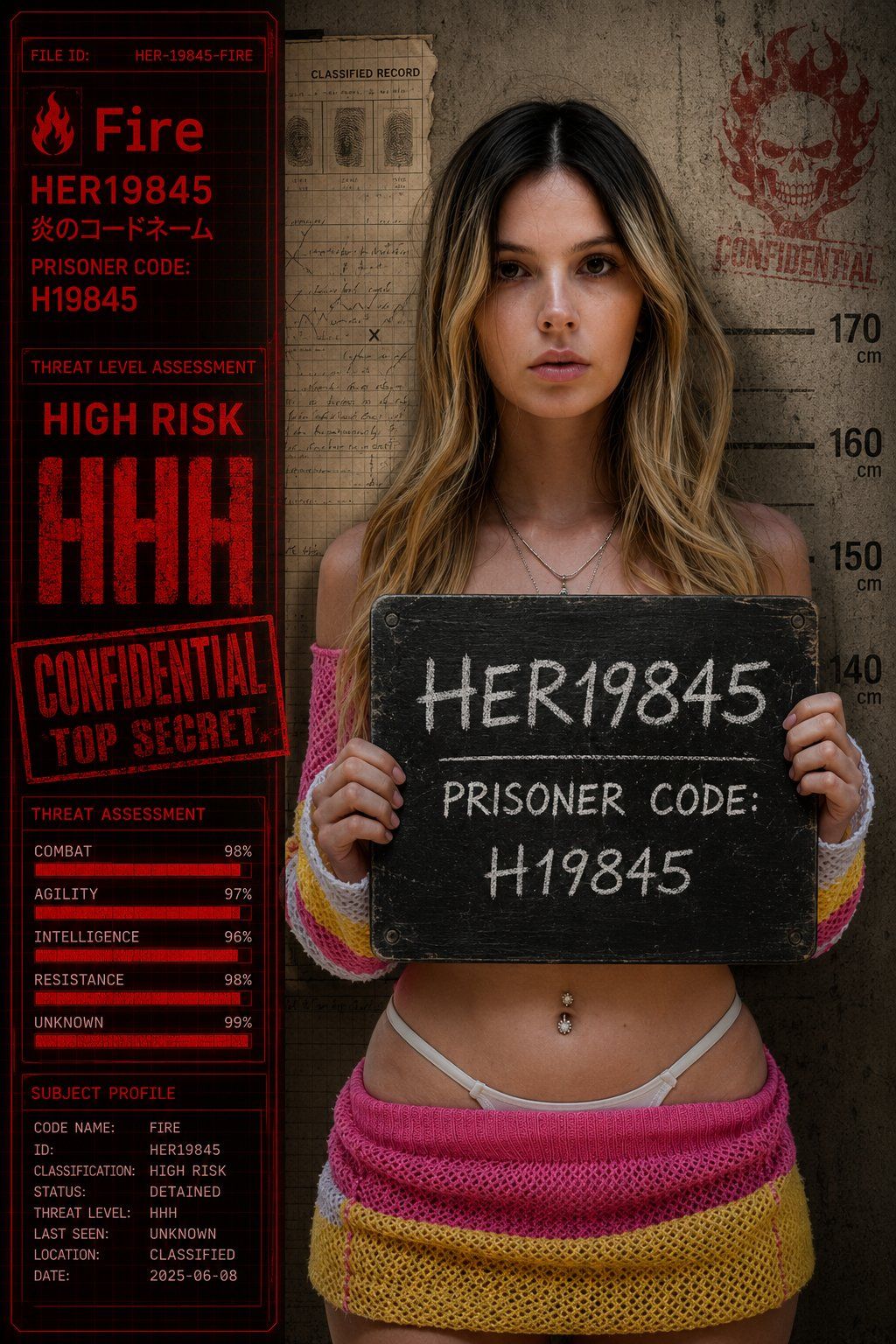
一张高端、照片级真实的摄影棚肖像,描绘了附件中的模特,被转化为一份详细、生动的“机密档案”。模特居中而立,手持一块带有纹理的黑色黑板,黑板上用白粉笔写着:“HER19845”和“囚犯代码:H19845”。模特的皮肤以完美的照片级真实感渲染。 构图是一种复杂的叠加效果。背景是一堵粗糙的混凝土墙,带有公制身高标记(140-170)。在这堵墙上方左侧,是一大片破旧的档案格子纸。左侧是一个完整的明亮红色、带有纹理的用户界面(UI)面板,如数据显示屏,其中包含所有库存文本:“Fire”、“HER19845”(带有日文字幕)、“PRISONER CODE: H19845”、“HIGH RISK”后跟一个大而褪色的红色“HHH”、橡皮图章“CONFIDENTIAL TOP SECRET”,以及一份详细的“Threat Assessment”列表,带有红色进度条,用于“Combat”、“Agility”、“Intelligence”、“Resistance”和“Unknown”(全部接近100%)。 附件的骷髅标志和“CONFIDENTIAL”以红色水洗纹理盖章在混凝土墙上。整体效果是一张高安全性库存照片,带有定向摄影棚照明,在皮肤上营造出受控的镜面高光,并在UI元素上产生清晰的光晕。景深较浅,焦点集中在主体和白板上。黑板的纹理应感觉触手可及。所有文本应清晰可读且准确。
Category
创意图片
Model
GPT Image 2
Creator
@her19845
Views0
Source ID
2085999201494974929
Published
Aug 8, 2026

Guide

About "一张高端、照片级真实的摄影棚肖像,描绘了附件中的模特,被转化为一份详细、生动的“机密档案”。模特居中而立,手持一块带有纹理的黑色黑板,黑板上用白..."

What is this prompt for?

"一张高端、照片级真实的摄影棚肖像,描绘了附件中的模特,被转化为一份详细、生动的“机密档案”。模特居中而立,手持一块带有纹理的黑色黑板,黑板上用白..." AI image prompt for GPT Image 2 (创意图片). Saved from X post by @her19845. GPT 图像2:…

The full copyable prompt and example visuals above are ready for AI image generation or one-click recreate in Picva.

How to use this prompt

  1. Step 1

    Open the prompt detail

    Review the example visuals, category, and full prompt text for "一张高端、照片级真实的摄影棚肖像,描绘了附件中的模特,被转化为一份详细、生动的“机密档案”。模特居中而立,手持一块带有纹理的黑色黑板,黑板上用白...".

  2. Step 2

    Copy the prompt

    Copy the prompt body from this page, or load it directly in Studio.

  3. Step 3

    Pick a model (GPT Image 2)

    Prefer GPT Image 2. If you switch models, keep subject and composition and tweak style terms.

  4. Step 4

    Generate and export

    Recreate the look in Picva, or export into your workflow for editing and publishing.

FAQ

What is the "一张高端、照片级真实的摄影棚肖像,描绘了附件中的模特,被转化为一份详细、生动的“机密档案”。模特居中而立,手持一块带有纹理的黑色黑板,黑板上用白..." prompt?
It is an AI image-generation prompt for GPT Image 2 in the 创意图片 category. This page includes the full prompt text, example visuals, and a one-click recreate path in Picva.
How do I use this prompt to generate an image?
Copy the prompt from this page, or use Generate / Studio. Paste it into a compatible image model, or recreate the look in Picva with optional reference images.
Which model is this prompt for?
This page lists GPT Image 2. Most descriptive prompts also transfer to nearby image models such as GPT Image, Flux, or Midjourney with light style tweaks.
Can I use the result commercially?
You can usually copy the prompt for creation, but commercial use of the final image depends on the model terms, reference-image rights, and the generated content. Follow the source author and platform rules.







