20

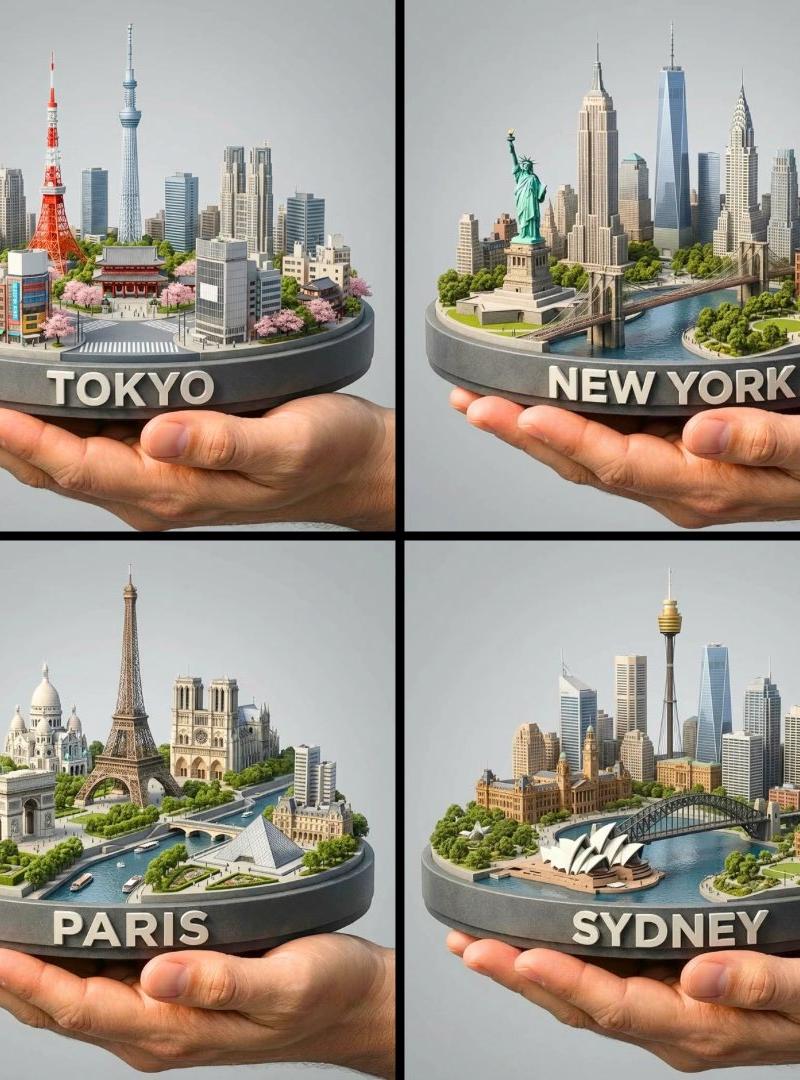
3D迷你城市模型
Click to enlarge

Example images

Photography & RealismXCbotaiart.picsUnknown图片

3D迷你城市模型

Prompt
3D Miniature Cities by GPT-1.5 on @BasedLabsAI 🌍✨
Prompt👇🏻 https://t.co/mnINUUFngm
“Create a hyper-realistic 1080x1080 square render of a human hand gently holding a rounded, beveled miniature display platform showcasing a 3D collectible diorama of [CITY]. Feature its most iconic landmarks, small-scale modern and historical architecture, and lush miniature greenery and trees. A bold 3D “[CITY]” sign is cleanly built into the front edge of the platform. Use a refined, desaturated color scheme with matte textures to enhance the realistic scale-model look. Light the scene with soft studio illumination, warm highlights, and subtle depth shadows. Place the composition against a neutral gray gradient backdrop, keeping the same viewing angle and perspective for consistency. Add atmospheric depth, photorealistic textures, and ultra-precise detailing for an 8K quality high-end collectible aesthetic”
Category
Photography & Realism
Model
Unknown
Creator
TechieSA
Source language
zh-CN
Views0
Source ID
3d-miniature-city-model
Studio

Guide

About "3D迷你城市模型"

What is this prompt for?

"3D迷你城市模型" AI image prompt for Unknown (Photography & Realism). 3D Miniature Cities by GPT-1.5 on @BasedLabsAI 🌍✨ Prompt👇🏻 https://t.co/mnINUUFngm “Create a…

The full copyable prompt and example visuals above are ready for AI image generation or one-click recreate in Picva.

How to use this prompt

  1. Step 1

    Open the prompt detail

    Review the example visuals, category, and full prompt text for "3D迷你城市模型".

  2. Step 2

    Copy the prompt

    Copy the prompt body from this page, or load it directly in Studio.

  3. Step 3

    Pick a model (Unknown)

    Prefer Unknown. If you switch models, keep subject and composition and tweak style terms.

  4. Step 4

    Generate and export

    Recreate the look in Picva, or export into your workflow for editing and publishing.

FAQ

What is the "3D迷你城市模型" prompt?
It is an AI image-generation prompt for Unknown in the Photography & Realism category. This page includes the full prompt text, example visuals, and a one-click recreate path in Picva.
How do I use this prompt to generate an image?
Copy the prompt from this page, or use Generate / Studio. Paste it into a compatible image model, or recreate the look in Picva with optional reference images.
Which model is this prompt for?
This page lists Unknown. Most descriptive prompts also transfer to nearby image models such as GPT Image, Flux, or Midjourney with light style tweaks.
Can I use the result commercially?
You can usually copy the prompt for creation, but commercial use of the final image depends on the model terms, reference-image rights, and the generated content. Follow the source author and platform rules.