ClipFlow 视频电子商务平台着陆页
Prompt
Prompt :
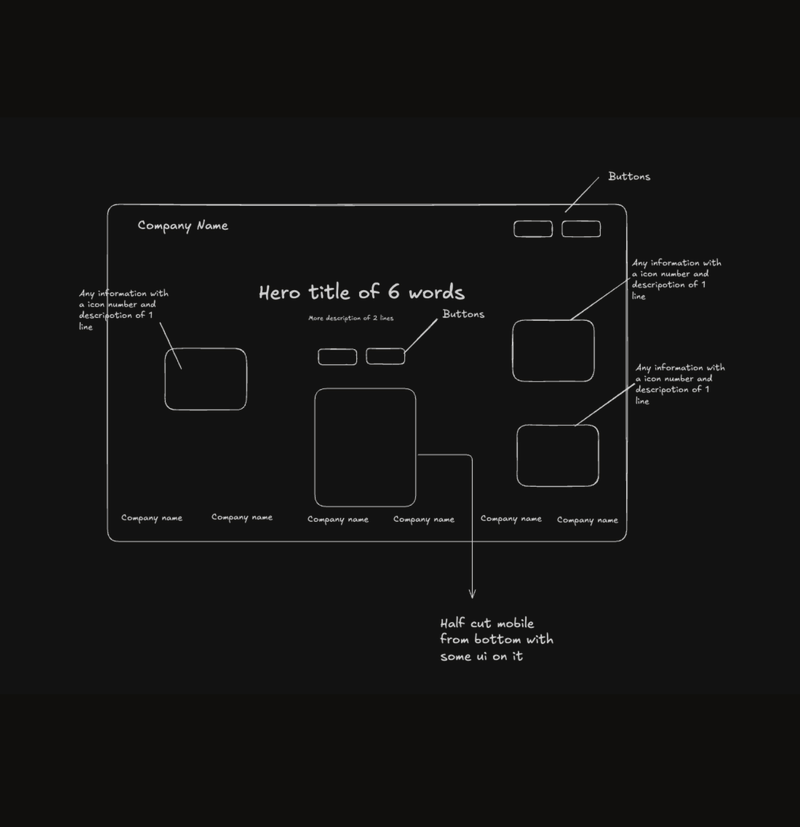
Build a modern SaaS landing page using Next.js (App Router) and Shadcn UI, replicating the layout, spacing, and visual hierarchy of the provided screenshot, but using the content and branding described below.
Website Description
Create a landing page for ClipFlow, a video commerce platform that enables brands to create interactive, shoppable videos and live shopping experiences. The page should feel clean, fast, premium, and conversion-focused, like top-tier startup SaaS products.
Page Structure
- Top navigation bar with CTAs
- Hero section with headline, subheadline, and CTA buttons
- Central mobile phone mockup showing a video
- Floating stat cards and product cards around the phone
- Social proof section with brand logos
Brand & Content (Use Exactly This Text)
Brand Name: ClipFlow
Navigation Bar
- Platform
- Use Cases
- Learn
- Pricing
- Request Demo (secondary button, outlined)
- Start Free Trial (primary button, filled)
Hero Section
Headline: Power Your Store With Interactive Video Commerce
Subheadline: Create, host, and monetize high-performance product videos, live shopping streams, and interactive experiences — all optimized for speed, scale, and conversions.
Primary CTA: Start Free Trial
Secondary CTA: Request a Demo
Floating Stat Cards
- 42.7 Min Average Session Duration
- 3.1B+ Video Views Delivered Worldwide
Left Bottom Info Card
Turn videos into instant shopping experiences
Button: Copy Share Link
Right Product Card
Performance Runner Pro
$149.00
Video Overlay Labels on Phone Mockup
- Tap to Shop
- View Details
- Add to Cart
Social Proof Section
Text: Trusted by modern commerce brands worldwide
Brand logos (text placeholders or simple logo components):
VELORA, NORTHWAVE, BLUMER, SKINNIFY, PUREDROP, LUXORA, THREADLINE, URBAN PEAK
Color Palette
- Primary Black: #111111
- White Background: #FFFFFF
- Secondary Text Gray: #6B7280
- Light Gray Backgrounds: #F5F5F5
- Yellow Accent Card: #FFD84D
- Orange Accent Card: #FF8A4C
- Soft Purple Gradient Shapes: #E9D5FF → #F5E9FF
Design Principles
- Large bold typography for hero headline
- Generous white space and padding
- Center-aligned hero content
- Rounded cards with subtle shadows
- Floating UI cards layered around the phone mockup
- Clean grid alignment and consistent spacing
- Mobile-first responsiveness with desktop enhancements
UI & Component Details
- Sticky top navigation bar
- Shadcn Button, Card, Badge, and Avatar components
- Primary CTA button: solid black with white text
- Secondary CTA button: white with black border
- Phone mockup centered with layered background gradients
- Floating cards positioned absolutely relative to hero container
- Logos displayed in grayscale with equal spacing
Technical Requirements
- Use Next.js App Router
- Use Shadcn UI + Tailwind CSS
- Fully responsive (mobile, tablet, desktop)
- Use reusable components
- Clean semantic HTML structure
- Category
- UI & Interfaces
- Model
- Unknown
- Creator
- Karan Kendre
- Source language
- zh-CN
- Source ID
- clipflow-video-commerce-platform-landing-page
Views0