20

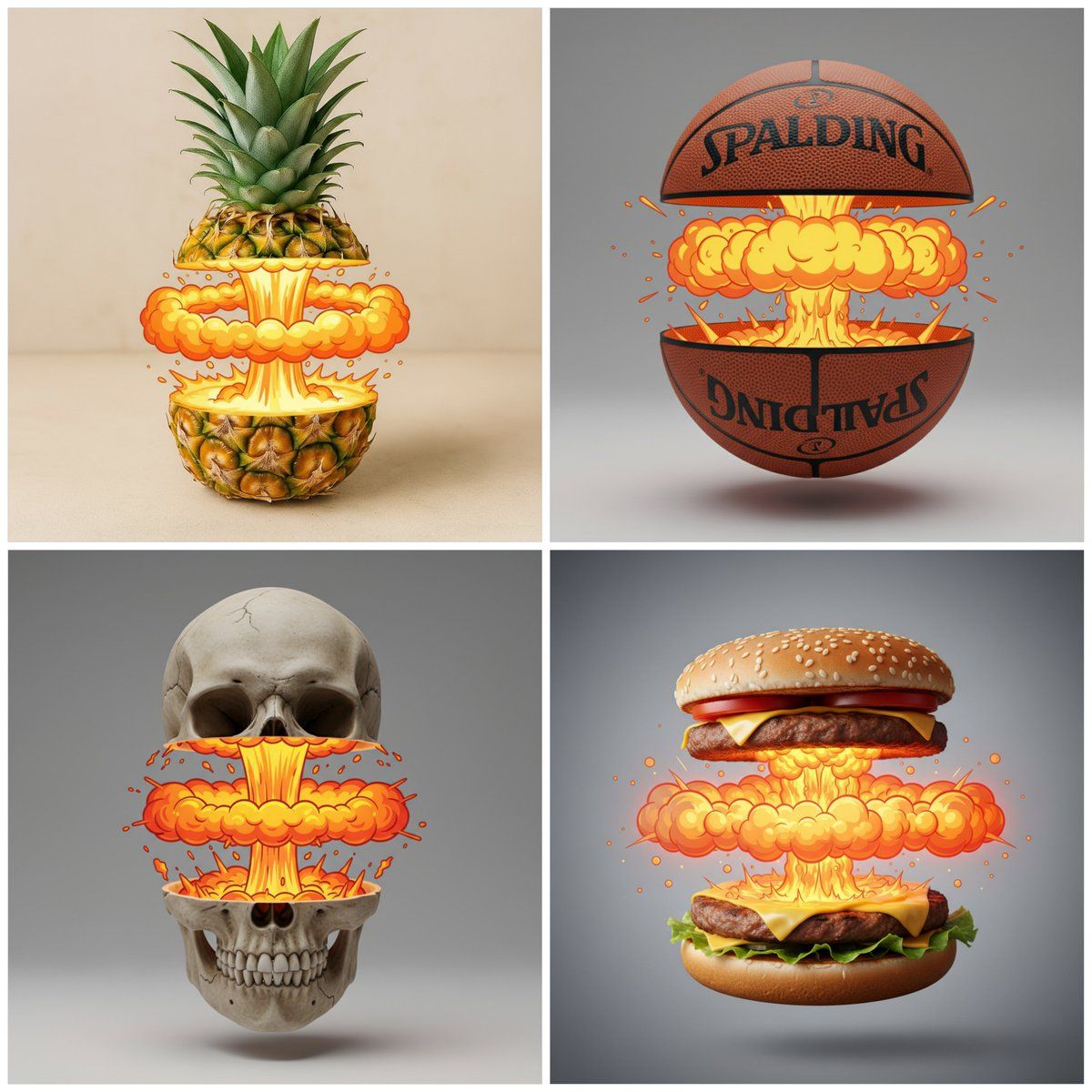
切割带有卡通爆炸的物体
Enlarge

切割带有卡通爆炸的物体

Prompt
cut cleanly THE [OBJECT] in half across the middle, the top and bottom halves slightly separated and floating apart. \nBetween the halves, instead of the natural inside, there is a stylized cartoon nuclear explosion effect: a central vertical column of glowing yellow-orange bubble smoke, with a wide horizontal shockwave ring of round bubbly clouds spreading to the sides, fiery glowing highlights above and below the shockwave, creating the impression of intense heat and energy\nThe outside of the [OBJECT] remains photorealistic with detailed texture and lighting, while the inner effect is highly graphic and playful, giving a striking contrast between realism and cartoon. Studio lighting, centered composition
将 [物体] 从中间干净利落地切成两半,上半部分和下半部分稍微分开并漂浮。\n在两半之间,不是自然的内部,而是一种风格化的卡通核爆炸效果:中央垂直柱状发光的黄橙色气泡烟雾,周围扩散着一圈宽阔的水平冲击波环,圆形气泡云,冲击波上方和下方有炽热的光芒,营造出强烈的热量和能量的印象\n[OBJECT] 的外部依然保持着照片级的真实感,纹理和灯光细节丰富;而内部效果则极具画面感,趣味十足,在现实主义和卡通风格之间形成了鲜明的对比。工作室灯光,居中构图
Category
Photography & Realism
Model
Unknown
Views0
Source ID
cut-object-with-cartoon-explosion

Guide

About "切割带有卡通爆炸的物体"

What is this prompt for?

"切割带有卡通爆炸的物体" AI image prompt for Unknown (Photography & Realism). cut cleanly THE [OBJECT] in half across the middle, the top and bottom halves slightly separ…

The full copyable prompt and example visuals above are ready for AI image generation or one-click recreate in Picva.

How to use this prompt

  1. Step 1

    Open the prompt detail

    Review the example visuals, category, and full prompt text for "切割带有卡通爆炸的物体".

  2. Step 2

    Copy the prompt

    Copy the prompt body from this page, or load it directly in Studio.

  3. Step 3

    Pick a model (Unknown)

    Prefer Unknown. If you switch models, keep subject and composition and tweak style terms.

  4. Step 4

    Generate and export

    Recreate the look in Picva, or export into your workflow for editing and publishing.

FAQ

What is the "切割带有卡通爆炸的物体" prompt?
It is an AI image-generation prompt for Unknown in the Photography & Realism category. This page includes the full prompt text, example visuals, and a one-click recreate path in Picva.
How do I use this prompt to generate an image?
Copy the prompt from this page, or use Generate / Studio. Paste it into a compatible image model, or recreate the look in Picva with optional reference images.
Which model is this prompt for?
This page lists Unknown. Most descriptive prompts also transfer to nearby image models such as GPT Image, Flux, or Midjourney with light style tweaks.
Can I use the result commercially?
You can usually copy the prompt for creation, but commercial use of the final image depends on the model terms, reference-image rights, and the generated content. Follow the source author and platform rules.