13

众人皆道我是妖 唯尔视我为祥瑞
Enlarge

众人皆道我是妖 唯尔视我为祥瑞

Prompt
✨众人皆道我是妖 唯尔视我为祥瑞
✍️中文提示词:
一、画面构图与机位
1 画面比例:竖幅构图,人物占画面高度约五分之四
2 镜头距离:中近景,从膝部到头顶完整入画
3 机位高度:略低于人物视线的微仰视角
4 人物位置:画面正中央略偏上,身体微微向右侧倾斜
5 画面留白:上下少量留白,左右被深色夜景与木栏包裹
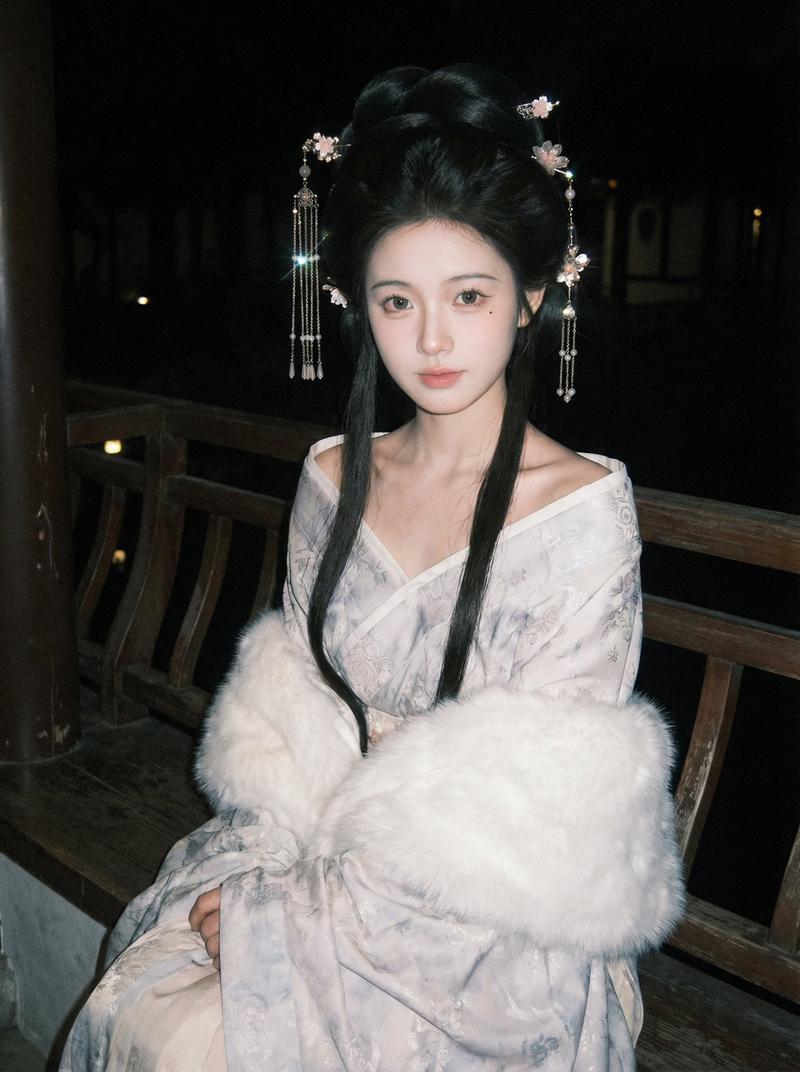
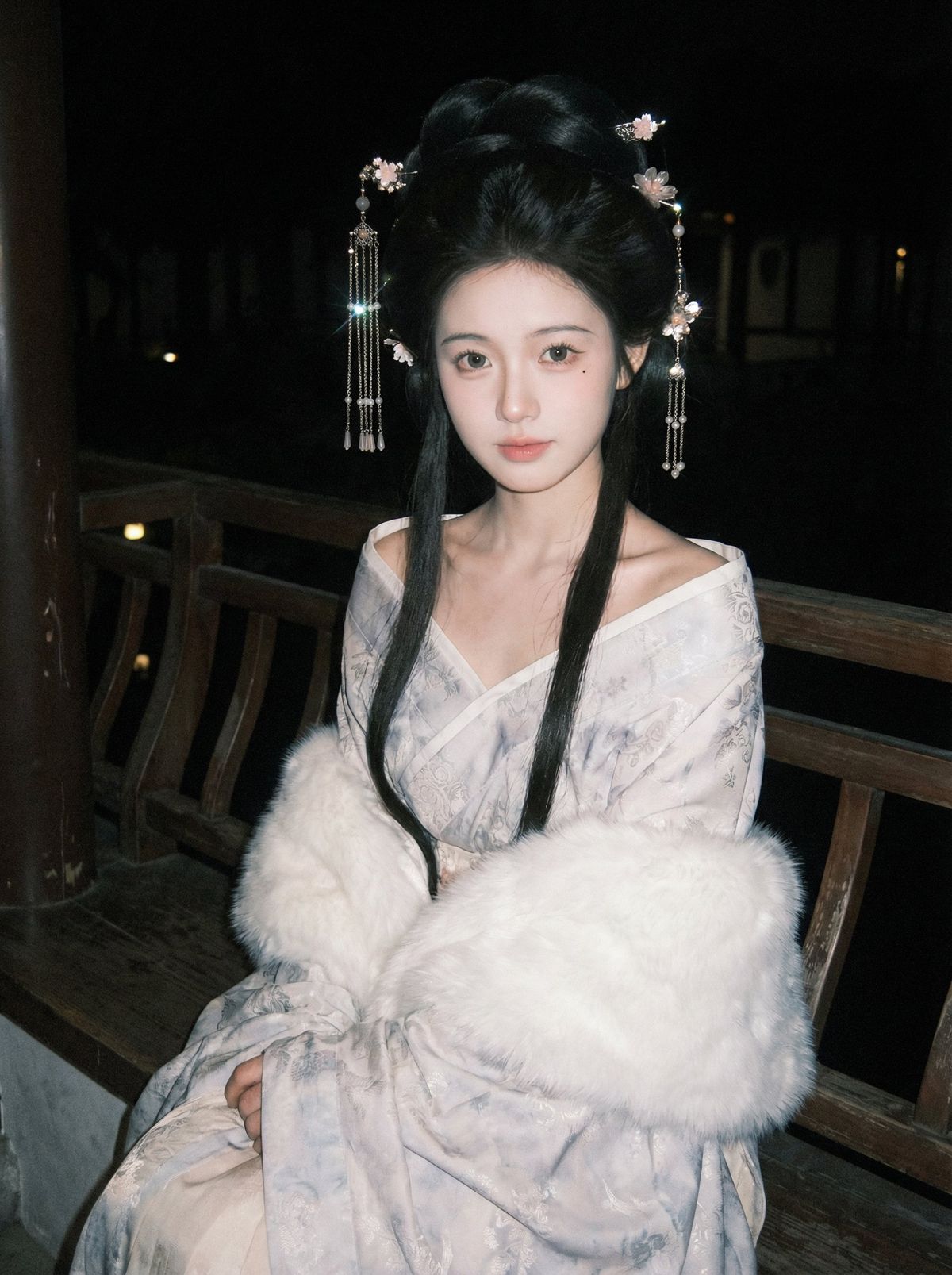
6 画面质感补充:像是在一张昏暗灯光下使用闪光灯拍摄的低质量 iPhone 照片中,背景几乎全黑,什么也看不清
二、场景与环境
1 场景类型:古风园林夜景
三、人物设定与姿态
1 人物设定:脸型精致、眼睛偏大、右眼下方点了一颗小痣,鼻梁细长、唇色淡粉、妆容干净,日韩感。
2 姿态动作:坐在木栏长椅上,双臂自然放置
3 肩颈线条:大面积露出肩膀与锁骨,颈部细长
4 面部角度:正对镜头,头稍微前倾,表情平静放松
四、服饰造型
1 服饰造型:古风宽袖长袍,浅色系带暗纹,领口为斜襟,大领口自然滑落,露出锁骨与肩颈线。
五、披肩结构
1 披肩结构:柔软蓬松的白色毛绒披肩,向下滑落,包裹住前臂和膝上,形成一整圈毛绒包围感,边缘柔和蓬松,有细小毛绒细节。
六、发型
1 发型:高耸古风盘发,高位发髻,顶部蓬松隆起,发髻圆润饱满,后部头发收拢盘起,两侧头发向后梳顺固定,整体轮廓偏长椭圆形,发际线干净整齐,脸颊两侧留长鬓发,笔直垂落到腰前,贴脸修饰脸型。
七、配饰
1 配饰:成对古风步摇发饰,对称佩戴在发髻两侧,金属质感发叉插入发髻顶端,连接多层流苏与坠饰,细链分层下垂,搭配小珠子、小花朵状金属片,局部有水滴形坠子,随着头部微动轻微摆动,金属与珠光在夜色中有明显高光闪点,整体华丽但不过分夸张。
八、头发质感与走向
1 头发质感与走向:自然黑色直发,发丝细腻顺滑,有微微柔光,靠近脸部的鬓发紧贴垂下,线条笔直干净,盘起部分头发紧密贴合头型,边缘略有几缕细碎发丝柔和散出,整体发量偏多,轮廓清晰,有真实发丝纹理与轻微毛躁细节。
九、情绪与氛围表达
1 情绪基调:安静、温柔、略带疏离又含有亲近感
2 氛围设定:深夜园林,周围安静,空气偏冷,人物给人柔软安全的包裹感
3 视线互动:直视镜头,无夸张笑容,眼神含蓄,传递温柔而平静的情绪
Category
Characters & People
Model
Unknown
Views0
Source ID
enigmatic-as-an-demon-yet-benevolent-to-you

Guide

About "众人皆道我是妖 唯尔视我为祥瑞"

What is this prompt for?

"众人皆道我是妖 唯尔视我为祥瑞" AI image prompt for Unknown (Characters & People). ✨众人皆道我是妖 唯尔视我为祥瑞 ✍️中文提示词: 一、画面构图与机位 1 画面比例:竖幅构图,人物占画面高度约五分之四 2 镜头距离:中近景,从膝部到头顶完整入画 3 机位高度:…

The full copyable prompt and example visuals above are ready for AI image generation or one-click recreate in Picva.

How to use this prompt

  1. Step 1

    Open the prompt detail

    Review the example visuals, category, and full prompt text for "众人皆道我是妖 唯尔视我为祥瑞".

  2. Step 2

    Copy the prompt

    Copy the prompt body from this page, or load it directly in Studio.

  3. Step 3

    Pick a model (Unknown)

    Prefer Unknown. If you switch models, keep subject and composition and tweak style terms.

  4. Step 4

    Generate and export

    Recreate the look in Picva, or export into your workflow for editing and publishing.

FAQ

What is the "众人皆道我是妖 唯尔视我为祥瑞" prompt?
It is an AI image-generation prompt for Unknown in the Characters & People category. This page includes the full prompt text, example visuals, and a one-click recreate path in Picva.
How do I use this prompt to generate an image?
Copy the prompt from this page, or use Generate / Studio. Paste it into a compatible image model, or recreate the look in Picva with optional reference images.
Which model is this prompt for?
This page lists Unknown. Most descriptive prompts also transfer to nearby image models such as GPT Image, Flux, or Midjourney with light style tweaks.
Can I use the result commercially?
You can usually copy the prompt for creation, but commercial use of the final image depends on the model terms, reference-image rights, and the generated content. Follow the source author and platform rules.