20

时尚品牌娃娃
Click to enlarge

Example images

Photography & RealismXCbotaiart.picsUnknown图片

时尚品牌娃娃

Prompt
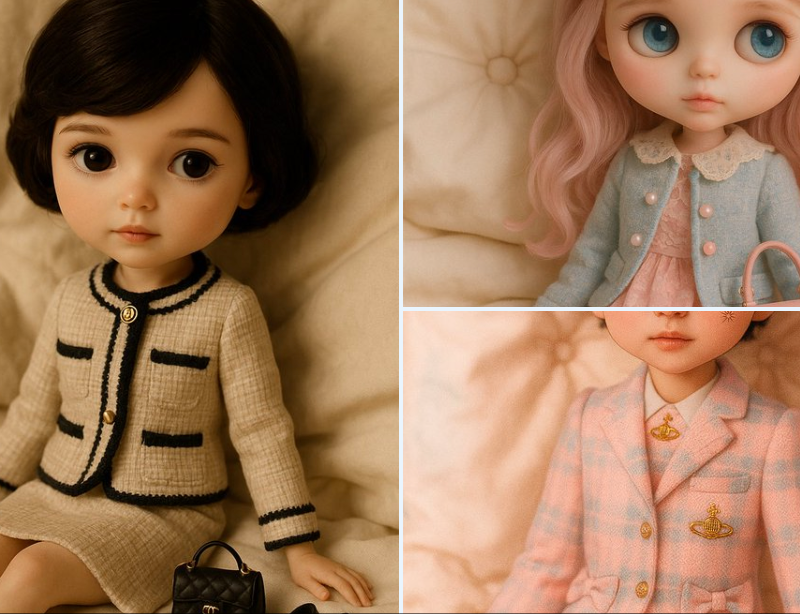
A hyper-realistic photograph of a fashion doll styled in the aesthetic of [BRAND], sitting on a plush, cream-colored bed with soft folds. The doll’s look reflects the brand’s signature elements — from hair and outfit to accessories — arranged thoughtfully to evoke a dreamy, vintage-inspired editorial. Studio-lit with warm, diffused lighting and a creamy, ivory-toned palette, the scene emulates luxury fashion photography with a soft, dollhouse-like atmosphere and shallow depth of field.
一张超写实的照片,一个时尚娃娃以 [BRAND] 的美学风格,坐在一张带有柔软褶皱的奶油色毛绒床上。这款玩偶的外观反映了该品牌的标志性元素——从头发和服装到配饰——经过精心安排,让人联想到梦幻般的复古风格社论。工作室照明采用温暖的漫射灯光和奶油色的象牙色调调色板,该场景以柔和的玩具屋般的氛围和浅景深模拟奢华时尚摄影。
Category
Photography & Realism
Model
Unknown
Creator
TheRelianceAI
Source language
zh-CN
Views0
Source ID
fashion-brand-doll
Studio

Guide

About "时尚品牌娃娃"

What is this prompt for?

"时尚品牌娃娃" AI image prompt for Unknown (Photography & Realism). A hyper-realistic photograph of a fashion doll styled in the aesthetic of [BRAND], sitting on a p…

The full copyable prompt and example visuals above are ready for AI image generation or one-click recreate in Picva.

How to use this prompt

  1. Step 1

    Open the prompt detail

    Review the example visuals, category, and full prompt text for "时尚品牌娃娃".

  2. Step 2

    Copy the prompt

    Copy the prompt body from this page, or load it directly in Studio.

  3. Step 3

    Pick a model (Unknown)

    Prefer Unknown. If you switch models, keep subject and composition and tweak style terms.

  4. Step 4

    Generate and export

    Recreate the look in Picva, or export into your workflow for editing and publishing.

FAQ

What is the "时尚品牌娃娃" prompt?
It is an AI image-generation prompt for Unknown in the Photography & Realism category. This page includes the full prompt text, example visuals, and a one-click recreate path in Picva.
How do I use this prompt to generate an image?
Copy the prompt from this page, or use Generate / Studio. Paste it into a compatible image model, or recreate the look in Picva with optional reference images.
Which model is this prompt for?
This page lists Unknown. Most descriptive prompts also transfer to nearby image models such as GPT Image, Flux, or Midjourney with light style tweaks.
Can I use the result commercially?
You can usually copy the prompt for creation, but commercial use of the final image depends on the model terms, reference-image rights, and the generated content. Follow the source author and platform rules.