20

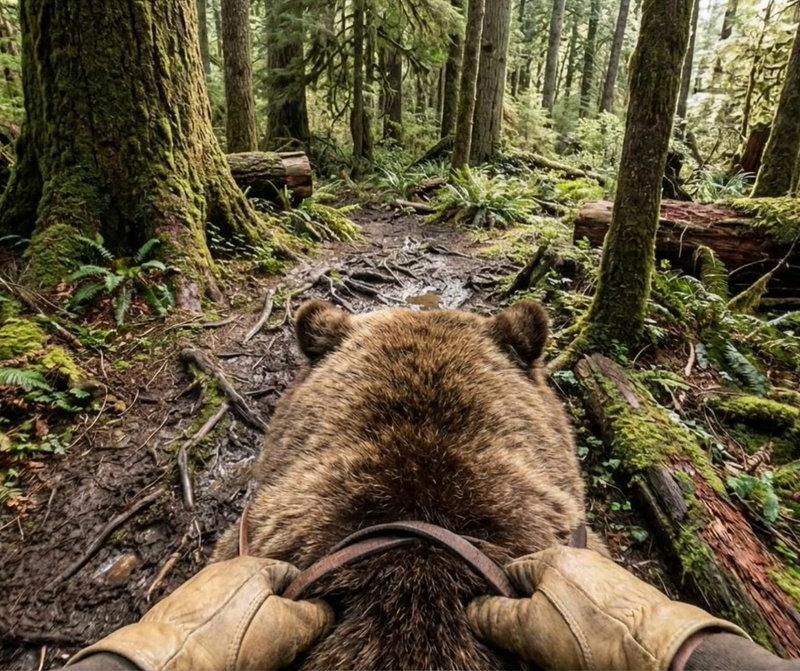
疾速奔跑的棕熊视角
Enlarge

Example images

疾速奔跑的棕熊视角

Prompt
prompt: Extremely fast-paced first-person POV cinematic shot sprinting on the back of a massive brown grizzly bear at full gallop, camera positioned directly behind the bear's head showing both small rounded ears pinned back, thick brown fur rippling with each powerful stride, muscular shoulders pumping intensely, rider's hands visible in tan leather gloves gripping worn leather reins attached to a simple harness. The bear charges forward at breakneck speed through an ancient old-growth temperate rainforest, paws thundering across a muddy trail covered in tangled exposed tree roots and scattered branches, mud and debris kicking up with each stride.
Category
Photography & Realism
Model
Unknown
Creator
gokaygokay
Source language
zh-CN
Views0
Source ID
first-person-pov-fast-galloping-brown-bear
Studio

Guide

About "疾速奔跑的棕熊视角"

What is this prompt for?

"疾速奔跑的棕熊视角" AI image prompt for Unknown (Photography & Realism). prompt: Extremely fast-paced first-person POV cinematic shot sprinting on the back of a massiv…

The full copyable prompt and example visuals above are ready for AI image generation or one-click recreate in Picva.

How to use this prompt

  1. Step 1

    Open the prompt detail

    Review the example visuals, category, and full prompt text for "疾速奔跑的棕熊视角".

  2. Step 2

    Copy the prompt

    Copy the prompt body from this page, or load it directly in Studio.

  3. Step 3

    Pick a model (Unknown)

    Prefer Unknown. If you switch models, keep subject and composition and tweak style terms.

  4. Step 4

    Generate and export

    Recreate the look in Picva, or export into your workflow for editing and publishing.

FAQ

What is the "疾速奔跑的棕熊视角" prompt?
It is an AI image-generation prompt for Unknown in the Photography & Realism category. This page includes the full prompt text, example visuals, and a one-click recreate path in Picva.
How do I use this prompt to generate an image?
Copy the prompt from this page, or use Generate / Studio. Paste it into a compatible image model, or recreate the look in Picva with optional reference images.
Which model is this prompt for?
This page lists Unknown. Most descriptive prompts also transfer to nearby image models such as GPT Image, Flux, or Midjourney with light style tweaks.
Can I use the result commercially?
You can usually copy the prompt for creation, but commercial use of the final image depends on the model terms, reference-image rights, and the generated content. Follow the source author and platform rules.