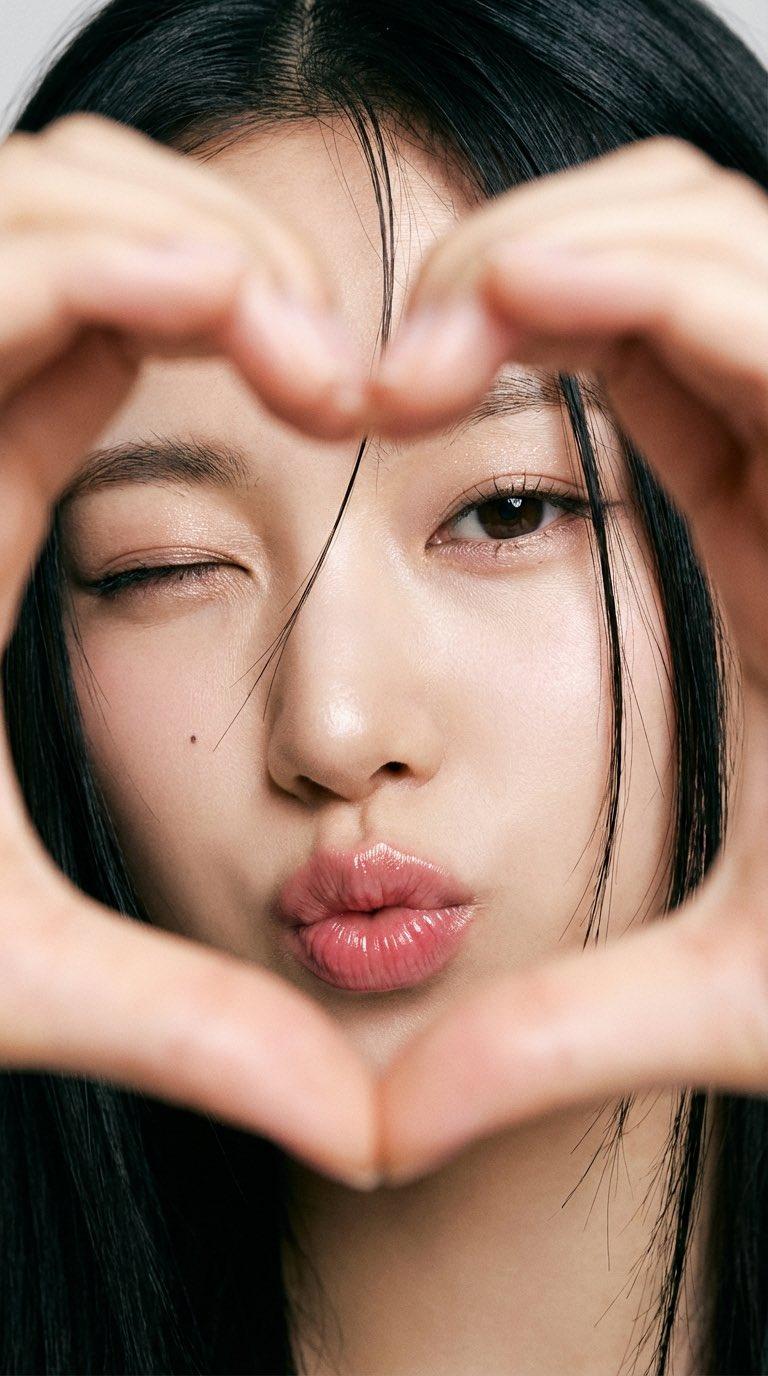
女生双手比出一个心形
Prompt
{\n "image_info": {\n "width": 768,\n "height": 1365,\n "aspect_ratio": "9:16",\n "orientation": "vertical"\n },\n\n "subject": {\n "type": "close-up portrait",\n "description": "A young East Asian woman making a heart shape with her hands directly in front of the camera, with her head gently tilted"\n },\n\n "clothing": {\n "visible": false,\n "notes": "No clothing visible within the framing"\n },\n\n "hair": {\n "color": "black",\n "style": "straight",\n "details": "Loose strands falling naturally across her face"\n },\n\n "face": {\n "eyes": {\n "shape": "almond-shaped",\n "color": "dark brown",\n "makeup": "subtle eyeliner, defined lashes, soft shimmer on lids",\n "expression": "one eye winked, the other softly open"\n },\n "eyebrows": "natural, slightly arched",\n "skin": "smooth, natural glow",\n "lips": {\n "shape": "full",\n "color": "pink glossy tint",\n "expression": "kiss face (puckered lips)"\n },\n "other_details": "small mole under the left eye"\n },\n\n "accessories": {\n "visible": false\n },\n\n "environment": {\n "background": "not visible; fully obscured by the extreme close-up framing"\n },\n\n "lighting": {\n "type": "soft diffused light",\n "effects": "even illumination, minimal shadows, natural skin highlights"\n },\n\n "camera": {\n "framing": "extreme close-up (eyes, nose, and lips filling the frame)",\n "angle": "straight-on",\n "depth_of_field": "very shallow",\n "focus": "sharp on eyes and lips",\n "foreground_elements": "hands forming a heart shape in front of the face"\n },\n\n "style": {\n "aesthetic": "soft, playful, intimate",\n "texture": "high-resolution portrait with film-like softness",\n "vibe": "cute, expressive, flirtatious"\n }\n}
{\n"image_info": {\n宽度:768,\n“高度”:1365,\n"aspect_ratio": "9:16",\n“方向”: “垂直”\n},\n\n“主题”: {\n“类型”:“特写肖像”,\n描述:一位年轻的东亚女性在镜头前用双手比出一个心形,头部微微倾斜。\n},\n\n“衣服”: {\n“可见”:否,\n备注:画面中看不到任何衣物。\n},\n\n“头发”: {\n“颜色:黑色”,\n“风格”:“直筒”,\n“细节”:“几缕散落的发丝自然地垂落在她的脸上”\n},\n\n“脸”: {\n"眼睛": {\n“形状”: “杏仁形”\n“颜色”: “深棕色”\n“妆容”:“淡雅的眼线,精致的睫毛,眼睑上柔和的珠光”,\n“表情”:“一只眼睛眨了眨,另一只眼睛轻轻睁开”\n},\n“眉毛”:“自然,略微拱起”,\n“肌肤”:“光滑、自然的光泽”,\n"嘴唇": {\n"形状": "饱满",\n“颜色”: “粉红色光泽色调”,\n“表情”:“亲吻脸(撅起嘴唇)”\n},\n"other_details": "左眼下方有一颗小痣"\n},\n\n“配件”: {\n“可见”:否\n},\n\n“环境”: {\n“背景”:“不可见;完全被极近的特写镜头遮挡住”\n},\n\n“灯光”: {\n“类型”:“柔和漫射光”,\n“效果”:“均匀照明,阴影极少,肌肤自然高光”\n},\n\n“相机”: {\n“构图”:“极近特写(眼睛、鼻子和嘴唇充满画面)”,\n"角度": "正面",\n"景深": "非常浅",\n“焦点”: “聚焦于眼睛和嘴唇”,\n"前景元素": "双手在脸前摆成心形"\n},\n\n“风格”: {\n“美学”:“柔和、俏皮、亲密”,\n“纹理”:“具有胶片般柔和感的高分辨率肖像”,\n氛围:可爱、活泼、爱调情\n}\n}- Category
- Photography & Realism
- Model
- Unknown
- Creator
- SDT🌿
- Source language
- zh-CN
- Source ID
- girl-making-heart-shape-with-hands
Views0