20

谷歌Gemini AI纳米香蕉3 Pro✨ 指示场景
Enlarge

Example images

谷歌Gemini AI纳米香蕉3 Pro✨ 指示场景

Prompt
Google Gemini ai Nano Banana 3 Pro ✨
Prompt ⤵️
{
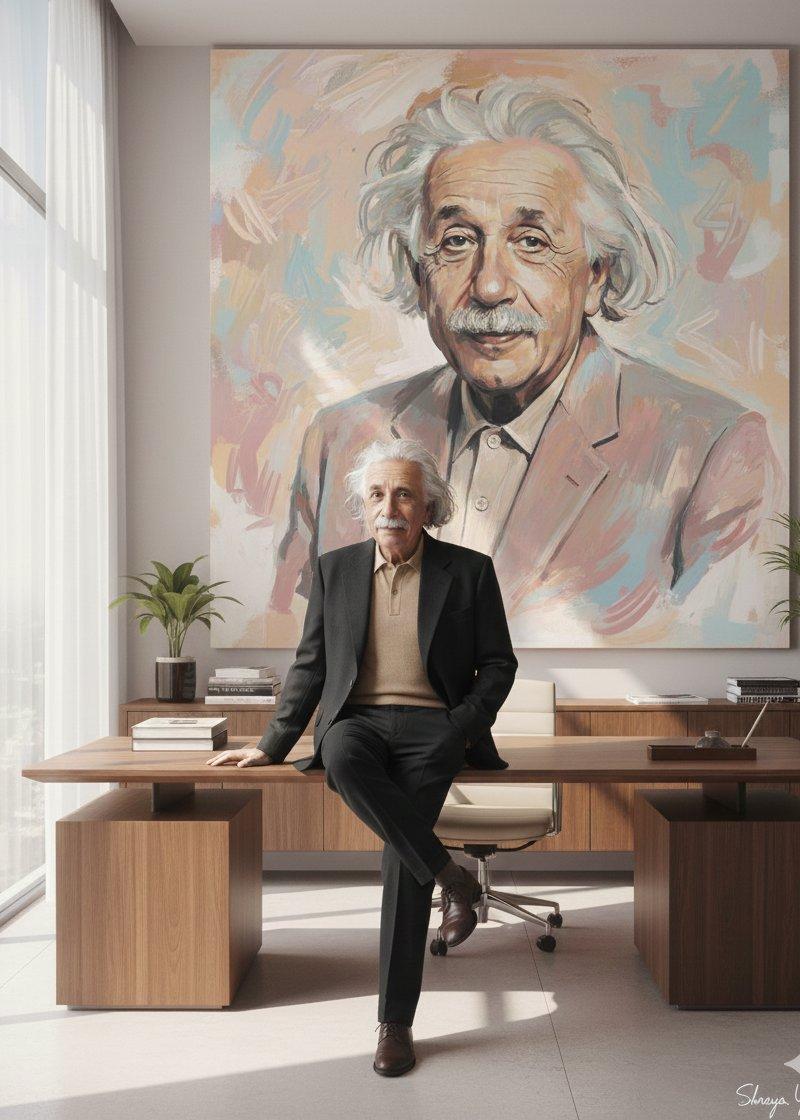
 "prompt": "A stylish cinematic scene featuring a full-body man sitting confidently on a large wooden desk in his personal luxury office room. He has one leg casually crossed over the other, exuding quiet power and charisma. He is wearing a sophisticated **black suit** (oversized soft-colored blazer and tailored trousers). The background wall features a huge artistic portrait of the **same man**, painted with highly expressive, dynamic pastel brushstrokes, including muted pinks, warm peaches, soft beiges, and pale blues, creating energy and movement. Soft daylight filters through large windows on the left. The mood is high-fashion editorial, with sharp yet dreamy lighting and a clean, sophisticated composition. **Use the uploaded face as a reference for both the man and the painted portrait.**",
 "style": "cinematic, high-fashion editorial, painterly brushstrokes for background art",
 "colors": "black suit, pastel portrait (muted pinks, warm peaches, soft beiges, pale blues), warm wood tones, soft daylight",
 "composition": "full-body shot, man centered, large artistic portrait dominating the background wall, clean lines, sharp yet soft focus",
 "face_reference_image": "uploaded:31653.jpg",
 "signature": "Shreya Yadav"
}
Category
Photography & Realism
Model
Nano Banana
Creator
Shreya Yadav
Source language
zh-CN
Views0
Source ID
google-gemini-ai-nano-banana-3-proprompt-scene
Studio

Guide

About "谷歌Gemini AI纳米香蕉3 Pro✨ 指示场景"

What is this prompt for?

"谷歌Gemini AI纳米香蕉3 Pro✨ 指示场景" AI image prompt for Nano Banana (Photography & Realism). Google Gemini ai Nano Banana 3 Pro ✨ Prompt ⤵️ { "prompt": "A stylish cin…

The full copyable prompt and example visuals above are ready for AI image generation or one-click recreate in Picva.

How to use this prompt

  1. Step 1

    Open the prompt detail

    Review the example visuals, category, and full prompt text for "谷歌Gemini AI纳米香蕉3 Pro✨ 指示场景".

  2. Step 2

    Copy the prompt

    Copy the prompt body from this page, or load it directly in Studio.

  3. Step 3

    Pick a model (Nano Banana)

    Prefer Nano Banana. If you switch models, keep subject and composition and tweak style terms.

  4. Step 4

    Generate and export

    Recreate the look in Picva, or export into your workflow for editing and publishing.

FAQ

What is the "谷歌Gemini AI纳米香蕉3 Pro✨ 指示场景" prompt?
It is an AI image-generation prompt for Nano Banana in the Photography & Realism category. This page includes the full prompt text, example visuals, and a one-click recreate path in Picva.
How do I use this prompt to generate an image?
Copy the prompt from this page, or use Generate / Studio. Paste it into a compatible image model, or recreate the look in Picva with optional reference images.
Which model is this prompt for?
This page lists Nano Banana. Most descriptive prompts also transfer to nearby image models such as GPT Image, Flux, or Midjourney with light style tweaks.
Can I use the result commercially?
You can usually copy the prompt for creation, but commercial use of the final image depends on the model terms, reference-image rights, and the generated content. Follow the source author and platform rules.