20

Google Gemini Nano 香蕉 Pro 对比鸟类提示
Enlarge

Example images

Google Gemini Nano 香蕉 Pro 对比鸟类提示

Prompt
Google Gemini Nano banana Pro
Contrasting bird prompt ⤵️
{
 "bird_pair": {
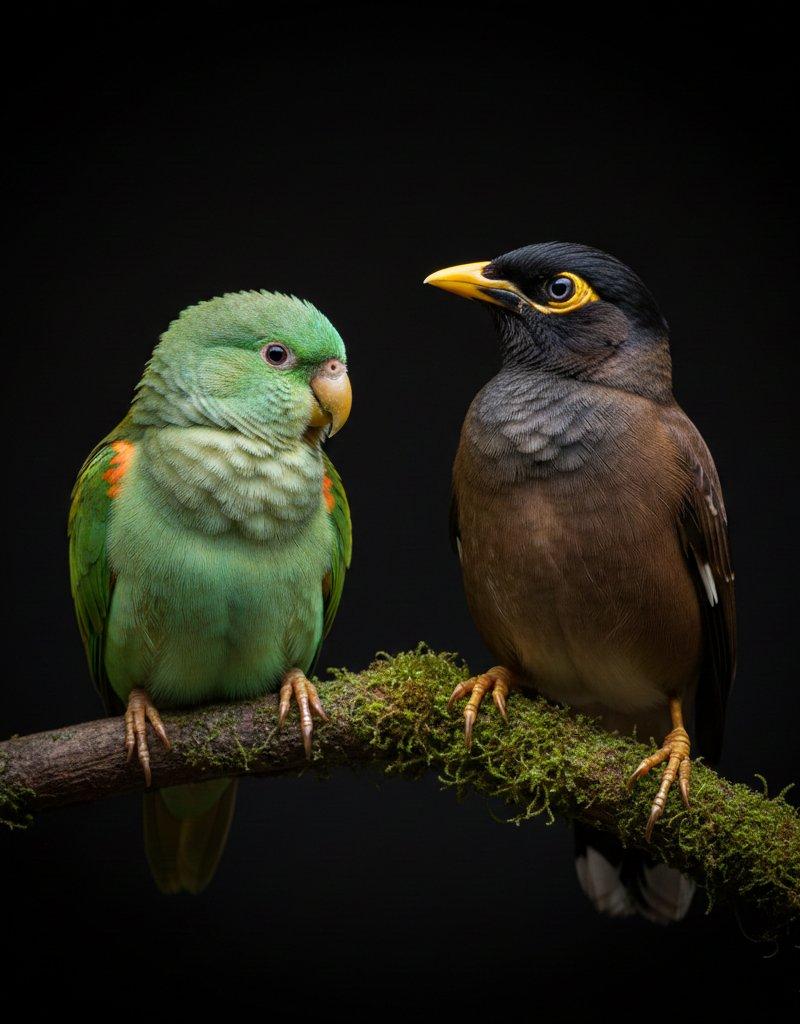
 "left_bird": "small green parrot with light emerald feathers, orange patches, and soft rounded shape",
 "right_bird": "brown-black myna with sharp yellow beak and distinct eye ring",
 "posture": "both perched calmly on a moss-covered branch, facing slightly toward each other"
 },
 "lighting_profile": {
 "style": "dramatic low-key lighting",
 "effect": "sharp highlights on feathers, deep shadows adding contrast",
 "background": "pure dark backdrop creating clean isolation around subjects"
 },
 "visual_aesthetics": {
 "mood": "calm, detailed, studio-style wildlife portrait",
 "color_palette": "natural greens, browns, yellows against black",
 "texture_focus": "feather detail, beak shine, moss surface clarity"
 },
 "composition": {
 "framing": "centered horizontal layout focusing on both birds equally",
 "depth": "foreground crisp and detailed with smooth falloff into dark void"
 },
 "quality": "8K hyper-realistic wildlife close-up with fine feather detail",
 "signature": "VIVEK HY"
}
Category
Photography & Realism
Model
Nano Banana Pro
Creator
Vivek HY
Source language
zh-CN
Views0
Source ID
google-gemini-nano-banana-pro-bird-contrast-prompt
Studio

Guide

About "Google Gemini Nano 香蕉 Pro 对比鸟类提示"

What is this prompt for?

"Google Gemini Nano 香蕉 Pro 对比鸟类提示" AI image prompt for Nano Banana Pro (Photography & Realism). Google Gemini Nano banana Pro Contrasting bird prompt ⤵️ { "bir…

The full copyable prompt and example visuals above are ready for AI image generation or one-click recreate in Picva.

How to use this prompt

  1. Step 1

    Open the prompt detail

    Review the example visuals, category, and full prompt text for "Google Gemini Nano 香蕉 Pro 对比鸟类提示".

  2. Step 2

    Copy the prompt

    Copy the prompt body from this page, or load it directly in Studio.

  3. Step 3

    Pick a model (Nano Banana Pro)

    Prefer Nano Banana Pro. If you switch models, keep subject and composition and tweak style terms.

  4. Step 4

    Generate and export

    Recreate the look in Picva, or export into your workflow for editing and publishing.

FAQ

What is the "Google Gemini Nano 香蕉 Pro 对比鸟类提示" prompt?
It is an AI image-generation prompt for Nano Banana Pro in the Photography & Realism category. This page includes the full prompt text, example visuals, and a one-click recreate path in Picva.
How do I use this prompt to generate an image?
Copy the prompt from this page, or use Generate / Studio. Paste it into a compatible image model, or recreate the look in Picva with optional reference images.
Which model is this prompt for?
This page lists Nano Banana Pro. Most descriptive prompts also transfer to nearby image models such as GPT Image, Flux, or Midjourney with light style tweaks.
Can I use the result commercially?
You can usually copy the prompt for creation, but commercial use of the final image depends on the model terms, reference-image rights, and the generated content. Follow the source author and platform rules.