20

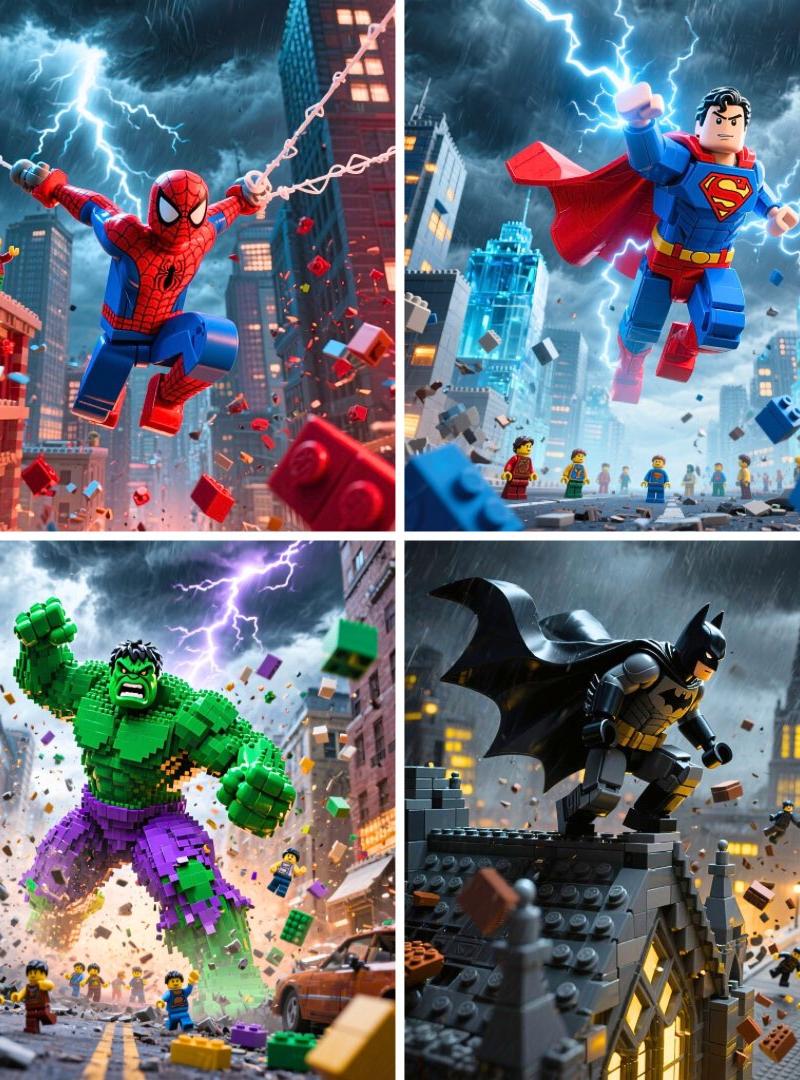
乐高超级英雄摆出充满动感的动作姿势
Click to enlarge

Example images

Photography & RealismXCbotaiart.picsUnknown图片

乐高超级英雄摆出充满动感的动作姿势

Prompt
Epic LEGO [SUPERHERO] in dynamic action pose showcasing their signature powers, wearing their iconic costume with authentic colors and details, dramatic stormy sky with brilliant lightning bolts illuminating the scene, heroic stance amid swirling LEGO debris and flying bricks, small LEGO minifigures scattered throughout the scene watching in awe, cinematic movie poster composition with photorealistic rendering, epic superhero atmosphere with rich saturated colors, professional depth of field and dramatic lighting effects, 1080x1080 square format
史诗级乐高【超级英雄】摆出充满动感的动作姿势,展现其标志性超能力,身着标志性服装,色彩和细节真实还原。戏剧性的暴风雨天空中,耀眼的闪电照亮整个场景。超级英雄摆出英勇姿态,周围是旋转的乐高碎片和飞舞的积木块,场景中散落着小型乐高小人仔,它们正惊叹地注视着这一切。整体采用电影海报式构图,配以逼真渲染效果,营造出史诗般的超级英雄氛围,色彩浓郁饱和,运用专业的景深和富有戏剧性的光影效果,尺寸为1080x1080的正方形格式。
Category
Photography & Realism
Model
Unknown
Creator
TechieSA
Source language
zh-CN
Views0
Source ID
lego-superhero-in-dynamic-action-pose
Studio

Guide

About "乐高超级英雄摆出充满动感的动作姿势"

What is this prompt for?

"乐高超级英雄摆出充满动感的动作姿势" AI image prompt for Unknown (Photography & Realism). Epic LEGO [SUPERHERO] in dynamic action pose showcasing their signature powers, wearin…

The full copyable prompt and example visuals above are ready for AI image generation or one-click recreate in Picva.

How to use this prompt

  1. Step 1

    Open the prompt detail

    Review the example visuals, category, and full prompt text for "乐高超级英雄摆出充满动感的动作姿势".

  2. Step 2

    Copy the prompt

    Copy the prompt body from this page, or load it directly in Studio.

  3. Step 3

    Pick a model (Unknown)

    Prefer Unknown. If you switch models, keep subject and composition and tweak style terms.

  4. Step 4

    Generate and export

    Recreate the look in Picva, or export into your workflow for editing and publishing.

FAQ

What is the "乐高超级英雄摆出充满动感的动作姿势" prompt?
It is an AI image-generation prompt for Unknown in the Photography & Realism category. This page includes the full prompt text, example visuals, and a one-click recreate path in Picva.
How do I use this prompt to generate an image?
Copy the prompt from this page, or use Generate / Studio. Paste it into a compatible image model, or recreate the look in Picva with optional reference images.
Which model is this prompt for?
This page lists Unknown. Most descriptive prompts also transfer to nearby image models such as GPT Image, Flux, or Midjourney with light style tweaks.
Can I use the result commercially?
You can usually copy the prompt for creation, but commercial use of the final image depends on the model terms, reference-image rights, and the generated content. Follow the source author and platform rules.