服装海报生成指南
Prompt
很多人都问提示词,提示词评论区见:
Disclaimer: AI-generated content for educational reference only. Not for commercial use. https://t.co/SkRzVs5Pv1
Prompt:
--------------------------
Using the uploaded photo as the sole character reference, generate a vertical outfit poster.
【LAYOUT HARD RULES】
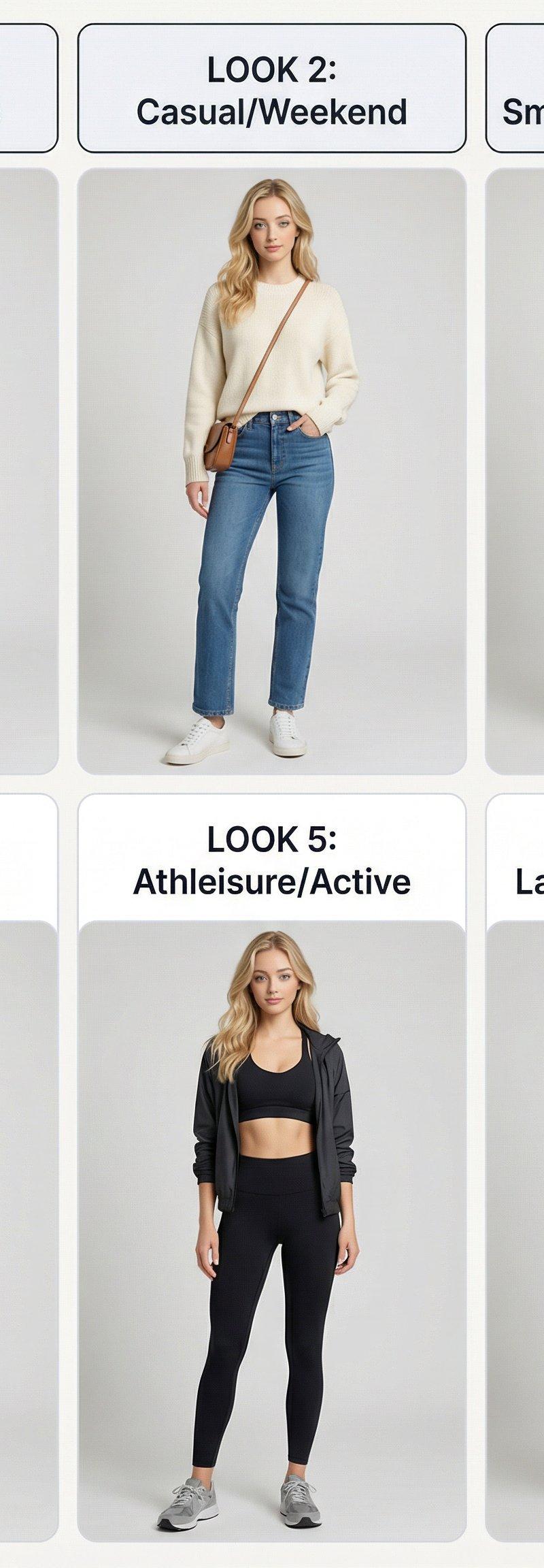
- Must have exactly 6 cards only, 2 rows × 3 columns (3 columns across, 2 rows down)
- Row 1: LOOK 1, 2, 3 | Row 2: LOOK 4, 5, 6
- Prohibited: 9-grid, 3 rows × 2 columns, 2-column layout, extra cards, top header/title
【CANVAS & LAYOUT】
- Vertical 4:5 aspect ratio, background #F7F5F2
- Grid occupies ≥92% of canvas height, bottom margin ≤3%
- Outer margin 2%, spacing 1.5%, strictly aligned
【CARD SPECIFICATIONS】
- White background #FFFFFF, border-radius 5%, stroke 1px #E5E7EB
- Top title bar: height 12%, background #F3F4F6, text color #111827
- Sans-serif font, alignment consistent throughout
【CHARACTER CONSISTENCY】
- All 6 must be the same person in different outfits: same face, same hairstyle, same body proportions, same demeanor
- Prohibited: switching people/changing face/altering gender features/extreme slimming or leg lengthening
【PHOTOGRAPHY QUALITY】
- Master-level studio full-body lookbook, 85mm portrait lens look
- Softbox key light + subtle fill, natural skin texture with light retouching
- Solid seamless background (white/light gray/off-white), no clutter
【UNIFORM CROPPING】
- 4:5 full-body, complete from head to shoes
- Subject centered, height 88%±2%
- Headroom 2-4%, footroom 3-5%, shoes fully visible
- All six shots: consistent camera height/focal length/lighting/pose
【OUTFIT RULES】
- Auto-adapt based on subject age (adult/child)
- Each look ≤3 core items, max 3 colors per outfit, accessories ≤2
- 6 looks distinctly different, but unified style: minimal/clean/polished/easy to recreate
【TITLE SETS】
Adult: Business/Classic → Casual/Weekend → Smart Casual/Evening → Resort/Vacation → Athleisure/Active → Layered/Transitional
Kids: Everyday/Clean → School/Polished → Weekend/Play → Party/Sweet → Active/Sporty → Layered/Cozy
NEGATIVE:
3x3, nine-grid, 9 cards, extra cards, 3 rows x 2 columns, two-column layout, big top header, page title, switching people, changing face, multiple people, lowres, blurry, plastic skin, wide-angle distortion, fisheye, warped body, extreme slimming, long legs effect, outdoor background, textured wall, cut off shoes, half body, adultification, sexy, lingerie, see-through, high heels (kids), heavy makeup (kids), watermark, cropped text
--------------------------
How to use it:
Using uploaded photo, generate a 6-panel outfit poster: strict 2 rows × 3 columns, same person in different outfits, studio full-body shots, 85mm lens look, white cards with title bars, no top header, subject at 88% height from head to shoes, 6 distinct but minimal/polished looks.
- Category
- Photography & Realism
- Model
- Unknown
- Creator
- 大卫叔的AI旅程
- Source language
- zh-CN
- Source ID
- outfit-poster-generation-guidelines
Views0