场景变化实验
Prompt
Scene Variations
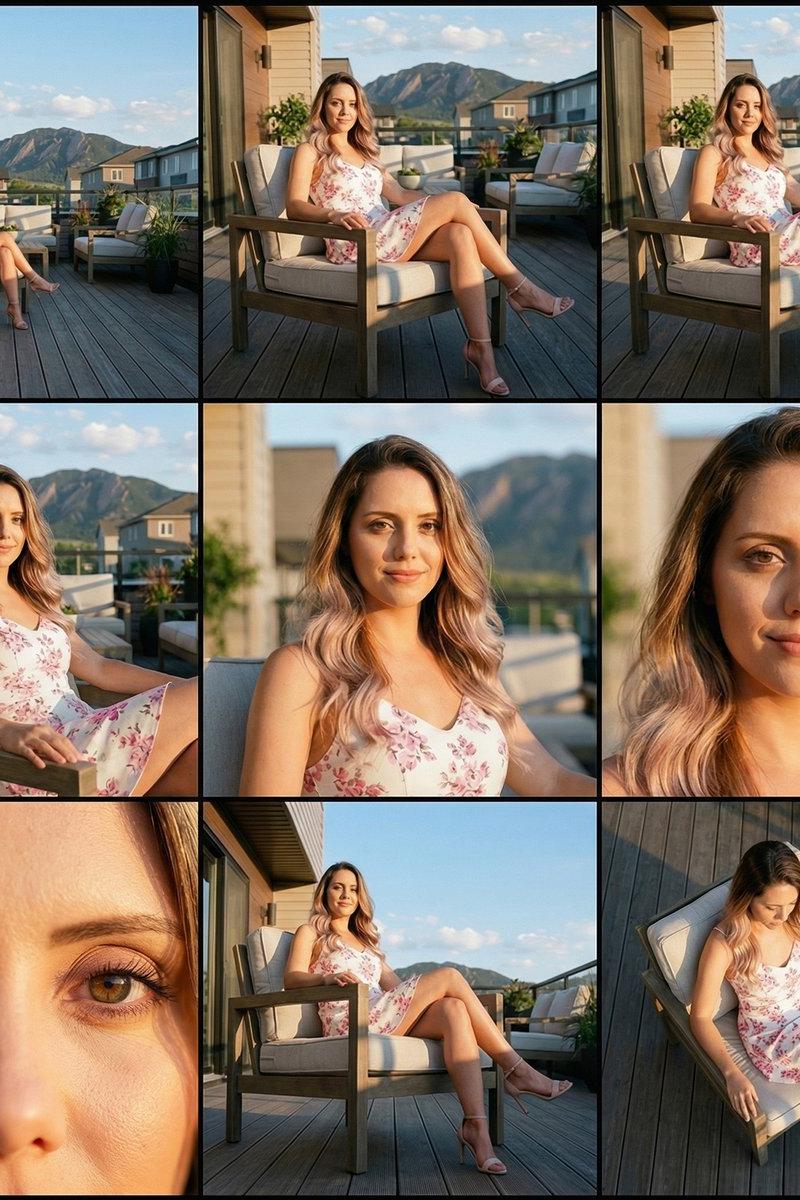
This is a continuation of earlier experiments that entail visualizing the same scene at different distances and angles. This concept was inspired by a Contact Sheet prompt by @techhalla that I've modified for my purposes. It is included below.
To replicate this, open Nano Banana Pro on your favorite surface. Upload your reference image and try the following prompt:
Analyze the input image and identify exactly which subject(s) it contains — whether a single person, a couple, a group, an object, a vehicle, or an animal. Preserve these same subjects in all nine frames with strict likeness accuracy: identical appearance, clothing, proportions, posture, textures, and environment. No new subjects may be added.
Generate a unified “Cinematic 3×3 Contact Sheet” featuring the same subject(s) in nine distinct camera setups. The lighting, color temperature, environment, and physical space must stay perfectly consistent across the grid. Only the camera distance, angle, and focal length may change.
All nine panels must be rendered with high-end editorial photo-realism: physically accurate lighting and shadows, crisp optical depth of field, realistic skin and fabric texture, natural highlights and reflections, true lens behavior, accurate perspective, zero painterly or illustrated artifacts.
Row 1 — Establishing & Context
1 - Extreme Long Shot (ELS): The subject(s) appear small within a wide environmental frame.
2 - Long Shot (LS): Full-body (or full object) framing from top to bottom.
3 - Medium Long Shot (3/4 or “American”): Knees-up framing for people, or a clean 3/4 view for objects.
Row 2 — Core Coverage
4 - Medium Shot (MS): Waist-up framing showing interaction, posture, or core action.
5 - Medium Close-Up (MCU): Chest-up framing with clear facial readability or primary object detail.
6 - Close-Up (CU): Tight framing on the subject’s face or the defining front area of the object.
Row 3 — Details & Angles
7 - Extreme Close-Up (ECU): Macro detail on eyes, hands, textures, or a specific defining feature.
8 - Low Angle Shot (Worm’s Eye): Camera positioned low, looking upward.
9 - High Angle Shot (Bird’s Eye): Camera positioned above, looking downward.
Depth of field should vary naturally between shots: deep DOF for wide shots, progressively shallower DOF as the camera moves into close-ups, producing realistic optical bokeh. Each panel must match the others in exposure, color grading, atmosphere, and environmental continuity.
The final result should resemble a professional cinematic storyboard grid: nine cohesive, hyper-real frames exploring the same subject(s) through consistent lighting, lensing, and environment, while showcasing increasing intimacy and varying perspective.
#NanoBananaPro
- Category
- Photography & Realism
- Model
- Nano Banana Pro
- Creator
- D. Humann
- Source language
- zh-CN
- Source ID
- scene-variations-experiment
Views0