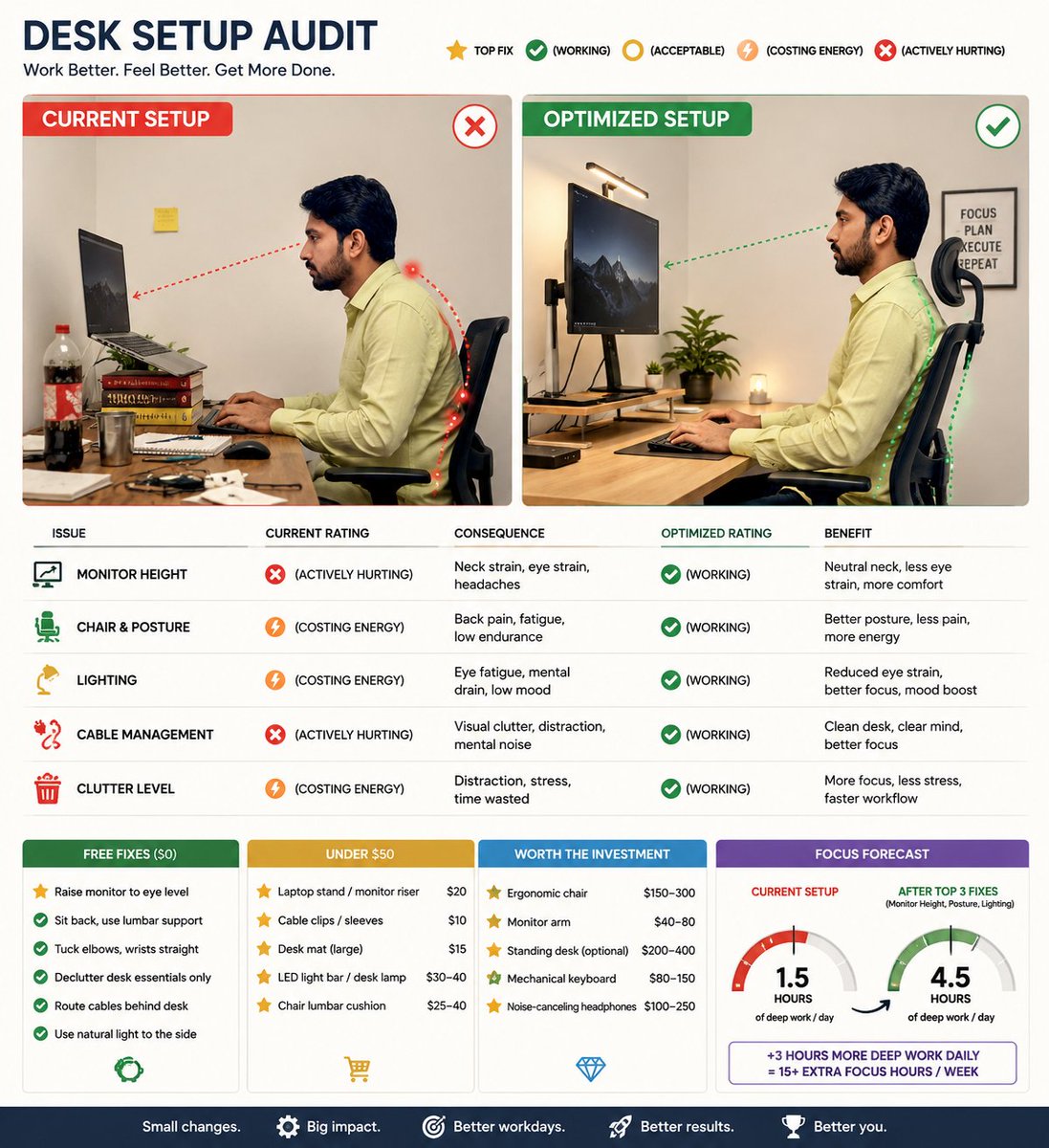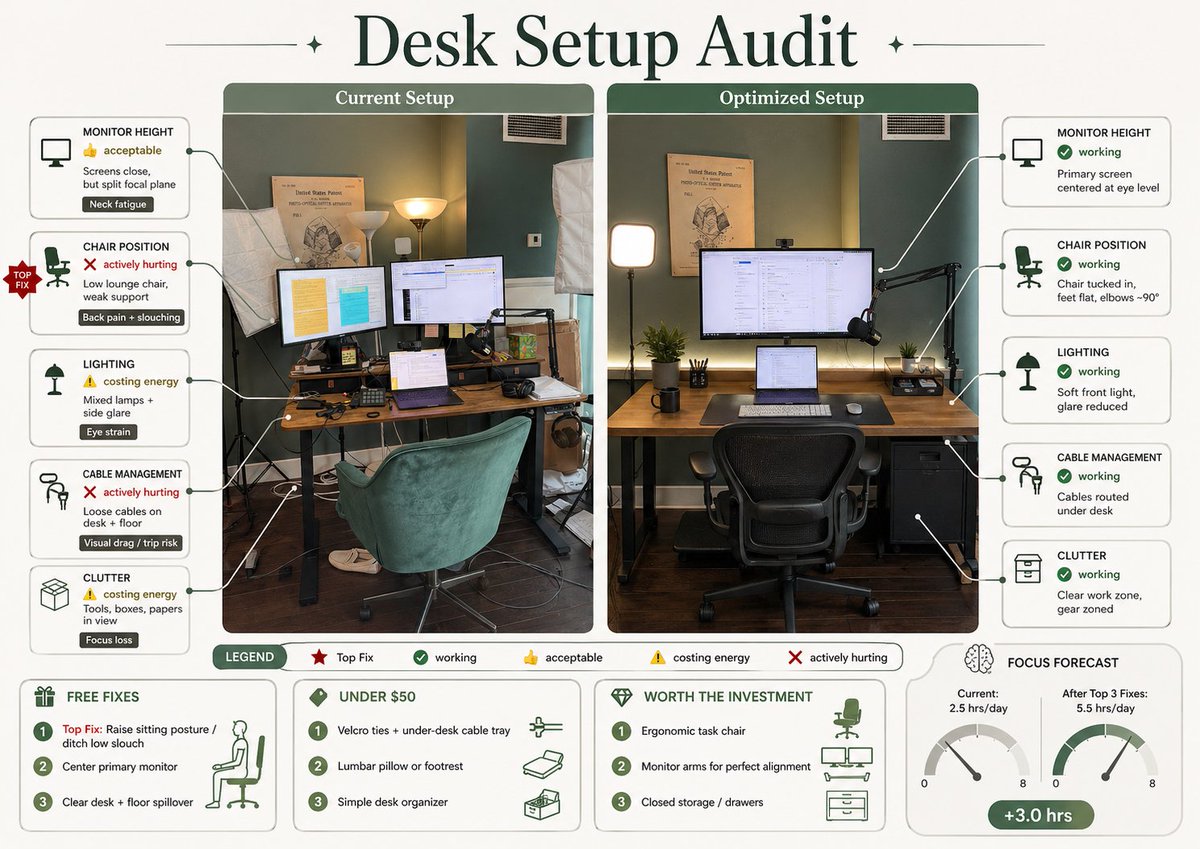
桌面布置审计信息图
此提示词可将一张桌面照片转化为精美的对比式人体工学审计信息图,助力工作空间优化与社交媒体分享。
- Category
- Charts & Infographics
- Model
- GPT Image 2
- Creator
- Allie K. Miller
- Source language
- en
- Source ID
- 16420
- Published
- Apr 26, 2026
Full prompt
Using REFERENCE_0, turn the attached desk photo and its written brief into a clean editorial-style infographic poster. Create a side-by-side comparison with exactly 2 labeled photo panels: “Current Setup” on the left using the original scene, and “Optimized Setup” on the right showing a plausible improved version of the same room and desk from a matching angle. Add a large serif headline at the top reading {argument name="headline text" default="Desk Setup Audit"}. Around the left panel, add exactly 5 issue callout cards connected by leader lines: 1) MONITOR HEIGHT — 👍 acceptable — “Screens close, but split focal plane” — tag “Neck fatigue”; 2) CHAIR POSITION — ❌ actively hurting — “Low lounge chair, weak support” — tag “Back pain + slouching”; 3) LIGHTING — ⚠️ costing energy — “Mixed lamps + side glare” — tag “Eye strain”; 4) CABLE MANAGEMENT — ❌ actively hurting — “Loose cables on desk + floor” — tag “Visual drag / trip risk”; 5) CLUTTER — ⚠️ costing energy — “Tools, boxes, papers in view” — tag “Focus loss”. Add a small red “TOP FIX” badge pointing to the chair position issue. Around the right panel, add exactly 5 improved callout cards: 1) MONITOR HEIGHT — ✅ working — “Primary screen centered at eye level”; 2) CHAIR POSITION — ✅ working — “Chair tucked in, feet flat, elbows ~90°”; 3) LIGHTING — ✅ working — “Soft front light, glare reduced”; 4) CABLE MANAGEMENT — ✅ working — “Cables routed under desk”; 5) CLUTTER — ✅ working — “Clear work zone, gear zoned”. In the optimized panel, visibly show the improvements: one main monitor centered, laptop centered below it, ergonomic office chair, cleaner desktop, cable routing hidden under the desk, softer balanced lighting, and a small drawer cabinet on the right while keeping the same room recognizable. Add a bottom legend with exactly 5 items: “LEGEND”, “Top Fix”, “working”, “acceptable”, “costing energy”, “actively hurting”. Along the bottom, add exactly 4 boxed sections: 1) “FREE FIXES” with 3 numbered items — “Top Fix: Raise sitting posture / ditch low slouch”, “Center primary monitor”, “Clear desk + floor spillover”; 2) “UNDER $50” with 3 numbered items — “Velcro ties + under-desk cable tray”, “Lumbar pillow or footrest”, “Simple desk organizer”; 3) “WORTH THE INVESTMENT” with 3 numbered items — “Ergonomic task chair”, “Monitor arms for perfect alignment”, “Closed storage / drawers”; 4) “FOCUS FORECAST” showing 2 gauges labeled “Current: 2.5 hrs/day” and “After Top 3 Fixes: 5.5 hrs/day”, plus a green pill reading “+3.0 hrs”. Use a refined magazine infographic aesthetic, muted green and cream palette, rounded boxes, minimal text, crisp icons, thin connector lines, and polished layout suitable for sharing on social media.Translations
桌面布置审计信息图
enUsing REFERENCE_0, turn the attached desk photo and its written brief into a clean editorial-style infographic poster. Create a side-by-side comparison with exactly 2 labeled photo panels: “Current Setup” on the left using the original scene, and “Optimized Setup” on the right showing a plausible improved version of the same room and desk from a matching angle. Add a large serif headline at the top reading {argument name="headline text" default="Desk Setup Audit"}. Around the left panel, add exactly 5 issue callout cards connected by leader lines: 1) MONITOR HEIGHT — 👍 acceptable — “Screens close, but split focal plane” — tag “Neck fatigue”; 2) CHAIR POSITION — ❌ actively hurting — “Low lounge chair, weak support” — tag “Back pain + slouching”; 3) LIGHTING — ⚠️ costing energy — “Mixed lamps + side glare” — tag “Eye strain”; 4) CABLE MANAGEMENT — ❌ actively hurting — “Loose cables on desk + floor” — tag “Visual drag / trip risk”; 5) CLUTTER — ⚠️ costing energy — “Tools, boxes, papers in view” — tag “Focus loss”. Add a small red “TOP FIX” badge pointing to the chair position issue. Around the right panel, add exactly 5 improved callout cards: 1) MONITOR HEIGHT — ✅ working — “Primary screen centered at eye level”; 2) CHAIR POSITION — ✅ working — “Chair tucked in, feet flat, elbows ~90°”; 3) LIGHTING — ✅ working — “Soft front light, glare reduced”; 4) CABLE MANAGEMENT — ✅ working — “Cables routed under desk”; 5) CLUTTER — ✅ working — “Clear work zone, gear zoned”. In the optimized panel, visibly show the improvements: one main monitor centered, laptop centered below it, ergonomic office chair, cleaner desktop, cable routing hidden under the desk, softer balanced lighting, and a small drawer cabinet on the right while keeping the same room recognizable. Add a bottom legend with exactly 5 items: “LEGEND”, “Top Fix”, “working”, “acceptable”, “costing energy”, “actively hurting”. Along the bottom, add exactly 4 boxed sections: 1) “FREE FIXES” with 3 numbered items — “Top Fix: Raise sitting posture / ditch low slouch”, “Center primary monitor”, “Clear desk + floor spillover”; 2) “UNDER $50” with 3 numbered items — “Velcro ties + under-desk cable tray”, “Lumbar pillow or footrest”, “Simple desk organizer”; 3) “WORTH THE INVESTMENT” with 3 numbered items — “Ergonomic task chair”, “Monitor arms for perfect alignment”, “Closed storage / drawers”; 4) “FOCUS FORECAST” showing 2 gauges labeled “Current: 2.5 hrs/day” and “After Top 3 Fixes: 5.5 hrs/day”, plus a green pill reading “+3.0 hrs”. Use a refined magazine infographic aesthetic, muted green and cream palette, rounded boxes, minimal text, crisp icons, thin connector lines, and polished layout suitable for sharing on social media.
桌面布置审计信息图
zh-CN使用 REFERENCE_0,将附带的桌面照片及其文字说明转化为一张简洁的编辑风格信息图海报。创建一个包含 2 个标注照片面板的左右对比图:左侧为“当前布置”,使用原始场景;右侧为“优化布置”,以匹配的角度展示同一房间和桌面的理想改进版本。在顶部添加一个醒目的大号衬线字体标题,内容为 {argument name="headline text" default="桌面布置审计"}。在左侧面板周围,添加 5 个由引导线连接的问题标注卡:1) 显示器高度 — 👍 可接受 — “屏幕距离尚可,但视线焦点分散” — 标签“颈部疲劳”;2) 座椅位置 — ❌ 严重影响 — “低矮休闲椅,支撑不足” — 标签“背痛 + 驼背”;3) 照明 — ⚠️ 损耗精力 — “混合光源 + 侧面眩光” — 标签“视疲劳”;4) 线缆管理 — ❌ 严重影响 — “桌面及地面线缆杂乱” — 标签“视觉干扰 / 绊倒风险”;5) 杂物 — ⚠️ 损耗精力 — “工具、盒子、纸张堆积” — 标签“注意力分散”。在座椅位置问题处添加一个红色的“首要修复”徽章。在右侧面板周围,添加 5 个改进后的标注卡:1) 显示器高度 — ✅ 良好 — “主屏幕居中,与视线齐平”;2) 座椅位置 — ✅ 良好 — “座椅推入,双脚平放,肘部约 90°”;3) 照明 — ✅ 良好 — “柔和前置光,眩光减少”;4) 线缆管理 — ✅ 良好 — “线缆收纳于桌下”;5) 杂物 — ✅ 良好 — “工作区整洁,设备分区明确”。在优化后的面板中,直观展示改进效果:主显示器居中,笔记本电脑置于下方,配备人体工学办公椅,桌面更整洁,线缆隐藏于桌下,光线柔和平衡,右侧增加一个小抽屉柜,同时保持房间原貌。在底部添加包含 5 个项目的图例:“图例”、“首要修复”、“良好”、“可接受”、“损耗精力”、“严重影响”。在最下方添加 4 个方框区域:1) “免费修复”包含 3 项: “首要修复:调整坐姿 / 告别低矮瘫坐”、“居中摆放主显示器”、“清理桌面及地面杂物”;2) “50 美元以下”包含 3 项: “魔术贴扎带 + 桌下理线槽”、“腰靠或脚垫”、“简约桌面收纳盒”;3) “值得投资”包含 3 项: “人体工学办公椅”、“显示器支架以实现完美对齐”、“封闭式储物柜 / 抽屉”;4) “专注力预测”显示 2 个仪表盘,分别标注为“当前:2.5 小时/天”和“完成前 3 项修复后:5.5 小时/天”,并配有一个绿色胶囊标签显示“+3.0 小时”。采用精致的杂志信息图美学,使用柔和的绿色与奶油色调,搭配圆角边框、极简文字、清晰图标、细连接线,以及适合社交媒体分享的精美排版。