17

二维码名片设计师
Enlarge

Example images

二维码名片设计师

Prompt
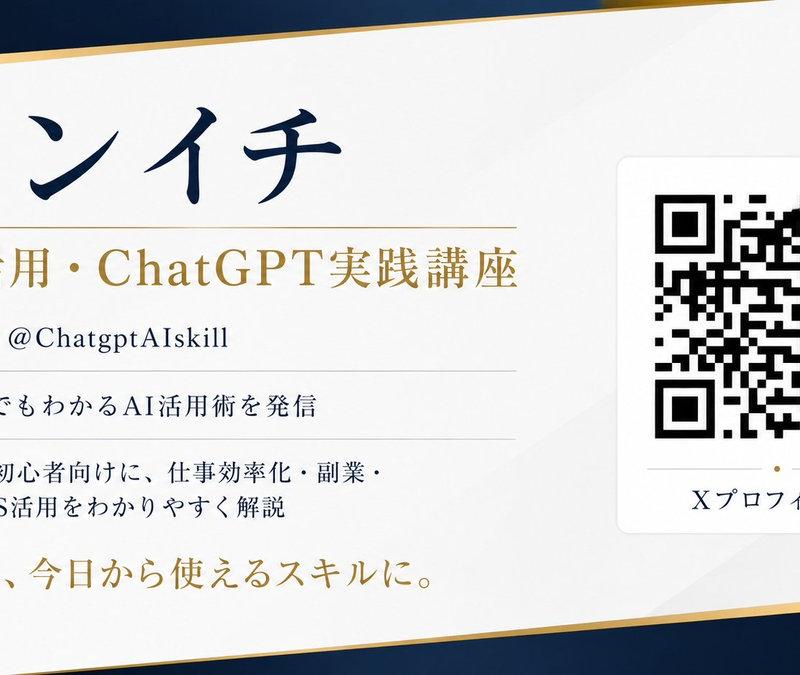
请根据 SNS (X) 个人资料信息,设计一张带有可扫描二维码的名片。

[目的]
将 X 账号的个人资料信息汇总到一张精致的横版名片中。名片的设计、配色方案、布局、留白设计及字体风格应由 AI 自动建议,以确保整体视觉效果达到最佳。

[需展示的信息]
- 姓名: {argument name="name" default="XXXX"}
- 职位: {argument name="title" default="XXXX"}
- X 账号: @{argument name="account name" default="XXXX"}
- 个人简介: XXXX
- 成就/特点: XXXX
- 一句话标语: XXXX
- 二维码链接地址: https://t.co/OQINcuK6wHXXXX

[关于二维码]
- 二维码不应仅作为装饰,必须确保能用智能手机扫描。
- 准确嵌入链接。
- 二维码尺寸需足够大,优先保证扫描准确性。
- 确保二维码周围有足够的留白。
- 请勿在二维码上叠加文字或装饰。
- 请勿扭曲或过度处理二维码。
- 优先考虑与背景的高对比度,以确保易读性。

[设计要求]
- 横版名片设计。
- 传达奢华感、精致感、信任感及专业感。
- 简约美观的布局,充分利用留白。
- 所有文字均为日语,清晰易读。
- 信息优先级明确,姓名和职位应最为突出。
- 由 AI 自动决定最佳背景色、强调色及字体平衡。
- 避免廉价的模板感。
- 呈现适合实际印刷的优雅成品。

[重要事项]
- AI 应提供美观且自然的建议,而非固定的布局。
- 同时,必须优先考虑二维码的实用性。
- 避免乱码,确保所有文字清晰可辨。
- 合理组织信息,实现最佳可读性。

宽高比 16:9。
请以高分辨率创建。
Category
Creative Use Cases
Model
GPT Image 2
Creator
ケンイチ | AIスキルアカデミー『誰でもわかるAI活用術』
Source language
ja
Views3
Source ID
21697
Published
May 20, 2026
Studio

Guide

About "二维码名片设计师"

What is this prompt for?

"二维码名片设计师" AI image prompt for GPT Image 2 (Creative Use Cases). 一个用于 GPT Image 2.0 的功能性提示词,旨在设计包含可扫描二维码且布局专业的精致名片。 Copy it on Picva and recreate the look in o…

The full copyable prompt and example visuals above are ready for AI image generation or one-click recreate in Picva.

How to use this prompt

  1. Step 1

    Open the prompt detail

    Review the example visuals, category, and full prompt text for "二维码名片设计师".

  2. Step 2

    Copy the prompt

    Copy the prompt body from this page, or load it directly in Studio.

  3. Step 3

    Pick a model (GPT Image 2)

    Prefer GPT Image 2. If you switch models, keep subject and composition and tweak style terms.

  4. Step 4

    Generate and export

    Recreate the look in Picva, or export into your workflow for editing and publishing.

FAQ

What is the "二维码名片设计师" prompt?
It is an AI image-generation prompt for GPT Image 2 in the Creative Use Cases category. This page includes the full prompt text, example visuals, and a one-click recreate path in Picva.
How do I use this prompt to generate an image?
Copy the prompt from this page, or use Generate / Studio. Paste it into a compatible image model, or recreate the look in Picva with optional reference images.
Which model is this prompt for?
This page lists GPT Image 2. Most descriptive prompts also transfer to nearby image models such as GPT Image, Flux, or Midjourney with light style tweaks.
Can I use the result commercially?
You can usually copy the prompt for creation, but commercial use of the final image depends on the model terms, reference-image rights, and the generated content. Follow the source author and platform rules.