GPT Image 2 Manga Planning Infographic
Prompt
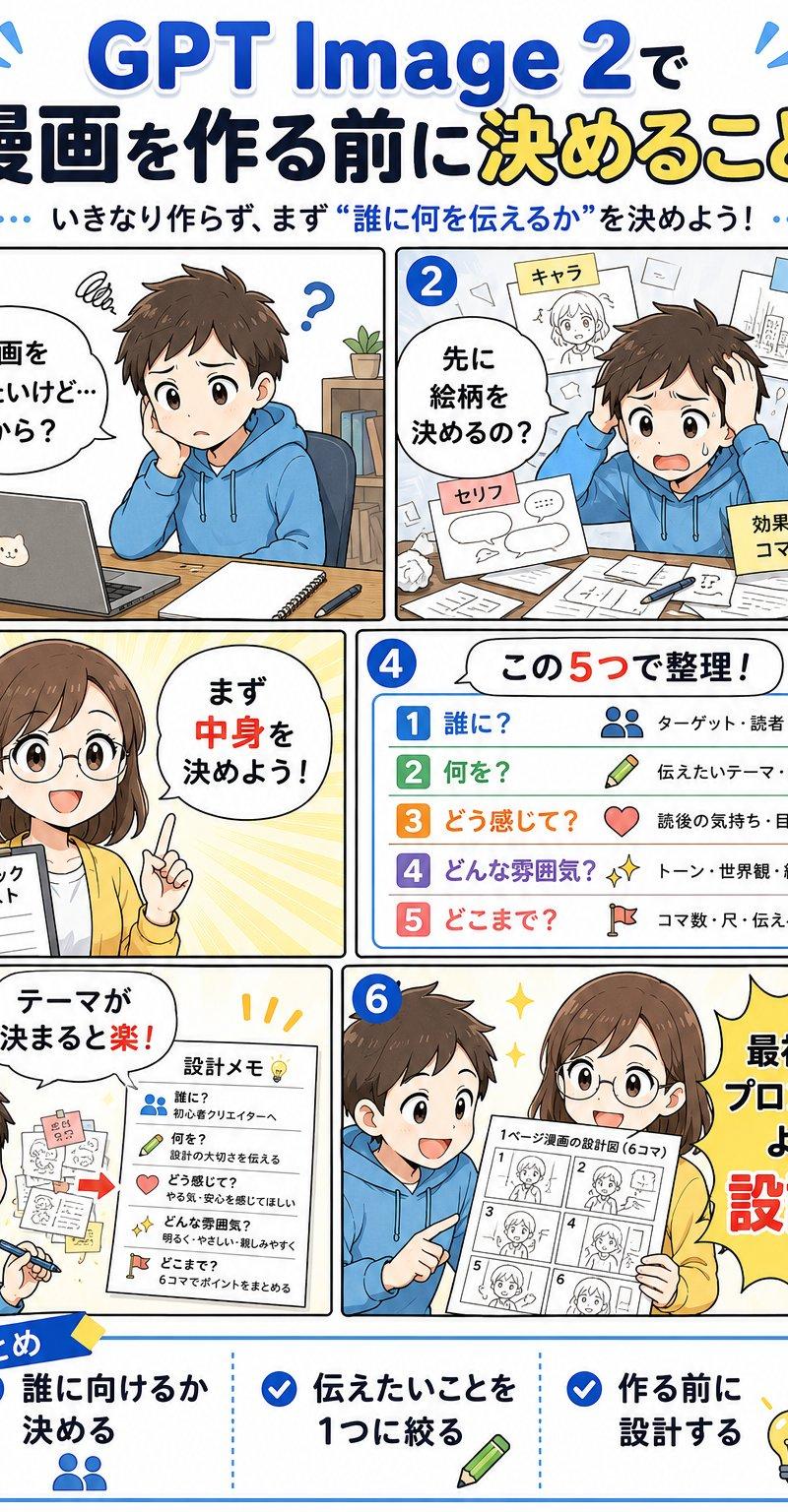
Goal: Create a vertical Japanese manga-style educational infographic about planning a comic before making it with {argument name="tool name" default="GPT Image 2"}. The main headline should read 「GPT Image 2で 漫画を作る前に決めること」 with 「決めること」 emphasized in yellow, and the subtitle should read 「いきなり作らず、まず“誰に何を伝えるか”を決めよう!」.

Canvas: Portrait 2:3 infographic, clean white background, bright blue accent color, thick rounded comic-panel borders, cheerful instructional tone, polished digital anime illustration. Use large readable Japanese typography with blue, black, yellow, and red emphasis. Add small sparkle and motion-line decorations near the title.

Layout: Arrange exactly 6 numbered manga panels in a 2-column grid, numbered with blue circles 1 through 6 in the upper-left corner of each panel, followed by one wide bottom summary box.

Panel 1: A young male student in a blue hoodie sits at a wooden desk with a laptop that has a cat sticker, a notebook, and a pen. He looks confused with a scribble above his head and a question mark. Add a speech bubble: 「漫画を作りたいけど…何から?」. His face is covered by a soft beige rectangular blur.

Panel 2: The same boy worries at a cluttered desk covered with papers. Around him float exactly 5 planning sheets or sticky notes labeled: 「キャラ」, 「背景」, 「色」, 「セリフ」, and 「効果・演出 コマ割り…」. Add a speech bubble: 「先に絵柄を決めるの?」.

Panel 3: A young female teacher/advisor in a yellow cardigan holds a checklist and raises one finger, standing against a warm yellow radial burst background. Her face is covered by a soft beige rectangular blur. Add a speech bubble: 「まず中身を決めよう!」. The checklist title reads 「チェックリスト」 and shows three checked boxes.

Panel 4: A clean list card titled 「この5つで整理!」. Show exactly 5 colored rows with matching icons and labels: 1 「誰に?」 with a people icon and note 「ターゲット・読者」; 2 「何を?」 with a pencil icon and note 「伝えたいテーマ・内容」; 3 「どう感じて?」 with a heart icon and note 「読後の気持ち・目的」; 4 「どんな雰囲気?」 with sparkles icon and note 「トーン・世界観・絵柄」; 5 「どこまで?」 with a flag icon and note 「コマ数・尺・伝える範囲」.

Panel 5: The boy is now smiling and writing, with sketches and sticky notes on the wall. Add a speech bubble: 「テーマが決まると楽!」. Include a paper titled 「設計メモ」 with exactly 5 checklist items corresponding to the same five questions: 「誰に?」, 「何を?」, 「どう感じて?」, 「どんな雰囲気?」, 「どこまで?」.

Panel 6: The boy in the blue hoodie and the female advisor in the yellow cardigan stand together happily. The boy's face is covered by a soft beige rectangular blur. The advisor holds a storyboard sheet labeled 「1ページ漫画の設計図(6コマ)」 containing exactly 6 small storyboard thumbnails numbered 1 to 6. On the right, place a large yellow starburst speech shape reading 「最初はプロンプトより設計!」 with 「設計!」 in large red letters.

Bottom summary box: A wide rounded rectangle with a blue ribbon label 「まとめ」. Divide it into exactly 3 columns with blue check icons. Column 1 text: 「誰に向けるか決める」 with a people icon. Column 2 text: 「伝えたいことを1つに絞る」 with a pencil icon. Column 3 text: 「作る前に設計する」 with a lightbulb icon.

Visual style: Friendly Japanese educational manga infographic, crisp line art, soft shadows, expressive anime characters, simple school/desk props, blue and yellow highlight palette, high legibility, balanced spacing, no photorealism.

Constraints: Use exactly 6 main panels, exactly 5 planning questions in the list, exactly 3 bottom summary points, and keep all visible text in Japanese as specified. Do not add extra panels, extra checklist rows, watermarks, logos, or unrelated text.- Category
- Charts & Infographics
- Model
- GPT Image 2
- Creator
- 陽仙堂
- Source language
- en
- Source ID
- 24514
- Published
- Jun 6, 2026
Views1.8K