20

Tea and Rain Mood Portrait
Enlarge

Example images

Tea and Rain Mood Portrait

Prompt
Tea & Rain Mood ☕

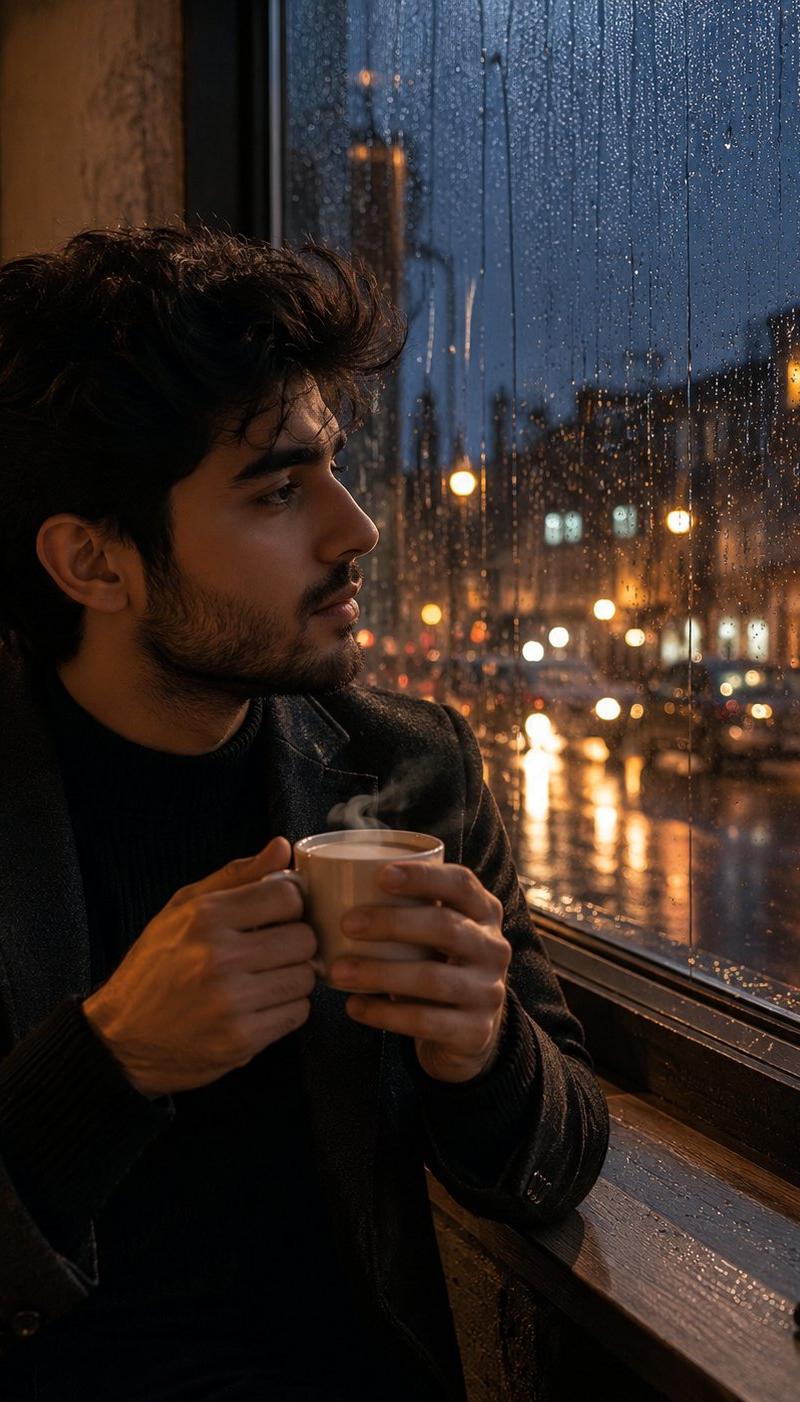
Create an ultra realistic cinematic portrait of a thoughtful {argument name="subject" default="young man"} sitting beside a large rain covered window during a peaceful evening. He is holding a steaming {argument name="beverage" default="cup of traditional tea"} with both hands, gazing outside at the rain soaked streets illuminated by warm streetlights and distant city lights. Soft golden reflections shimmer across the wet glass while raindrops create dreamy bokeh patterns.

The man has neatly styled dark hair, natural facial features, warm brown eyes, and a calm introspective expression. He wears a {argument name="clothing" default="fitted black sweater"} layered under a dark charcoal coat, creating a refined yet cozy aesthetic. Subtle beard stubble, realistic skin texture, visible pores, and natural lighting enhance the authenticity.

The atmosphere feels quiet, reflective, and emotionally rich. Steam rises gently from the tea cup, illuminated by soft ambient lighting. The background shows blurred city lights, rain streaks, and a moody blue hour skyline. Cinematic storytelling, luxury lifestyle photography, emotional depth, shallow depth of field, soft contrast, realistic reflections, warm and cool color balance, premium editorial quality, photorealistic, 85mm lens, f/1.8, HDR, ultra detailed, masterpiece, 8K.

Negative Prompt: low quality, blurry face, extra fingers, distorted hands, cartoon, anime, CGI, overexposed lighting, unrealistic skin, duplicate person, watermark, text, logo, poor composition, low resolution.
Category
Charts & Infographics
Model
GPT Image 2
Creator
Mukesh Kumar
Source language
en
Views619
Source ID
24590
Published
Jun 7, 2026
Studio

Guide

About "Tea and Rain Mood Portrait"

What is this prompt for?

"Tea and Rain Mood Portrait" AI image prompt for GPT Image 2 (Charts & Infographics). A reflective and atmospheric prompt for a young man sitting by a rainy wi…

The full copyable prompt and example visuals above are ready for AI image generation or one-click recreate in Picva.

How to use this prompt

  1. Step 1

    Open the prompt detail

    Review the example visuals, category, and full prompt text for "Tea and Rain Mood Portrait".

  2. Step 2

    Copy the prompt

    Copy the prompt body from this page, or load it directly in Studio.

  3. Step 3

    Pick a model (GPT Image 2)

    Prefer GPT Image 2. If you switch models, keep subject and composition and tweak style terms.

  4. Step 4

    Generate and export

    Recreate the look in Picva, or export into your workflow for editing and publishing.

FAQ

What is the "Tea and Rain Mood Portrait" prompt?
It is an AI image-generation prompt for GPT Image 2 in the Charts & Infographics category. This page includes the full prompt text, example visuals, and a one-click recreate path in Picva.
How do I use this prompt to generate an image?
Copy the prompt from this page, or use Generate / Studio. Paste it into a compatible image model, or recreate the look in Picva with optional reference images.
Which model is this prompt for?
This page lists GPT Image 2. Most descriptive prompts also transfer to nearby image models such as GPT Image, Flux, or Midjourney with light style tweaks.
Can I use the result commercially?
You can usually copy the prompt for creation, but commercial use of the final image depends on the model terms, reference-image rights, and the generated content. Follow the source author and platform rules.