AI 使用对比信息图
Prompt
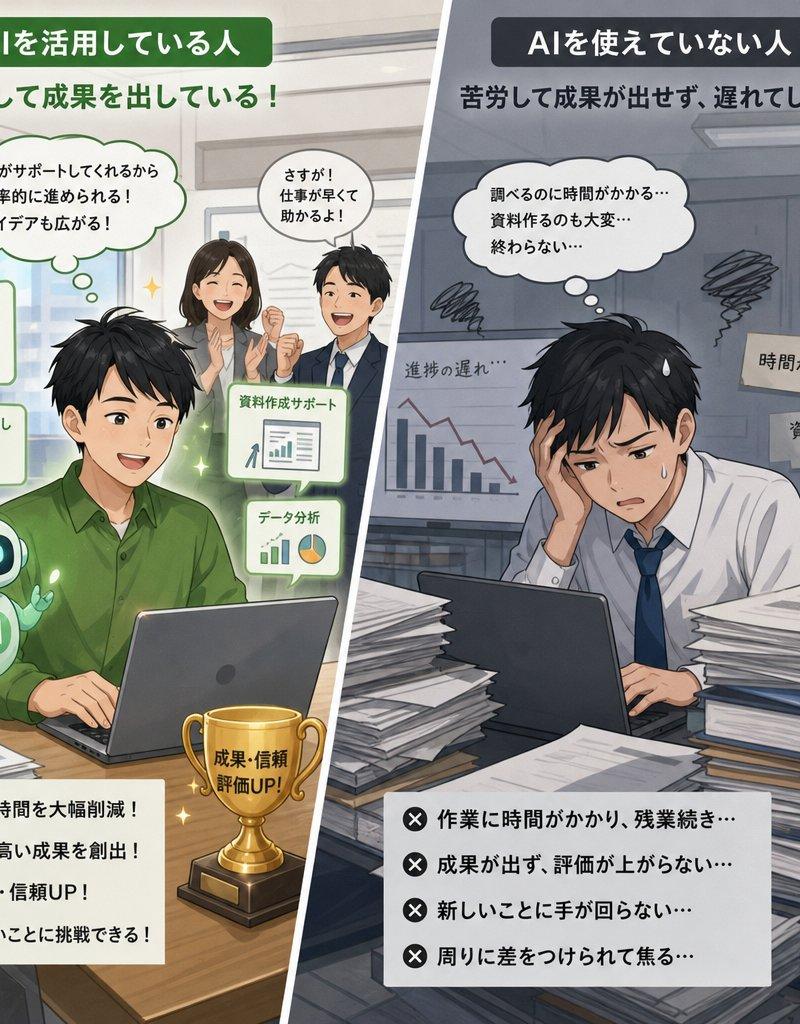
Goal: Create a square Japanese comparison infographic showing the difference between a person who uses AI and a person who does not, in a polished semi-realistic anime business illustration style.

Canvas: 1:1 square social media image, split diagonally from near the top center toward the bottom center into two contrasting halves. Use bright warm colors on the left and dark gray-blue colors on the right. Add a clean white diagonal divider between the two scenes.

Left panel: Show a successful office worker using AI. The main subject is a young Japanese businessperson in a {argument name="shirt color" default="green"} shirt sitting at a wooden desk with a laptop. Place a cute small teal-and-white robot assistant beside the laptop, with “AI” written on its body. Add subtle green glow, sparkles, and a positive atmosphere. In the background, show two business colleagues standing and discussing, a bright office window, plants, and presentation materials. Deliberately obscure or softly blur all human faces for privacy-like anonymization.

Left text: At the top, place a green rounded title label reading 「AIを活用している人」. Under it, add the headline 「活躍して成果を出している!」. Include exactly 2 white thought/speech bubbles: one large bubble saying 「AIがサポートしてくれるから効率的に進められる!アイデアも広がる!」 and one smaller bubble saying 「さすが!仕事が早くて助かるよ!」. Include exactly 3 floating AI support cards around the worker: 「情報収集・要約」 with a document and magnifying glass icon, 「アイデア出し」 with a lightbulb icon, and 「資料作成サポート」 plus 「データ分析」 with chart icons. On the desk, include a gold trophy labeled 「成果・信頼 評価UP!」. At the bottom left, add a white checklist card with exactly 4 green check items: 「作業時間を大幅削減!」, 「質の高い成果を創出!」, 「評価・信頼UP!」, 「新しいことに挑戦できる!」.

Right panel: Show a stressed office worker who is not using AI. The main subject is a young Japanese businessperson in a white shirt and blue tie slumped at a desk, holding their head with one hand while looking overwhelmed at a laptop. Surround the desk with large stacks of papers, binders, and documents. The office should look dim, cold, cluttered, and late-at-night, with a wall clock, scribble stress marks, a downward-trending chart, and an exhausted mood. Deliberately obscure or softly blur the human face as on the left side.

Right text: At the top, place a dark rounded title label reading 「AIを使えていない人」. Under it, add the headline 「苦労して成果が出せず、遅れてしまう…」. Include exactly 1 large white thought bubble above the worker saying 「調べるのに時間がかかる…資料作るのも大変…終わらない…」. Include exactly 3 beige sticky notes on the wall or around the worker: 「時間がない!」, 「資料が多すぎる…」, and 「何から手をつければ…」. Add a small label near the downward chart reading 「進捗の遅れ…」. At the bottom right, add a white checklist card with exactly 4 black X items: 「作業に時間がかかり、残業続き…」, 「成果が出ず、評価が上がらない…」, 「新しいことに手が回らない…」, 「周りに差をつけられて焦る…」.

Visual style: High-quality Japanese business illustration, semi-realistic anime, clean infographic composition, crisp readable typography, soft shading, detailed office props, strong emotional contrast between success and struggle. Keep all Japanese text legible and exactly as written. No watermark, no extra logos, no additional checklist items.- Category
- Charts & Infographics
- Model
- GPT Image 2
- Creator
- 谷知 紀英🐸 緑グリーン株式会社|代表取締役🥬
- Source language
- en
- Source ID
- 24820
- Published
- Jun 8, 2026
Views0