20

Python 脚本生成的隐藏 Logo 风景
Enlarge

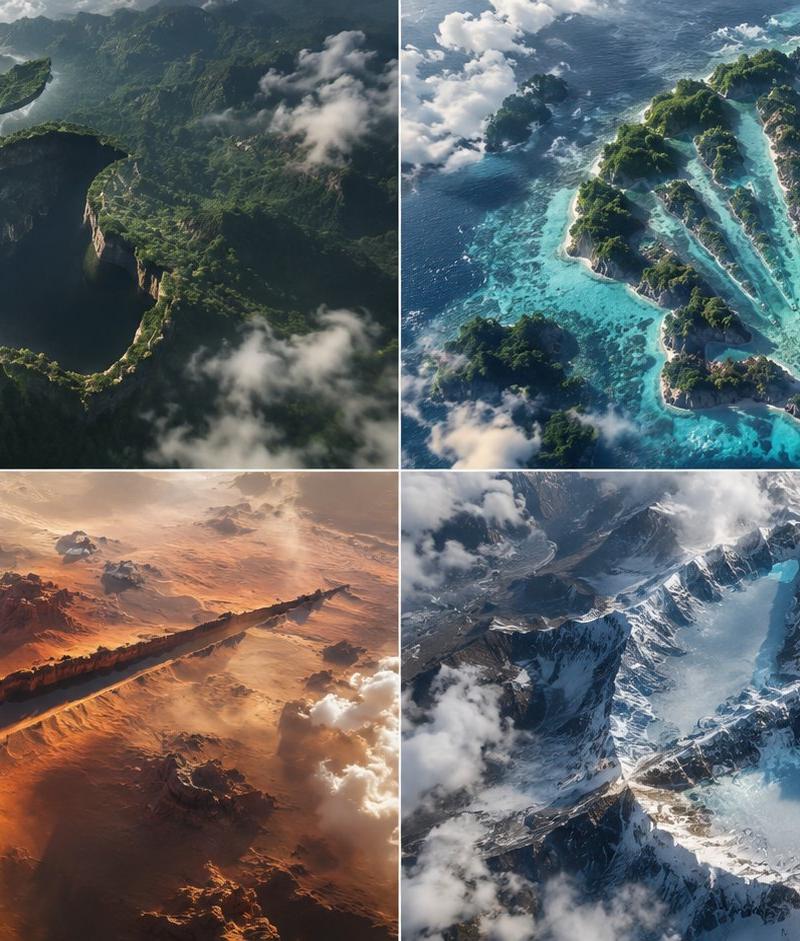
Example images

Python 脚本生成的隐藏 Logo 风景

Prompt
2x2 grid, think hard and find different input as and bs that work: class HiddenLogoLandscape: def __init__(self, logo="{argument name="logo name" default="{Input A}"}", biome="{argument name="biome" default="{Input B}"}"): self.logo = logo self.biome = biome self.scene = self.__infer__() def __infer__(self): s = Scene() s.terrain = Terrain() # Carving rule: main logo shape is a negative space drop in the biome's surface s.terrain.negative_carve = self.logo.main_body s.terrain.negative_altitude = -150 # meters drop s.terrain.negative_texture = f"dark {self.biome.material} (shadowed forest, void canyon)" # Floating islands for detached parts s.terrain.floating_islands = [{ "shape": part, "material": f"{self.biome.material} floating landmass", "altitude": +200, "position": "suspended above main shape" } for part in self.logo.detached_elements] s.atmosphere = "swirling clouds, mist, god rays backlight" s.pareidolia = "edges formed organically by trees, cliffs, snow—no smooth vectors" s .camera = "aerial drone, 1:1 framing, high contrast, cinematic" return s def render(self): return NationalGeographicAerial(self.scene) exec(HiddenLogoLandscape().render())
Category
Charts & Infographics
Model
GPT Image 2
Creator
Gadgetify
Source language
en
Views0
Source ID
25167
Published
Jun 11, 2026
Studio

Guide

About "Python 脚本生成的隐藏 Logo 风景"

What is this prompt for?

"Python 脚本生成的隐藏 Logo 风景" AI image prompt for GPT Image 2 (Charts & Infographics). 一个极具创意的提示词,采用 Python 类格式,旨在生成视错觉风格的风景图,将 Logo 作为负空间隐藏在地形之中。 Copy it on Picva…

The full copyable prompt and example visuals above are ready for AI image generation or one-click recreate in Picva.

How to use this prompt

  1. Step 1

    Open the prompt detail

    Review the example visuals, category, and full prompt text for "Python 脚本生成的隐藏 Logo 风景".

  2. Step 2

    Copy the prompt

    Copy the prompt body from this page, or load it directly in Studio.

  3. Step 3

    Pick a model (GPT Image 2)

    Prefer GPT Image 2. If you switch models, keep subject and composition and tweak style terms.

  4. Step 4

    Generate and export

    Recreate the look in Picva, or export into your workflow for editing and publishing.

FAQ

What is the "Python 脚本生成的隐藏 Logo 风景" prompt?
It is an AI image-generation prompt for GPT Image 2 in the Charts & Infographics category. This page includes the full prompt text, example visuals, and a one-click recreate path in Picva.
How do I use this prompt to generate an image?
Copy the prompt from this page, or use Generate / Studio. Paste it into a compatible image model, or recreate the look in Picva with optional reference images.
Which model is this prompt for?
This page lists GPT Image 2. Most descriptive prompts also transfer to nearby image models such as GPT Image, Flux, or Midjourney with light style tweaks.
Can I use the result commercially?
You can usually copy the prompt for creation, but commercial use of the final image depends on the model terms, reference-image rights, and the generated content. Follow the source author and platform rules.