20

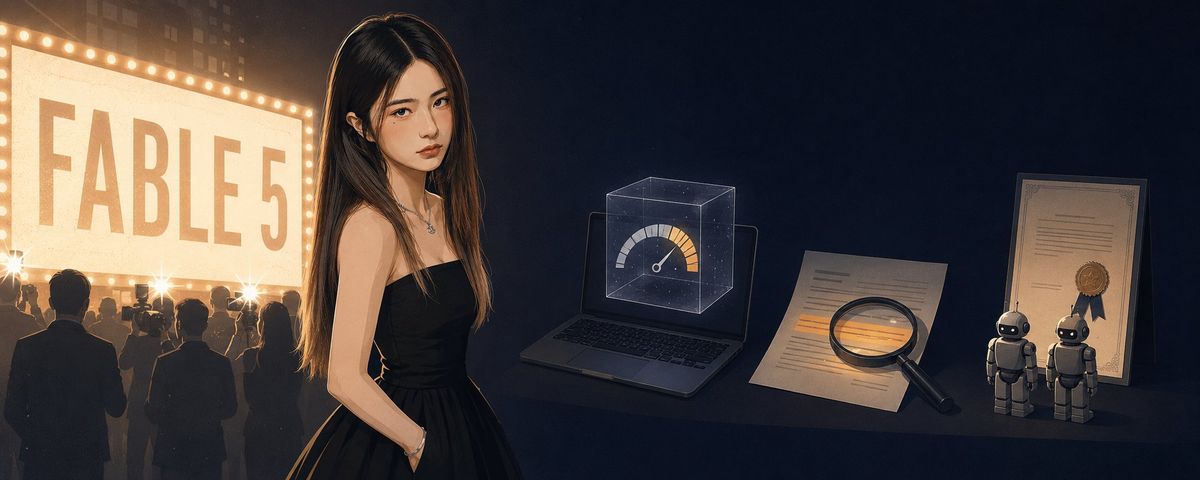
电影感 FABLE 5 AI 调查场景
Enlarge

Example images

电影感 FABLE 5 AI 调查场景

Prompt
Create a cinematic widescreen editorial image in a dark nighttime city setting, aspect ratio about 3:1. Center-left stands a young woman with {argument name="hair color" default="long dark brown hair"}, wearing a strapless black evening dress and a small necklace, posed in three-quarter view with one hand in her pocket; her face is intentionally obscured by a smooth rectangular blurred censor block. On the far left, place a large glowing theater marquee sign bordered by warm bulbs, reading {argument name="marquee text" default="FABLE 5"} in huge faded block letters, with a crowd of silhouetted people below it facing the sign; the crowd should feel numerous but remain indistinct. Use warm golden light from the sign on the left and cool deep navy shadows on the right. On the right half, arrange exactly 6 visible evidence/AI-analysis objects on a dark tabletop: 1 open laptop, 1 transparent holographic cube above the laptop containing a speedometer-style gauge, 1 loose paper document with highlighted lines, 1 black magnifying glass resting over the paper, 1 framed certificate with a ribbon seal, and 2 small humanoid robots standing side by side near the certificate. The overall mood should blend film noir, AI investigation, celebrity mystery, and tech-analysis symbolism, with realistic painterly detail, dramatic rim lighting, shallow depth of field, subtle grain, and no extra readable text besides the marquee.
Category
UI & Interfaces
Model
GPT Image 2
Creator
Agugu
Views0
Source ID
25233
Published
Jun 11, 2026

Guide

About "电影感 FABLE 5 AI 调查场景"

What is this prompt for?

"电影感 FABLE 5 AI 调查场景" AI image prompt for GPT Image 2 (UI & Interfaces). 一张宽银幕黑色电影风格场景,展示了一位被遮挡面部的女性、发光的 FABLE 5 电影招牌、人群剪影以及用于科技评论视觉效果的 AI 调查物品。 Copy it on Pic…

The full copyable prompt and example visuals above are ready for AI image generation or one-click recreate in Picva.

How to use this prompt

  1. Step 1

    Open the prompt detail

    Review the example visuals, category, and full prompt text for "电影感 FABLE 5 AI 调查场景".

  2. Step 2

    Copy the prompt

    Copy the prompt body from this page, or load it directly in Studio.

  3. Step 3

    Pick a model (GPT Image 2)

    Prefer GPT Image 2. If you switch models, keep subject and composition and tweak style terms.

  4. Step 4

    Generate and export

    Recreate the look in Picva, or export into your workflow for editing and publishing.

FAQ

What is the "电影感 FABLE 5 AI 调查场景" prompt?
It is an AI image-generation prompt for GPT Image 2 in the UI & Interfaces category. This page includes the full prompt text, example visuals, and a one-click recreate path in Picva.
How do I use this prompt to generate an image?
Copy the prompt from this page, or use Generate / Studio. Paste it into a compatible image model, or recreate the look in Picva with optional reference images.
Which model is this prompt for?
This page lists GPT Image 2. Most descriptive prompts also transfer to nearby image models such as GPT Image, Flux, or Midjourney with light style tweaks.
Can I use the result commercially?
You can usually copy the prompt for creation, but commercial use of the final image depends on the model terms, reference-image rights, and the generated content. Follow the source author and platform rules.