Excel VBA 社区推广横幅
为 Excel 和 VBA 社区生成一张方形的日文推广信息图,包含福利介绍、会员徽章、行动号召(CTA)以及友好的绿色品牌风格。
- Category
- Charts & Infographics
- Model
- GPT Image 2
- Creator
- Excel Fun
- Source language
- en
- Source ID
- 27586
- Published
- Jul 3, 2026
Full prompt
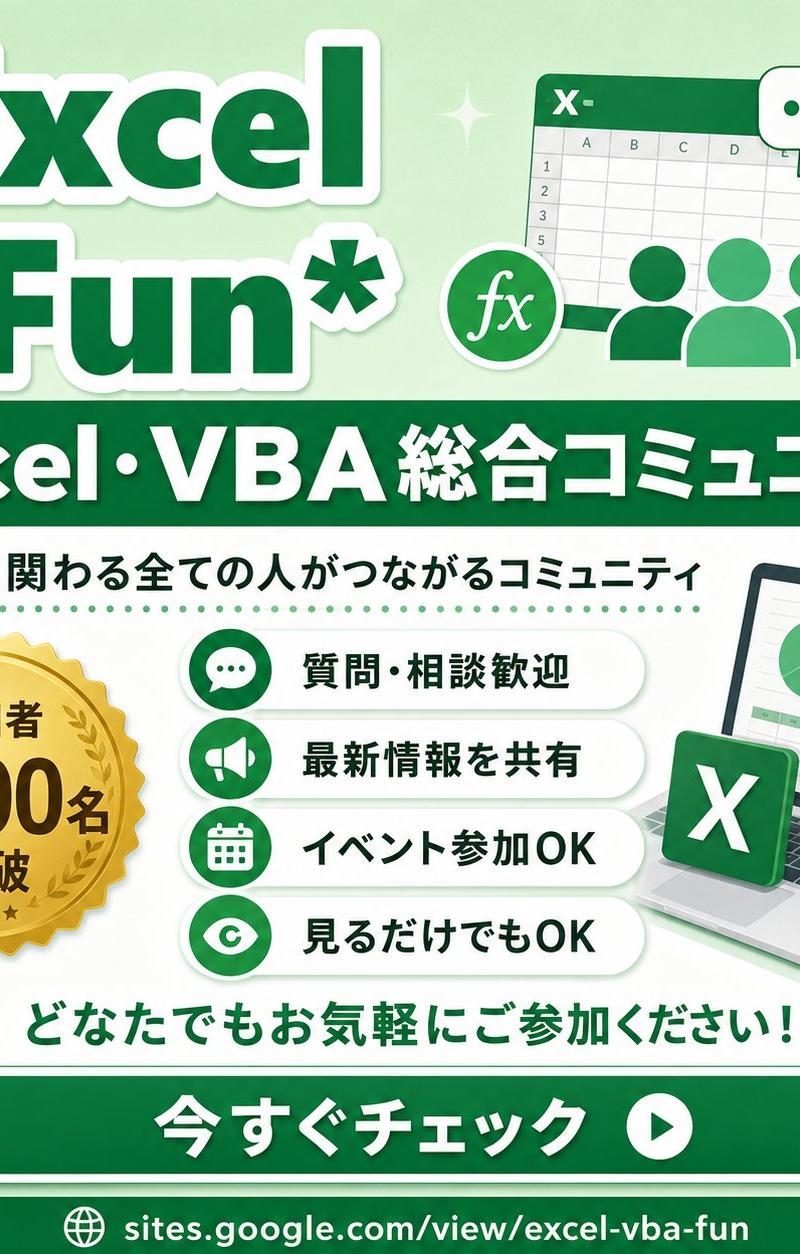
Goal: Create a square promotional infographic for an Excel and VBA online community, using a friendly green-and-white corporate style with Japanese typography.

Canvas: 1:1 square social media image, 768 x 768 px feel, pale mint green gradient background with soft white curves, subtle sparkles, small leaf decorations in the lower corners, and a clean high-contrast layout.

Layout: Large title block at the top left, illustration block at the top right, wide dark-green banner across the upper middle, main information area in the center, call-to-action button near the bottom, and URL footer at the very bottom.

Text content: Top title reads “{argument name="main title" default="Excel Fun*"}” in oversized bold dark green letters with thick white outline and soft drop shadow. Middle ribbon banner reads “{argument name="community headline" default="Excel・VBA 総合コミュニティ"}” in bold white text. Under it, add the subtitle “{argument name="community description" default="Excelに関わる全ての人がつながるコミュニティ"}” in dark green. The gold medal badge says “{argument name="member badge text" default="参加者 2500名 突破"}”. Bottom encouragement line says “どなたでもお気軽にご参加ください!” in green. Large rounded CTA button says “{argument name="button text" default="今すぐチェック"}” in bold white, with a white circular play icon on the right. Footer URL reads “sites.google.com/view/excel-vba-fun” with a small globe icon.

Subject details: Top-right illustration shows a stylized Excel spreadsheet window with an “X-” mark in the header, visible grid cells and column letters, three simplified green user silhouettes in front, a round “fx” formula icon, and exactly 2 chat bubbles: one white bubble with three green dots and one green bubble with three white dots. Center-left contains exactly 1 gold seal medal with serrated edge, laurel wreath, three small stars, and bold black-brown lettering. Center-right contains exactly 1 laptop angled slightly right, showing a spreadsheet dashboard with exactly 1 pie chart and exactly 1 green bar chart; place exactly 1 floating green Excel app tile with a white X in front of the laptop.

Benefit list: Create exactly 4 horizontal rounded white pill cards stacked vertically in the center. Each card has a green circular icon on the left and bold dark green Japanese text on the right. The 4 cards are: 1) chat bubble icon, “質問・相談歓迎”; 2) megaphone icon, “最新情報を共有”; 3) calendar icon, “イベント参加OK”; 4) eye icon, “見るだけでもOK”. Add a dotted green divider line above the benefit list.

Visual style: Bright vector illustration, glossy social-banner design, rounded shapes, thick outlines, soft shadows, clean Japanese sans-serif typography, mostly emerald green, mint green, white, and gold. Keep everything crisp, cheerful, accessible, and community-oriented.

Constraints: Use exactly the counted elements described above; do not add extra benefit cards, extra badges, extra chat bubbles, QR codes, watermarks, or unrelated logos. Preserve the Japanese text exactly where specified.Translations2
Excel VBA 社区推广横幅
zh-CN目标:为 Excel 和 VBA 在线社区创建一个方形推广信息图,采用友好且专业的绿白配色风格,并使用日文字体。 画布:1:1 正方形社交媒体图片,768 x 768 px 视觉感,淡薄荷绿渐变背景,带有柔和的白色曲线、细微的闪光效果,底部角落有小叶子装饰,布局清晰且对比度高。 布局:左上角为大标题区,右上角为插图区,中上部横跨一条深绿色横幅,中心为主要信息区,底部附近为行动号召按钮,最底部为 URL 页脚。 文本内容:顶部标题显示“{argument name="main title" default="Excel Fun*"}”,使用超大加粗深绿色字体,配有厚实的白色描边和柔和的投影。中间丝带横幅显示“{argument name="community headline" default="Excel・VBA 総合コミュニティ"}”,使用加粗白色文本。下方添加副标题“{argument name="community description" default="Excelに関わる全ての人がつながるコミュニティ"}”,字体为深绿色。金色奖章徽章显示“{argument name="member badge text" default="参加者 2500名 突破"}”。底部鼓励语显示“どなたでもお気軽にご参加ください!”(绿色字体)。大型圆角 CTA 按钮显示“{argument name="button text" default="今すぐチェック"}”,加粗白色字体,右侧配有一个白色圆形播放图标。页脚 URL 显示“sites.google.com/view/excel-vba-fun”,并附带一个小地球图标。 主体细节:右上角插图展示一个风格化的 Excel 电子表格窗口,标题栏带有“X-”标记,可见网格单元格和列字母,前方有三个简化的绿色用户剪影,一个圆形的“fx”公式图标,以及正好 2 个聊天气泡:一个带有三个绿点的白色气泡和一个带有三个白点的绿色气泡。中心左侧包含正好 1 枚带有锯齿边缘、月桂花环和三颗小星星的金色印章奖章,文字为加粗的黑褐色。中心右侧包含正好 1 台略微向右倾斜的笔记本电脑,显示一个包含正好 1 个饼图和正好 1 个绿色柱状图的电子表格仪表板;在笔记本电脑前方放置正好 1 个浮动的绿色 Excel 应用磁贴,上面有一个白色 X。 福利列表:在中心垂直堆叠正好 4 张水平圆角白色胶囊卡片。每张卡片左侧有一个绿色圆形图标,右侧为加粗的深绿色日文文本。4 张卡片分别为:1) 聊天气泡图标,“質問・相談歓迎”;2) 扩音器图标,“最新情報を共有”;3) 日历图标,“イベント参加OK”;4) 眼睛图标,“見るだけでもOK”。在福利列表上方添加一条虚线绿色分隔线。 视觉风格:明亮的矢量插图,光泽感的社交横幅设计,圆润的形状,粗轮廓,柔和的阴影,简洁的日文无衬线字体,主色调为翡翠绿、薄荷绿、白色和金色。保持整体清晰、欢快、易于亲近且具有社区感。 约束条件:严格使用上述计数的元素;不要添加额外的福利卡片、额外徽章、额外聊天气泡、二维码、水印或不相关的徽标。按指定要求保留日文文本。
Excel VBA 社区推广横幅
enGoal: Create a square promotional infographic for an Excel and VBA online community, using a friendly green-and-white corporate style with Japanese typography. Canvas: 1:1 square social media image, 768 x 768 px feel, pale mint green gradient background with soft white curves, subtle sparkles, small leaf decorations in the lower corners, and a clean high-contrast layout. Layout: Large title block at the top left, illustration block at the top right, wide dark-green banner across the upper middle, main information area in the center, call-to-action button near the bottom, and URL footer at the very bottom. Text content: Top title reads “{argument name="main title" default="Excel Fun*"}” in oversized bold dark green letters with thick white outline and soft drop shadow. Middle ribbon banner reads “{argument name="community headline" default="Excel・VBA 総合コミュニティ"}” in bold white text. Under it, add the subtitle “{argument name="community description" default="Excelに関わる全ての人がつながるコミュニティ"}” in dark green. The gold medal badge says “{argument name="member badge text" default="参加者 2500名 突破"}”. Bottom encouragement line says “どなたでもお気軽にご参加ください!” in green. Large rounded CTA button says “{argument name="button text" default="今すぐチェック"}” in bold white, with a white circular play icon on the right. Footer URL reads “sites.google.com/view/excel-vba-fun” with a small globe icon. Subject details: Top-right illustration shows a stylized Excel spreadsheet window with an “X-” mark in the header, visible grid cells and column letters, three simplified green user silhouettes in front, a round “fx” formula icon, and exactly 2 chat bubbles: one white bubble with three green dots and one green bubble with three white dots. Center-left contains exactly 1 gold seal medal with serrated edge, laurel wreath, three small stars, and bold black-brown lettering. Center-right contains exactly 1 laptop angled slightly right, showing a spreadsheet dashboard with exactly 1 pie chart and exactly 1 green bar chart; place exactly 1 floating green Excel app tile with a white X in front of the laptop. Benefit list: Create exactly 4 horizontal rounded white pill cards stacked vertically in the center. Each card has a green circular icon on the left and bold dark green Japanese text on the right. The 4 cards are: 1) chat bubble icon, “質問・相談歓迎”; 2) megaphone icon, “最新情報を共有”; 3) calendar icon, “イベント参加OK”; 4) eye icon, “見るだけでもOK”. Add a dotted green divider line above the benefit list. Visual style: Bright vector illustration, glossy social-banner design, rounded shapes, thick outlines, soft shadows, clean Japanese sans-serif typography, mostly emerald green, mint green, white, and gold. Keep everything crisp, cheerful, accessible, and community-oriented. Constraints: Use exactly the counted elements described above; do not add extra benefit cards, extra badges, extra chat bubbles, QR codes, watermarks, or unrelated logos. Preserve the Japanese text exactly where specified.