20

从动漫到写实风格的华丽变身

Prompt
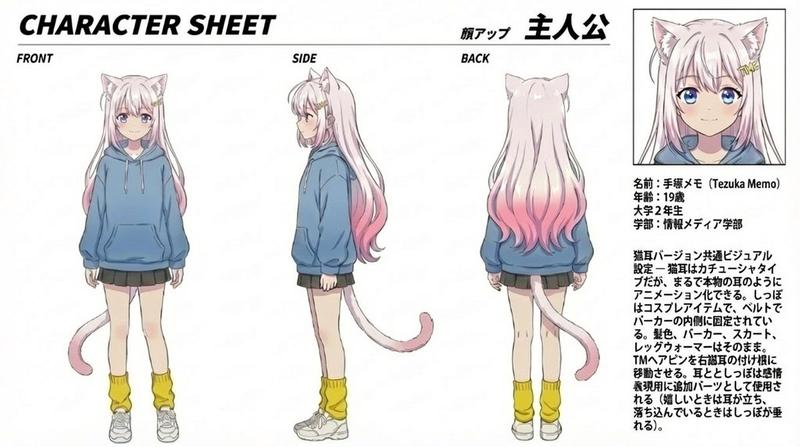
图片 1 = 动漫风格主角角色设定图。
图片 2 = 写实风格主角角色设定图。
图片 3 = 变身场景的分镜参考。

基于所附分镜,制作一段 15 秒的 16:9 横屏变身场景视频。

主题:
一段以可爱为核心的高质量变身场景,动漫角色在彩虹魔法和大量丝带装饰的包裹下,蜕变为写实风格的真人女主角。

流程:
开头,动漫风格的主角站在梦幻般的粉色与淡彩虹色空间中。主角拥有大眼睛、深棕色长波浪卷发、蓬松的刘海,佩戴粉色小丝带发饰,身穿超大款白色针织毛衣、淡粉色荷叶边短裙、白色短袜和白色厚底运动鞋。
在第 1-2 镜中,展示可爱动漫脸庞和眼睛的超特写。
在第 3 镜中,主角伸出手,指尖流淌出彩虹粒子、爱心、宝石、丝带和闪烁的装饰物。
在第 4-6 镜中,粉色丝带、彩虹光芒、心形特效、珠宝和蕾丝般的魔法阵在主角周围高速旋转。
在第 5 镜中,胸前出现巨大的发光丝带图案,作为可爱元素的核心。
在第 6 镜中,俯拍镜头展示主角悬浮在丝带螺旋的中心。
从第 7 镜开始,脸部、头发和手部的质感逐渐变得写实。
在第 8 镜中,使用更具写实感的脸部特写镜头,展示眼睛的倒影和发丝质感。
在第 9-10 镜中,变身能量爆发,主角在彩虹粒子和丝带的环绕中旋转并完成蜕变。
在第 11 镜中,主角落地或在梦幻空间中摆出一个安静的姿势。
在第 12 镜中,以写实风格主角的可爱姿势超特写作为结尾。请确保所有图像中角色的发型、五官和服装保持一致。

风格:
电影级变身视频,从剧场版动漫风格开始,过渡到高清写实视觉效果。配色方案以粉色、白色、薰衣草紫、淡蓝色和彩虹偏光为主。使用大量的丝带、水晶、珍珠、魔法阵、星星和闪光元素。

剪辑:
运用有节奏的快速剪辑、特写、低角度拍摄、俯拍、快速平移和流畅的匹配剪辑。确保变身过程是连续的动作,而非幻灯片播放。角色应通过旋转、悬浮和落地自然地进行动作。
Category
Charts & Infographics
Model
seedance-2.0
Views0
Source ID
5878
Published
Jun 9, 2026

Guide

About "从动漫到写实风格的华丽变身"

What is this prompt for?

"从动漫到写实风格的华丽变身" AI image prompt for seedance-2.0 (Charts & Infographics). 一个高度精细的电影级变身提示词,描述了一个可爱的 2D 动漫角色在魔法丝带和粒子环绕中,蜕变为写实风格真人女主角的过程。 Copy it on Picva and rec…

The full copyable prompt and example visuals above are ready for AI image generation or one-click recreate in Picva.

How to use this prompt

  1. Step 1

    Open the prompt detail

    Review the example visuals, category, and full prompt text for "从动漫到写实风格的华丽变身".

  2. Step 2

    Copy the prompt

    Copy the prompt body from this page, or load it directly in Studio.

  3. Step 3

    Pick a model (seedance-2.0)

    Prefer seedance-2.0. If you switch models, keep subject and composition and tweak style terms.

  4. Step 4

    Generate and export

    Recreate the look in Picva, or export into your workflow for editing and publishing.

FAQ

What is the "从动漫到写实风格的华丽变身" prompt?
It is an AI image-generation prompt for seedance-2.0 in the Charts & Infographics category. This page includes the full prompt text, example visuals, and a one-click recreate path in Picva.
How do I use this prompt to generate an image?
Copy the prompt from this page, or use Generate / Studio. Paste it into a compatible image model, or recreate the look in Picva with optional reference images.
Which model is this prompt for?
This page lists seedance-2.0. Most descriptive prompts also transfer to nearby image models such as GPT Image, Flux, or Midjourney with light style tweaks.
Can I use the result commercially?
You can usually copy the prompt for creation, but commercial use of the final image depends on the model terms, reference-image rights, and the generated content. Follow the source author and platform rules.