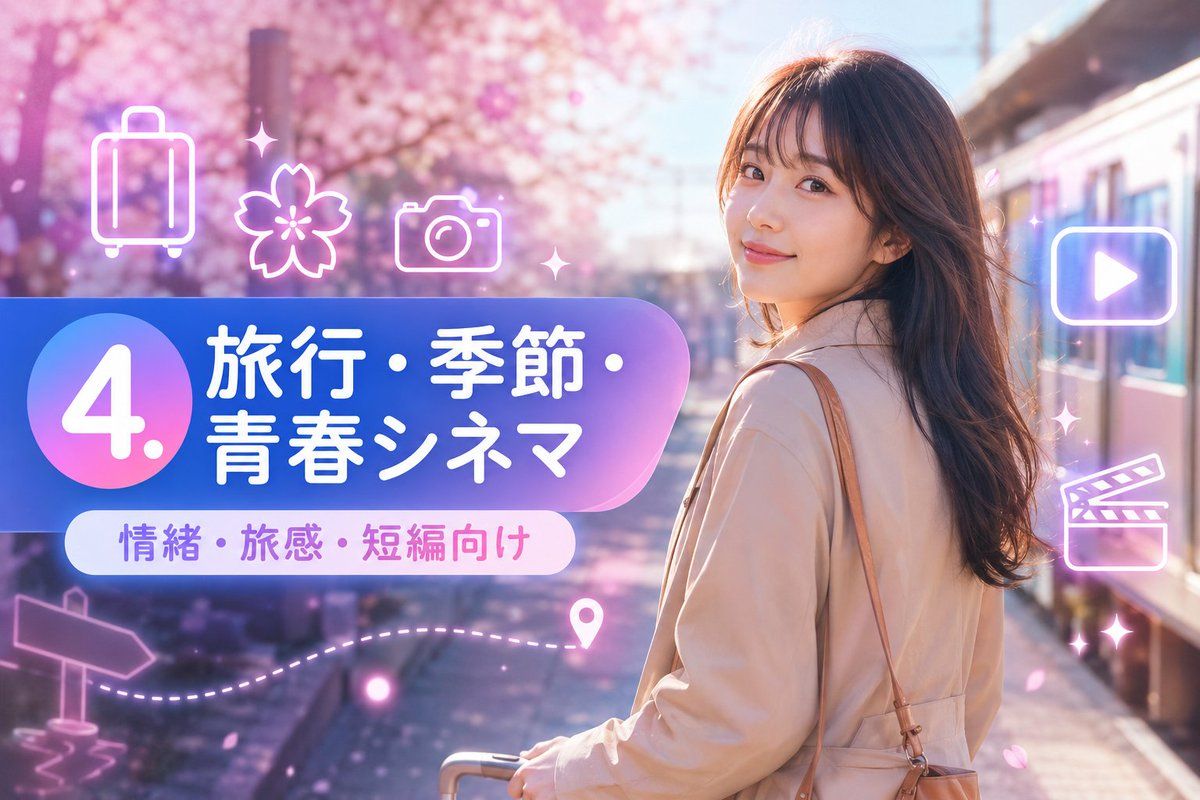
Creates a Japanese spring travel-themed social media thumbnail with sakura scenery, neon icons, and a bold numbered title banner.
Highlight product features and key ingredients
Use soft natural lighting to enhance texture
Clean hierarchy for posters, ads, and ecommerce banners
Customize subject, brand, and scene details
Example results
Prompt (Multi-language)
Goal: Create a vibrant Japanese travel-video title card for a short-form prompt collection, combining a cinematic spring travel photo background with glossy neon UI graphics.
Canvas: Horizontal 16:9 image, 1152×768 feel, high-resolution, bright pastel color grading, soft bloom and lens flare.
Background: A young woman traveler stands on the right side at a train platform beside a modern train, viewed from behind/three-quarter back, face intentionally obscured by a plain skin-tone rectangular blur. She has long wavy dark brown hair, wears a light beige trench coat, carries a tan shoulder bag, and holds the handle of a small rolling suitcase near the bottom center. The setting is a dreamy cherry-blossom station in spring, with pink sakura trees filling the left and upper background, scattered falling petals, warm sunlight, and shallow depth of field.
Main graphic layout: Place a large rounded gradient banner across the left-center, extending toward the woman. The banner uses a blue-to-purple-to-pink translucent glossy gradient with a large circular badge on the far left. Inside the circle, display a huge white number {argument name="section number" default="4."}. To the right of the circle, set bold rounded Japanese headline text in white: {argument name="headline text" default="旅行・季節・青春シネマ"}. Below it, add a smaller white rounded pill label with purple-pink text: {argument name="subtitle text" default="情緒・旅感・短編向け"}.
Visible text count: exactly 3 text elements: 1 large number badge reading "4.", 1 main Japanese headline reading "旅行・季節・青春シネマ", and 1 subtitle pill reading "情緒・旅感・短編向け".
Neon icon overlay count: exactly 9 glowing white-pink line icons and decorative elements around the banner and right side: 1 suitcase icon at upper left, 1 cherry blossom icon near upper center-left, 1 camera icon above the banner, 1 play button icon inside a rounded rectangle on the upper right, 1 clapperboard icon on the mid-right, 1 signpost arrow icon at lower left, 1 dotted travel path sweeping along the lower left-to-center, 1 map pin near the end of the dotted path, and 2 small sparkle/star accents near the top center and right side. Keep all icons semi-transparent, neon outlined, and softly glowing.
Style: Japanese social-media thumbnail design, cute travel aesthetic, glossy gradient panels, soft pink and lavender atmosphere, cinematic bokeh, dreamy sakura petals, clean rounded typography, bright white text with subtle glow, polished promotional-card composition.
Constraints: Keep the woman on the right and the graphic title block on the left, do not add extra text, do not add logos or watermarks, keep the face covered by a simple rectangular blur, and maintain a cheerful spring travel mood.
How to use this template
Choose this template
Browse templates and select this one.
Edit the prompt
Adjust product, brand, language, and details.
Generate image
Create a consistent AI image.
Download and use
Export a high-resolution asset for publishing.
Frequently asked questions
Can I use this template commercially?
Yes. Confirm final usage rights against your plan and model provider terms.
Do I need design skills?
No. Replace the product, scene, and copy in the prompt.
What image sizes are supported?
Common ratios such as 9:16, 4:5, 1:1, and 16:9 are supported.
Can I modify the prompt?
Yes. The template is designed for reusable composition, lighting, and style.