15

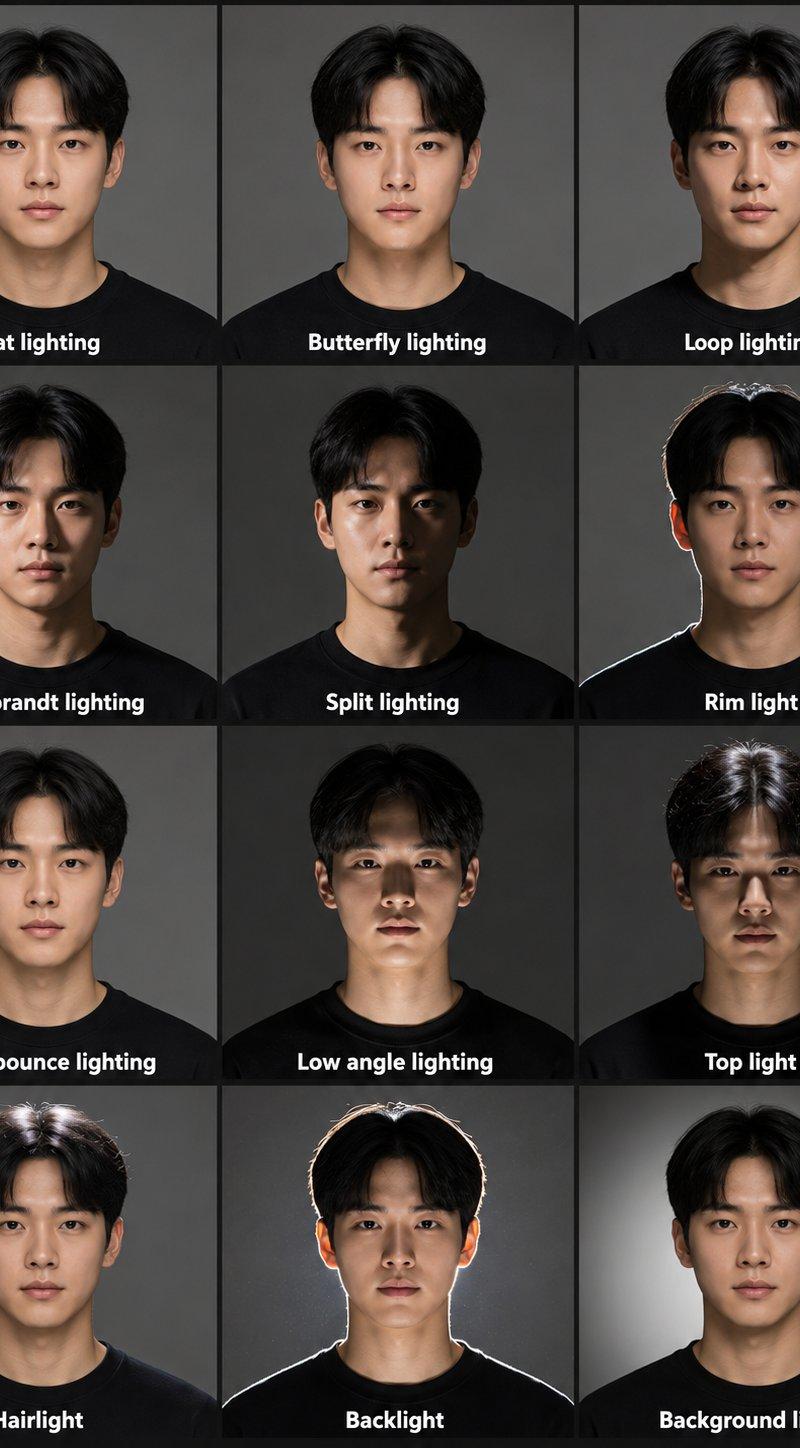
影棚人像摄影布光对比参考图
Enlarge

Example images

影棚人像摄影布光对比参考图

Prompt
Create a professional studio portrait lighting reference chart featuring the same young Asian model shown in 12 separate portrait panels arranged in a clean 3 column by 4 row grid. The model has short black center-parted hair, smooth natural skin, a neutral black crewneck top, and a calm front facing expression. Each panel shows the same face and pose but with a different lighting setup.

Use a simple gray studio background and realistic photography style. Add clear white text labels at the bottom of each panel.

Lighting setups to include:
Flat lighting
Butterfly lighting
Loop lighting
Rembrandt lighting
Split lighting
Rim light
Ceiling bounce lighting
Low angle lighting
Top light
Hairlight
Backlight
Background light

The image should look like a professional cinematography or photography lighting guide, with consistent framing, realistic shadows, natural skin texture, accurate facial highlights and clear comparison between each lighting style. Use soft studio portrait quality, sharp focus, high detail, and educational reference layout.
Category
Charts & Infographics
Model
ChatGPT
Creator
@bmx_ai13
Source language
zh-CN
Views42
Source ID
16205
Published
Jun 17, 2026
Studio

Guide

About "影棚人像摄影布光对比参考图"

What is this prompt for?

"影棚人像摄影布光对比参考图" AI image prompt for ChatGPT (Charts & Infographics). 创建一个专业的人像摄影棚布光参考图,由同一位年轻亚洲模特展示在12个独立的肖像面板中,排列成一个整齐的3列4行网格。模特留着黑色中分短发,皮肤光滑自然,穿着中性的黑色圆领上衣,神情…

The full copyable prompt and example visuals above are ready for AI image generation or one-click recreate in Picva.

How to use this prompt

  1. Step 1

    Open the prompt detail

    Review the example visuals, category, and full prompt text for "影棚人像摄影布光对比参考图".

  2. Step 2

    Copy the prompt

    Copy the prompt body from this page, or load it directly in Studio.

  3. Step 3

    Pick a model (ChatGPT)

    Prefer ChatGPT. If you switch models, keep subject and composition and tweak style terms.

  4. Step 4

    Generate and export

    Recreate the look in Picva, or export into your workflow for editing and publishing.

FAQ

What is the "影棚人像摄影布光对比参考图" prompt?
It is an AI image-generation prompt for ChatGPT in the Charts & Infographics category. This page includes the full prompt text, example visuals, and a one-click recreate path in Picva.
How do I use this prompt to generate an image?
Copy the prompt from this page, or use Generate / Studio. Paste it into a compatible image model, or recreate the look in Picva with optional reference images.
Which model is this prompt for?
This page lists ChatGPT. Most descriptive prompts also transfer to nearby image models such as GPT Image, Flux, or Midjourney with light style tweaks.
Can I use the result commercially?
You can usually copy the prompt for creation, but commercial use of the final image depends on the model terms, reference-image rights, and the generated content. Follow the source author and platform rules.